I have seen many platforms playing multiple videos where the presenter and their screen are separate streams but they are kept in sync. Native HTML5 video support was relatively new when I last worked on web development so I decided to experiment with multiple videos in an HTML5 document. Here is the basic HTML page:
I ran this through the W3C Markup Validation Service and this snippet passed the check. My initial attempt closed the video tag using the <video ... /> style. The validator complained that “Self-closing syntax (/>) used on a non-void HTML element.” A search engine led me to Mozilla’s Void element page.
A void element is an element in HTML that cannot have any child nodes (i.e., nested elements or text nodes). Void elements only have a start tag; end tags must not be specified for void elements.
This means that non-void elements should have a closing tag. It’s also strange to me that the controls attribute is required to show controls but I guess it makes sense to let that be, well, controllable.
To synchronize the videos, we need to ensure that playing one video results in the other playing as well. Likewise for pausing, seeking, and changing the playback speed. My first attempt at this was to add JavaScript to the head of the HTML document. I’m not using jQuery or any other libraries. Therefore, I ran into exceptions because the DOM wasn’t ready when my script was running. Vanilla JavaScript equivalent of jQuery’s $.ready() – how to call a function when the page/DOM is ready for it [duplicate] suggested putting the script after all the HTML elements. All this was once second nature to me back in the IE6 days but this suggestion is good enough for my experiment. The final page now looks like this (with links to the relevant events, properties, and methods):
<!DOCTYPE html>
<html lang="en">
<title>Two Video Synchronization Demo</title>
<body>
<!-- https://developer.mozilla.org/en-US/docs/Web/HTML/Element/video -->
<videocontrols id="video1" src="flower.mp4"></video>
<videocontrols id="video2" src="nature.mp4"></video>
<script>
const video1 = document.getElementById("video1");
const video2 = document.getElementById("video2");
// Handle the play event on each video to ensure that
// when one video is played the other plays as well.
video1.addEventListener("play", (event) => {
video2.play();
});
video2.addEventListener("play", (event) => {
video1.play();
});
// Handle the pause event on each video to ensure that
// when one video is paused the other is paused as well.
video1.addEventListener("pause", (event) => {
video2.pause();
});
video2.addEventListener("pause", (event) => {
video1.pause();
});
// Handle the ratechange event on each video to ensure that
// when the playback rate of one video is changed,
// the other is set to use the same rate.
video1.addEventListener("ratechange", (event) => {
video2.playbackRate = video1.playbackRate;
});
video2.addEventListener("ratechange", (event) => {
video1.playbackRate = video2.playbackRate;
});
// Handle the seek event on each video to ensure that
// when one video is seeked the other seeks to the same location.
video1.addEventListener("seeked", (event) => {
// Do not use fastSeek since we need precision.
if (video1.paused && video2.paused) {
video2.currentTime = video1.currentTime;
}
});
video2.addEventListener("seeked", (event) => {
if (video1.paused && video2.paused) {
video1.currentTime = video2.currentTime;
}
});
</script>
</body>
</html>
Notice that the last requirement on seeking is implemented slightly differently: I synchronized the current time in the videos only if they were both paused. This prevents weird behavior where the videos keep syncing to each other interrupting playback.
The last thing I wanted to do was lay out the videos so that one overlaps the other (in the top left or bottom right). I needed to add a style tag to the head of the document. I searched for how to put a div in the bottom right and the StackOverflow question How can I position my div at the bottom of its container? suggests absolute positioning in a container div. See the CSS in the final page below.
<!DOCTYPE html>
<html lang="en">
<title>Two Video Synchronization Demo</title>
<style>
#video-container {
position: relative;
}
#video1 {
width: 20%;
position:absolute;
top: 0px;
left: 0px;
}
#video2 {
width: 100%;
}
</style>
<body>
<div id="video-container">
<videocontrols id="video1" src="flower.mp4"></video>
<videocontrols id="video2" src="nature.mp4"></video>
</div>
<script>
const video1 = document.getElementById("video1");
const video2 = document.getElementById("video2");
// Handle the play event on each video to ensure that
// when one video is played the other plays as well.
video1.addEventListener("play", (event) => {
video2.play();
});
video2.addEventListener("play", (event) => {
video1.play();
});
// Handle the pause event on each video to ensure that
// when one video is paused the other is paused as well.
video1.addEventListener("pause", (event) => {
video2.pause();
});
video2.addEventListener("pause", (event) => {
video1.pause();
});
// Handle the ratechange event on each video to ensure that
// when the playback rate of one video is changed,
// the other is set to use the same rate.
video1.addEventListener("ratechange", (event) => {
video2.playbackRate = video1.playbackRate;
});
video2.addEventListener("ratechange", (event) => {
video1.playbackRate = video2.playbackRate;
});
// Handle the seek event on each video to ensure that
// when one video is seeked the other seeks to the same location.
video1.addEventListener("seeked", (event) => {
// Do not use fastSeek since we need precision.
if (video1.paused && video2.paused) {
video2.currentTime = video1.currentTime;
}
});
video2.addEventListener("seeked", (event) => {
if (video1.paused && video2.paused) {
video1.currentTime = video2.currentTime;
}
});
</script>
</body>
</html>
This was a useful HTML, JavaScript, and CSS refresher!
I want to evaluate the OpenJDK serial collector using a Java program I wrote to factorize natural numbers by trial division. This post is about how to set up the app to run in a Docker container on a Linux host. Since the host is a shared machine, I put all my work under ~/swesonga (my own custom home directory). The directory structure for the container will be under ~/swesonga/container/.
Set up the Factorization App
First, log into Linux machine and download the Java binaries to test:
ssh user@IPaddress
mkdir -p ~/swesonga/container/java/binaries/jdk/x64/
cd ~/swesonga/container/java/binaries/jdk/x64/

curl -Lo microsoft-jdk-21.0.5-linux-x64.tar.gz https://aka.ms/download-jdk/microsoft-jdk-21.0.5-linux-x64.tar.gz

tar xzf microsoft-jdk-21.0.5-linux-x64.tar.gz
cd ~/swesonga/container/
git clone https://github.com/swesonga/factorize

cd ~/swesonga/container/java
curl -Lo commons-cli-1.9.0-bin.tar.gz https://dlcdn.apache.org//commons/cli/binaries/commons-cli-1.9.0-bin.tar.gz
tar xzf commons-cli-1.9.0-bin.tar.gz
Verify that docker is up by running docker version. I got this output:
user@machine:~/swesonga$ docker version
Client: Docker Engine - Community
 Version:           23.0.1
 API version:       1.42
 Go version:        go1.19.5
 Git commit:        a5ee5b1
 Built:             Thu Feb  9 19:46:56 2023
 OS/Arch:           linux/amd64
 Context:           default
Cannot connect to the Docker daemon at unix:///var/run/docker.sock. Is the docker daemon running?
One error I ran into initially was that docker was unable to start the container process. I had missed the COPY command in the Dockerfile so the file couldn’t be found:
user@machine:~/swesonga$ docker run -i -t swesonga-jdk21-testapp
docker: Error response from daemon: failed to create shim task: OCI runtime create failed: runc create failed: unable to start container process: exec: "/home/<user>/swesonga/java/binaries/jdk/x64/jdk-21.0.5+11/bin/java": stat /home/<user>/swesonga/java/binaries/jdk/x64/jdk-21.0.5+11/bin/java: no such file or directory: unknown.
ERRO[0000] error waiting for container:
user@machine:~/swesonga$ docker system df
TYPE            TOTAL     ACTIVE    SIZE      RECLAIMABLE
Images          2         2         1.22GB    443.1MB (36%)
Containers      3         0         0B        0B
Local Volumes   0         0         0B        0B
Build Cache     9         0         776.9MB   776.9MB
user@machine:~/swesonga$ docker system df -v
Images space usage:

REPOSITORY               TAG       IMAGE ID       CREATED          SIZE      SHARED SIZE   UNIQUE SIZE   CONTAINERS
swesonga-jdk21-testapp   latest    682fedf54071   11 minutes ago   1.22GB    443.1MB       776.9MB       2
<none>                   <none>    4c068055cad5   26 minutes ago   443.1MB   443.1MB       0B            1

Containers space usage:

CONTAINER ID   IMAGE                    COMMAND                  LOCAL VOLUMES   SIZE      CREATED          STATUS    NAMES
c77b69082a8a   swesonga-jdk21-testapp   "/home/<user>/swesonga/…"   0               0B        6 minutes ago    Created   awesome_chatelet
58c723638dd2   swesonga-jdk21-testapp   "/home/<user>/swesonga/…"   0               0B        8 minutes ago    Created   sharp_lamport
4a3be55725b5   4c068055cad5             "/home/<user>/swesonga/…"   0               0B        17 minutes ago   Created   lucid_tharp

Local Volumes space usage:

VOLUME NAME   LINKS     SIZE

Build cache usage: 776.9MB
...
I tried pruning the build cache as suggested in that post.
user@machine:~/swesonga$ docker builder prune --all
WARNING! This will remove all build cache. Are you sure you want to continue? [y/N] y
ID                                              RECLAIMABLE     SIZE            LAST ACCESSED
te4o8rbj7s6nh6pluquzummzz                       true            0B              8 minutes ago
n2wbz4gf448fluw4uuogiqxdo*                      true    776.9MB         8 minutes ago
...
Total:  1.554GB
I realized that pruning wasn’t what I needed because now the cache was empty but the containers were still there based on the next output:
user@machine:~/swesonga$ docker system df -v
Images space usage:

REPOSITORY               TAG       IMAGE ID       CREATED          SIZE      SHARED SIZE   UNIQUE SIZE   CONTAINERS
swesonga-jdk21-testapp   latest    682fedf54071   18 minutes ago   1.22GB    443.1MB       776.9MB       2
<none>                   <none>    4c068055cad5   33 minutes ago   443.1MB   443.1MB       0B            1

Containers space usage:

CONTAINER ID   IMAGE                    COMMAND                  LOCAL VOLUMES   SIZE      CREATED          STATUS    NAMES
c77b69082a8a   swesonga-jdk21-testapp   "/home/<user>/swesonga/…"   0               0B        13 minutes ago   Created   awesome_chatelet
58c723638dd2   swesonga-jdk21-testapp   "/home/<user>/swesonga/…"   0               0B        15 minutes ago   Created   sharp_lamport
4a3be55725b5   4c068055cad5             "/home/<user>/swesonga/…"   0               0B        24 minutes ago   Created   lucid_tharp

Local Volumes space usage:

VOLUME NAME   LINKS     SIZE

Build cache usage: 0B

CACHE ID   CACHE TYPE   SIZE      CREATED   LAST USED   USAGE     SHARED
user@machine:~/swesonga$
I should have been using docker ps -a instead! The -a shows the existing containers (regardless of whether they are running).
user@machine:~/swesonga$ docker ps -a
CONTAINER ID   IMAGE          COMMAND                  CREATED          STATUS    PORTS     NAMES
c77b69082a8a   682fedf54071   "/home/<user>/swesonga/…"   16 minutes ago   Created             awesome_chatelet
58c723638dd2   682fedf54071   "/home/<user>/swesonga/…"   18 minutes ago   Created             sharp_lamport
4a3be55725b5   4c068055cad5   "/home/<user>/swesonga/…"   27 minutes ago   Created             lucid_tharp
user@machine:~/swesonga$
I started displaying the Dockerfile before building and one of the errors I ran into was because I hadn’t saved the Dockerfile. Sheesh.
cat Dockerfile
docker build -t swesonga-jdk21-testapp .
docker ps -a
docker run -i -t swesonga-jdk21-testapp
docker ps -a
docker run -i --memory 2GB -t swesonga-jdk21-testapp
Observe the head of the jdk21 GC log below. The total memory is now reported as 2048M. The maximum heap size is 25% of this total, as expected. The initial heap is 32MB and the minimum heap is 8MB.
The test passed on x64 but I wanted to see how to step into the test code itself so I tried this setup in Visual Studio 2022. Unfortunately, it was not straightforward to break into the correct process when launching the test in Visual Studio 2022.
I decided to try to understand the test execution sequence and started by looking at the output generated when running the jtreg test. Notice that the CreateCoredumpOnCrash product flag is disabled. The first thing I did was to enable it so that there is a core dump to examine.
The core dump wasn’t particularly helpful. I worked on simplifying the test so that only the failing scenarios remained. The log in the JBS issue was interpreted code only so I added the -Xint argument and could still reproduce the failure on Windows AArch64.
I came back to the idea of capturing the full command line for the final java.exe process that runs the test. Is there a way to log process start on Windows to capture all command lines? Copilot cited PowerShell and Command Line Logging | LogRhythm, which suggested enabling the use of Event ID 4688: a new process has been created.
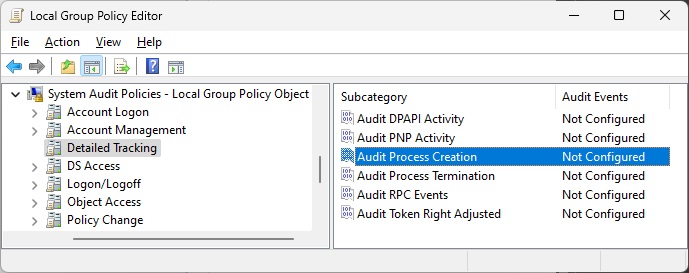
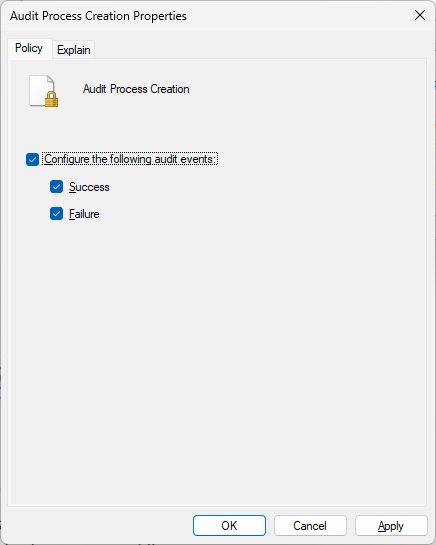
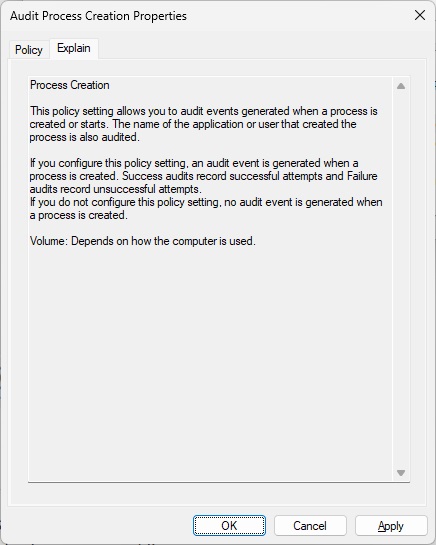
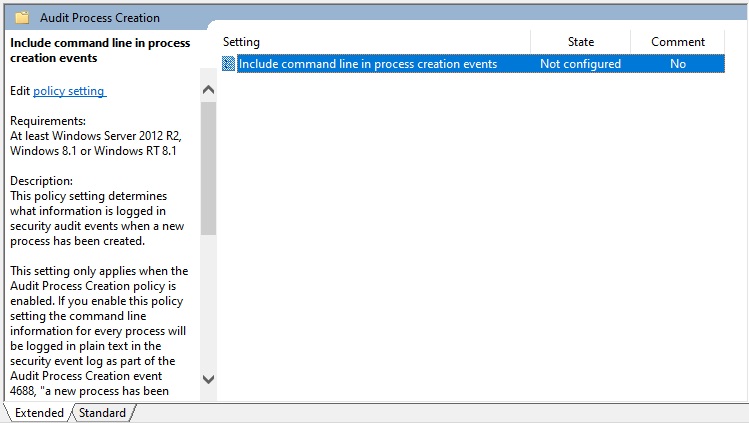
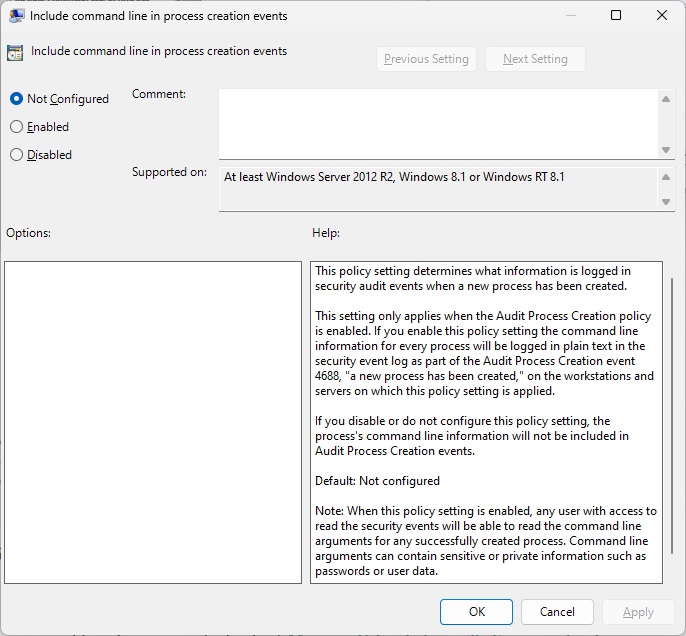
However, the event viewer didn’t have command line arguments when I did this, which is what I needed. I just looked up Event ID 4688 and found 4688(S) A new process has been created. – Windows 10 | Microsoft Learn, which explains that you must enable “Administrative Templates\System\Audit Process Creation\Include command line in process creation events” group policy to include command line in process creation events. Hmm, I definitely didn’t do that when I was investigating this issue. I just tried this and it does the trick!
In the midst of all this wrangling, I decide to write a simple test to spit out the value of the sun.jnu.encoding property. That test runs fine so next step is to use the same flags as the failing jtreg test. However, as I added the ZGC flags to the test command line, I realized that I hadn’t even tried those flags with the java -version. What an oversight! The bug reproduces without running any specific program!
Since the assert happens when cloning an array, I decided to find the native implementation of the clone method. Searched for “clone_” and the only relevant hit (from a quick glance) appeared to be in the LinkResolver::check_method_accessability method.
Command: C:/java/forks/openjdk/jdk/build/windows-aarch64-server-slowdebug/jdk/bin/java.exe

Arguments: -XX:+UseZGC -XX:+ZGenerational -XX:+ZVerifyOops -version

Working Dir: C:/java/forks/openjdk/jdk
The failure appeared to be happening in this statement: HeapAccess<>::clone(obj(), new_obj_oop, size). I got this callstack by stepping into the calls in the slowdebug build because the is_valid function is inlined in the fastdebug build, preventing me from setting a breakpoint in it.
jvm.dll!is_valid(zaddress addr, bool assert_on_failure) Line 298	C++
jvm.dll!assert_is_valid(zaddress addr) Line 321	C++
jvm.dll!to_zaddress(unsigned __int64 value) Line 339	C++
jvm.dll!to_zaddress(oopDesc * o) Line 345	C++
jvm.dll!ZBarrierSet::AccessBarrier<270432,ZBarrierSet>::clone_in_heap(oopDesc * src, oopDesc * dst, unsigned __int64 size) Line 433	C++
jvm.dll!AccessInternal::PostRuntimeDispatch<ZBarrierSet::AccessBarrier<270400,ZBarrierSet>,9,270400>::access_barrier(oopDesc * src, oopDesc * dst, unsigned __int64 size) Line 200	C++
jvm.dll!AccessInternal::RuntimeDispatch<270400,oopDesc *,9>::clone_init(oopDesc * src, oopDesc * dst, unsigned __int64 size) Line 349	C++
jvm.dll!AccessInternal::RuntimeDispatch<270400,oopDesc *,9>::clone(oopDesc * src, oopDesc * dst, unsigned __int64 size) Line 533	C++
jvm.dll!AccessInternal::PreRuntimeDispatch::clone<270400>(oopDesc * src, oopDesc * dst, unsigned __int64 size) Line 890	C++
jvm.dll!AccessInternal::clone<262144>(oopDesc * src, oopDesc * dst, unsigned __int64 size) Line 1181	C++
jvm.dll!Access<262144>::clone(oopDesc * src, oopDesc * dst, unsigned __int64 size) Line 212	C++
jvm.dll!JVM_Clone(JNIEnv_ * env, _jobject * handle) Line 698	C++
00000298b2bbf056()	Unknown
00000298a2ee5590()	Unknown
000000c053dfe908()	Unknown
Here’s the stack from stepping into the fastdebug assembly (note that line numbers might be off since this is not slowdebug):
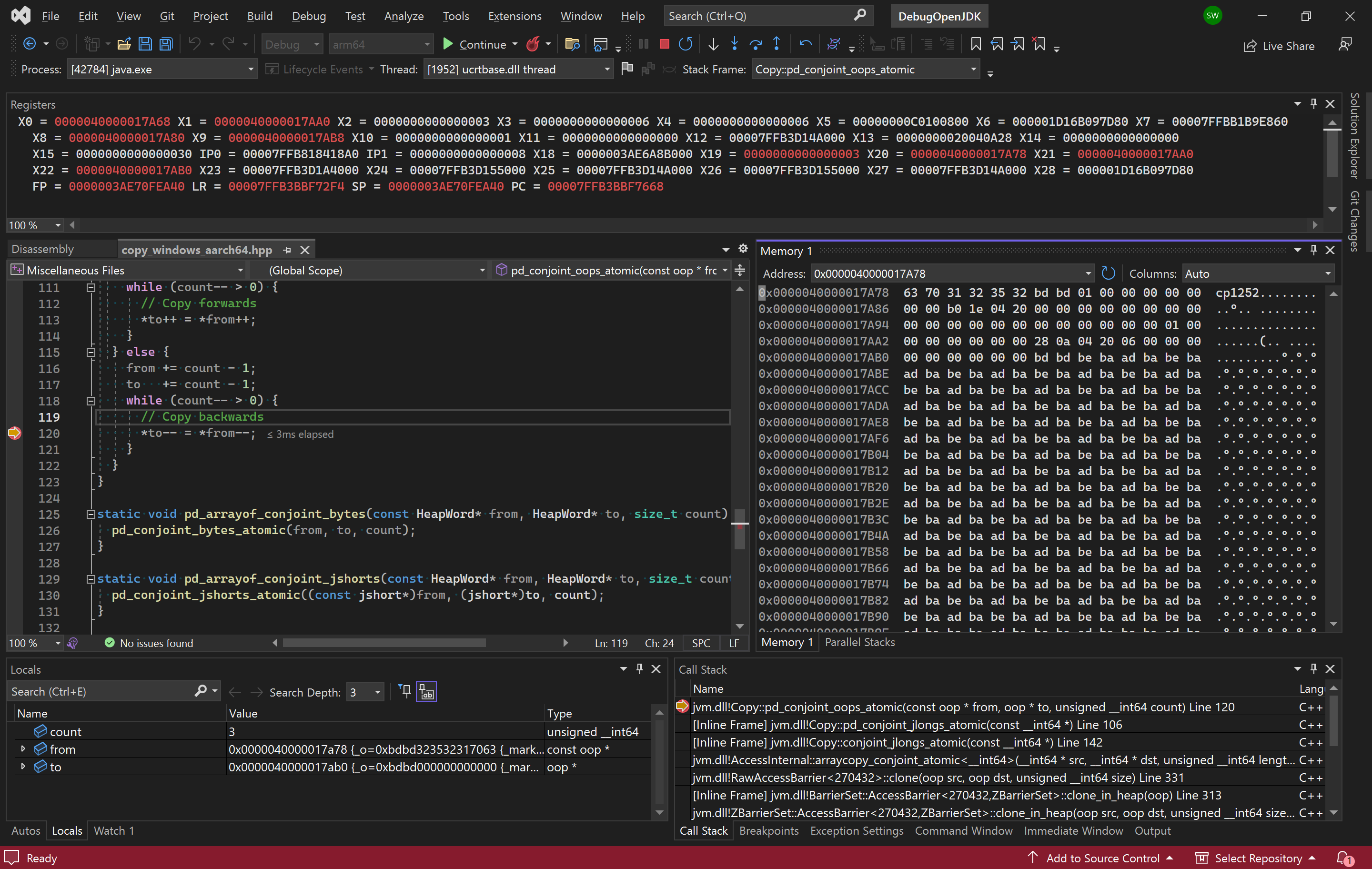
I looked at this and searched for UTF-8 byte 0xBD meaning – Search (bing.com) but that didn’t turn up anything meaningful. I noticed that count is 3 on my Aarch64 device so we are copying 3 oops. Was this expected given that the count is 4 on Windows x64? More importantly though, the big question I have now is why doesn’t slowdebug step into the oop checking code when pressing F11 on line 120 in the screenshot? I expected the behavior of oop::on_usage to be different, not that it wouldn’t be called at all! When browsing the sources in VSCode on my x64 desktop, I clicked on the oop type (of the src argument) and it took me to a typedef of class oopDesc*. That’s when I spotted the CHECK_UNHANDLED_OOPS ifndef. The fastdebug build must have this defined! The only non-cpp/hpp file that contains CHECK_UNHANDLED_OOPS is jdk/make/hotspot/lib/JvmFlags.gmk. Sure enough, it is only defined for fastdebug. This means that I should be able to enable it for slowdebug and release and verify whether the behavior is present there. We can therefore configure a slowdebug build with the --with-extra-cflags=-DCHECK_UNHANDLED_OOPS option.
date; time bash configure --with-jtreg=/cygdrive/c/java/binaries/jtreg-7.4+1 --with-gtest=/cygdrive/c/repos/googletest --with-boot-jdk=/cygdrive/c/java/binaries/jdk/x64/jdk-22.0.1+8 --openjdk-target=aarch64-unknown-cygwin --with-debug-level=slowdebug --with-extra-cflags=-DCHECK_UNHANDLED_OOPS

time /cygdrive/c/repos/scratchpad/scripts/java/cygwin/build-jdk.sh windows aarch64 0 slowdebug
Looking at the actual pointer, I noticed that its value is the data “cp1252..”. After further investigation, I conclude that the bug is that we’re calling oops::operator= instead of just copying the values! I test a fix that simply copies the values directly and it works! The test passes even with the -DCHECK_UNHANDLED_OOPS option!
On to the next question: is there anything else using the pd_conjoint_oops_atomic function (and will it be negatively affected by my change)? While searching for “pd_conjoint_oops_atomic”, I notice that some platforms have an assert that oops == long or smth like that. There are 2 users of pd_conjoint_oops_atomic:
One idea is to run Java programs on a build linked with /PROFILE (Performance Tools Profiler) i.e. configured via --with-extra-ldflags=-profile to enable collection of code coverage data then confirming that those functions are executed. That seems cumbersome though so I try to create some array copying code to see if I can get to those functions (using breakpoints but none are hit). After taking a break: I wonder if I can just search from the bottom instead? Looking in jvm.cpp for copy reveals the JVM_ArrayCopy function. Here is my Java program:
public class CopyArray {
    public static void main(String[] args) {
        int length = 0xdeadc0d;
        int srcPos = 0;

        if (args.length > 0) {
            try {
                int userLength = Integer.parseInt(args[0]);
                length = userLength;
            }
            catch (Throwable e) {
                System.err.println("Ignoring invalid user arguments.");
            }
        }

        byte[] src = new byte[length];

        for (int i = 0; i < src.length; i++) {
            src[i] = (byte)(i % 256);
        }
        byte[] dest = new byte[length];
        System.arraycopy(src, srcPos, dest, 0, length);
    }
}
I debugged the JVM running this program on my x64 machine. This hits the target function, JVM_ArrayCopy but there are so many callers. I have to set a condition on the breakpoint (hence the magic value of the length above) before I can step in to see where my call goes. Here are the source paths (note the different commit)
jvm.dll!Copy::pd_conjoint_bytes_atomic(const void * from, void * to, unsigned __int64 count) Line 119	C++
jvm.dll!Copy::conjoint_memory_atomic(const void * from, void * to, unsigned __int64 size) Line 53	C++
jvm.dll!AccessInternal::arraycopy_conjoint_atomic<void>(void * src, void * dst, unsigned __int64 length) Line 164	C++
jvm.dll!RawAccessBarrierArrayCopy::arraycopy<136585312,void>(arrayOop src_obj, unsigned __int64 src_offset_in_bytes, void * src_raw, arrayOop dst_obj, unsigned __int64 dst_offset_in_bytes, void * dst_raw, unsigned __int64 length) Line 298	C++
jvm.dll!RawAccessBarrier<136585312>::arraycopy<void>(arrayOop src_obj, unsigned __int64 src_offset_in_bytes, void * src_raw, arrayOop dst_obj, unsigned __int64 dst_offset_in_bytes, void * dst_raw, unsigned __int64 length) Line 308	C++
jvm.dll!AccessInternal::PreRuntimeDispatch::arraycopy<136587328,void>(arrayOop src_obj, unsigned __int64 src_offset_in_bytes, void * src_raw, arrayOop dst_obj, unsigned __int64 dst_offset_in_bytes, void * dst_raw, unsigned __int64 length) Line 834	C++
jvm.dll!AccessInternal::PreRuntimeDispatch::arraycopy<136585280,void>(arrayOop src_obj, unsigned __int64 src_offset_in_bytes, void * src_raw, arrayOop dst_obj, unsigned __int64 dst_offset_in_bytes, void * dst_raw, unsigned __int64 length) Line 867	C++
jvm.dll!AccessInternal::arraycopy_reduce_types<136585280,void>(arrayOop src_obj, unsigned __int64 src_offset_in_bytes, void * src_raw, arrayOop dst_obj, unsigned __int64 dst_offset_in_bytes, void * dst_raw, unsigned __int64 length) Line 1008	C++
jvm.dll!AccessInternal::arraycopy<136577024,void>(arrayOop src_obj, unsigned __int64 src_offset_in_bytes, const void * src_raw, arrayOop dst_obj, unsigned __int64 dst_offset_in_bytes, void * dst_raw, unsigned __int64 length) Line 1172	C++
jvm.dll!Access<136577024>::arraycopy<void>(arrayOop src_obj, unsigned __int64 src_offset_in_bytes, const void * src_raw, arrayOop dst_obj, unsigned __int64 dst_offset_in_bytes, void * dst_raw, unsigned __int64 length) Line 147	C++
jvm.dll!ArrayAccess<134217728>::arraycopy<void>(arrayOop src_obj, unsigned __int64 src_offset_in_bytes, arrayOop dst_obj, unsigned __int64 dst_offset_in_bytes, unsigned __int64 length) Line 301	C++
jvm.dll!TypeArrayKlass::copy_array(arrayOop s, int src_pos, arrayOop d, int dst_pos, int length, JavaThread * __the_thread__) Line 170	C++
jvm.dll!JVM_ArrayCopy(JNIEnv_ * env, _jclass * ignored, _jobject * src, int src_pos, _jobject * dst, int dst_pos, int length) Line 307	C++
00000244ea690702()	Unknown
Copy::conjoint_memory_atomic is interesting because it has a comment indicating that copying bytes is not aligned and so there is no need to be atomic. The if statements in that method indicate that I can change the size of elements in the array to call different paths. Looks like I need to create an array of objects.
/**
export JAVA_HOME=~/java/binaries/jdk/x64/jdk-21.0.2+13
$JAVA_HOME/bin/javac CopyArray.java
$JAVA_HOME/bin/java CopyArray
 */

public class CopyArray {
    public static void main(String[] args) {
        int length = 0xdead;
        int srcPos = 0;

        if (args.length > 0) {
            try {
                int userLength = Integer.parseInt(args[0]);
                length = userLength;
            }
            catch (Throwable e) {
                System.err.println("Ignoring invalid user arguments.");
            }
        }

        Object[] src = new Object[length];

        for (int i = 0; i < src.length; i++) {
            src[i] = new Object();
        }
        Object[] dest = new Object[length];
        System.arraycopy(src, srcPos, dest, 0, length);
    }
}
Now we are closer to the array_oops code I was trying to hit:
jvm.dll!Copy::pd_conjoint_jints_atomic(const int * from, int * to, unsigned __int64 count) Line 52	C++
jvm.dll!Copy::conjoint_oops_atomic(const narrowOop * from, narrowOop * to, unsigned __int64 count) Line 155	C++
jvm.dll!AccessInternal::arraycopy_conjoint_oops(narrowOop * src, narrowOop * dst, unsigned __int64 length) Line 54	C++
jvm.dll!RawAccessBarrierArrayCopy::arraycopy<50331750,HeapWordImpl *>(arrayOop src_obj, unsigned __int64 src_offset_in_bytes, HeapWordImpl * * src_raw, arrayOop dst_obj, unsigned __int64 dst_offset_in_bytes, HeapWordImpl * * dst_raw, unsigned __int64 length) Line 234	C++
jvm.dll!RawAccessBarrier<52715622>::arraycopy<enum narrowOop>(arrayOop src_obj, unsigned __int64 src_offset_in_bytes, narrowOop * src_raw, arrayOop dst_obj, unsigned __int64 dst_offset_in_bytes, narrowOop * dst_raw, unsigned __int64 length) Line 308	C++
jvm.dll!RawAccessBarrier<52715622>::oop_arraycopy<enum narrowOop>(arrayOop src_obj, unsigned __int64 src_offset_in_bytes, narrowOop * src_raw, arrayOop dst_obj, unsigned __int64 dst_offset_in_bytes, narrowOop * dst_raw, unsigned __int64 length) Line 130	C++
jvm.dll!ModRefBarrierSet::AccessBarrier<35938406,CardTableBarrierSet>::oop_arraycopy_in_heap<enum narrowOop>(arrayOop src_obj, unsigned __int64 src_offset_in_bytes, narrowOop * src_raw, arrayOop dst_obj, unsigned __int64 dst_offset_in_bytes, narrowOop * dst_raw, unsigned __int64 length) Line 109	C++
jvm.dll!AccessInternal::PostRuntimeDispatch<CardTableBarrierSet::AccessBarrier<35938406,CardTableBarrierSet>,8,35938406>::oop_access_barrier<HeapWordImpl *>(arrayOop src_obj, unsigned __int64 src_offset_in_bytes, HeapWordImpl * * src_raw, arrayOop dst_obj, unsigned __int64 dst_offset_in_bytes, HeapWordImpl * * dst_raw, unsigned __int64 length) Line 142	C++
jvm.dll!AccessInternal::RuntimeDispatch<35938374,HeapWordImpl *,8>::arraycopy(arrayOop src_obj, unsigned __int64 src_offset_in_bytes, HeapWordImpl * * src_raw, arrayOop dst_obj, unsigned __int64 dst_offset_in_bytes, HeapWordImpl * * dst_raw, unsigned __int64 length) Line 517	C++
jvm.dll!AccessInternal::PreRuntimeDispatch::arraycopy<35938374,HeapWordImpl *>(arrayOop src_obj, unsigned __int64 src_offset_in_bytes, HeapWordImpl * * src_raw, arrayOop dst_obj, unsigned __int64 dst_offset_in_bytes, HeapWordImpl * * dst_raw, unsigned __int64 length) Line 871	C++
jvm.dll!AccessInternal::arraycopy_reduce_types<35938372>(arrayOop src_obj, unsigned __int64 src_offset_in_bytes, HeapWordImpl * * src_raw, arrayOop dst_obj, unsigned __int64 dst_offset_in_bytes, HeapWordImpl * * dst_raw, unsigned __int64 length) Line 1018	C++
jvm.dll!AccessInternal::arraycopy<35913732,HeapWordImpl *>(arrayOop src_obj, unsigned __int64 src_offset_in_bytes, HeapWordImpl * const * src_raw, arrayOop dst_obj, unsigned __int64 dst_offset_in_bytes, HeapWordImpl * * dst_raw, unsigned __int64 length) Line 1172	C++
jvm.dll!Access<35913728>::oop_arraycopy<HeapWordImpl *>(arrayOop src_obj, unsigned __int64 src_offset_in_bytes, HeapWordImpl * const * src_raw, arrayOop dst_obj, unsigned __int64 dst_offset_in_bytes, HeapWordImpl * * dst_raw, unsigned __int64 length) Line 136	C++
jvm.dll!ArrayAccess<33554432>::oop_arraycopy(arrayOop src_obj, unsigned __int64 src_offset_in_bytes, arrayOop dst_obj, unsigned __int64 dst_offset_in_bytes, unsigned __int64 length) Line 327	C++
jvm.dll!ObjArrayKlass::do_copy(arrayOop s, unsigned __int64 src_offset, arrayOop d, unsigned __int64 dst_offset, int length, JavaThread * __the_thread__) Line 197	C++
jvm.dll!ObjArrayKlass::copy_array(arrayOop s, int src_pos, arrayOop d, int dst_pos, int length, JavaThread * __the_thread__) Line 282	C++
jvm.dll!JVM_ArrayCopy(JNIEnv_ * env, _jclass * ignored, _jobject * src, int src_pos, _jobject * dst, int dst_pos, int length) Line 307	C++
00000202d3f00502()	Unknown
00000202cc269950()	Unknown
In this call stack, the arraycopy_conjoint_oops(narrowOop* src, narrowOop* dst, size_t length) implementation that is called has narrow oops because of the branch in ObjArrayKlass::copy_array. Launch the application using these arguments instead:
Now the code block of interest is hit! Hmm, I’m realizing that I should have been explicit about the collector to use. This was debugging the G1 collector (chosen ergonomically).
jvm.dll!ZBarrierSet::AccessBarrier<52715590,ZBarrierSet>::oop_arraycopy_in_heap_no_check_cast(zpointer * dst, zpointer * src, unsigned __int64 length) Line 371	C++
jvm.dll!ZBarrierSet::AccessBarrier<35938374,ZBarrierSet>::oop_arraycopy_in_heap(arrayOop src_obj, unsigned __int64 src_offset_in_bytes, zpointer * src_raw, arrayOop dst_obj, unsigned __int64 dst_offset_in_bytes, zpointer * dst_raw, unsigned __int64 length) Line 403	C++
jvm.dll!ZBarrierSet::AccessBarrier<35938374,ZBarrierSet>::oop_arraycopy_in_heap(arrayOop src_obj, unsigned __int64 src_offset_in_bytes, oop * src_raw, arrayOop dst_obj, unsigned __int64 dst_offset_in_bytes, oop * dst_raw, unsigned __int64 length) Line 128	C++
jvm.dll!AccessInternal::PostRuntimeDispatch<ZBarrierSet::AccessBarrier<35938374,ZBarrierSet>,8,35938374>::oop_access_barrier<HeapWordImpl *>(arrayOop src_obj, unsigned __int64 src_offset_in_bytes, HeapWordImpl * * src_raw, arrayOop dst_obj, unsigned __int64 dst_offset_in_bytes, HeapWordImpl * * dst_raw, unsigned __int64 length) Line 142	C++
jvm.dll!AccessInternal::RuntimeDispatch<35938374,HeapWordImpl *,8>::arraycopy(arrayOop src_obj, unsigned __int64 src_offset_in_bytes, HeapWordImpl * * src_raw, arrayOop dst_obj, unsigned __int64 dst_offset_in_bytes, HeapWordImpl * * dst_raw, unsigned __int64 length) Line 517	C++
jvm.dll!AccessInternal::PreRuntimeDispatch::arraycopy<35938374,HeapWordImpl *>(arrayOop src_obj, unsigned __int64 src_offset_in_bytes, HeapWordImpl * * src_raw, arrayOop dst_obj, unsigned __int64 dst_offset_in_bytes, HeapWordImpl * * dst_raw, unsigned __int64 length) Line 871	C++
jvm.dll!AccessInternal::arraycopy_reduce_types<35938372>(arrayOop src_obj, unsigned __int64 src_offset_in_bytes, HeapWordImpl * * src_raw, arrayOop dst_obj, unsigned __int64 dst_offset_in_bytes, HeapWordImpl * * dst_raw, unsigned __int64 length) Line 1018	C++
jvm.dll!AccessInternal::arraycopy<35913732,HeapWordImpl *>(arrayOop src_obj, unsigned __int64 src_offset_in_bytes, HeapWordImpl * const * src_raw, arrayOop dst_obj, unsigned __int64 dst_offset_in_bytes, HeapWordImpl * * dst_raw, unsigned __int64 length) Line 1172	C++
jvm.dll!Access<35913728>::oop_arraycopy<HeapWordImpl *>(arrayOop src_obj, unsigned __int64 src_offset_in_bytes, HeapWordImpl * const * src_raw, arrayOop dst_obj, unsigned __int64 dst_offset_in_bytes, HeapWordImpl * * dst_raw, unsigned __int64 length) Line 136	C++
jvm.dll!ArrayAccess<33554432>::oop_arraycopy(arrayOop src_obj, unsigned __int64 src_offset_in_bytes, arrayOop dst_obj, unsigned __int64 dst_offset_in_bytes, unsigned __int64 length) Line 327	C++
jvm.dll!ObjArrayKlass::do_copy(arrayOop s, unsigned __int64 src_offset, arrayOop d, unsigned __int64 dst_offset, int length, JavaThread * __the_thread__) Line 198	C++
jvm.dll!ObjArrayKlass::copy_array(arrayOop s, int src_pos, arrayOop d, int dst_pos, int length, JavaThread * __the_thread__) Line 290	C++
jvm.dll!JVM_ArrayCopy(JNIEnv_ * env, _jclass * ignored, _jobject * src, int src_pos, _jobject * dst, int dst_pos, int length) Line 308	C++
000002602e8c06a8()	Unknown
I need to turn off compressed oops with the serial collector as well but it looks like there is no check_oop_function for the serial collector. That said, this exploration of array copying code was insightful, showing how the data type sizes determine which path is taken for copying primitives and objects. There didn’t appear to be any red flags about removing the oop::operator= usage so I opened 8334475: UnsafeIntrinsicsTest.java#ZGenerationalDebug assert(!assert_on_failure) failed: Has low-order bits set by swesonga · Pull Request #20390 · openjdk/jdk (github.com) to fix the assertion failure. The most interesting part of this investigation was that the bad address was a data value (cp1252) staring right at me and I missed it. This was quite educational for me though.
One of the downsides of horse ownership is the cost. The cost of the horse is just the starting point. Transporting the horse is a non-trivial cost. We needed to buy a trailer and many of the trailers we looked at are heavy enough that we needed to buy a truck as well. This raised the question of what the minimum required towing capacity would be. It’s strange that these trucks are classified using tons. What Does Half-Ton, Three-Quarter-Ton, One-Ton Mean When Talking About Pickup Trucks? | Cars.com gives me the impression that tonnage is a historical artifact of payload measurement. A ton seems to be a reference to a Short ton – Wikipedia. It is also interesting that Toyota and Nissan don’t really have offerings above the half-ton classification. The approximate weight of the trailer (and the horse) that I want to transport (or alternatively, our camper) requires at least a 3/4-ton truck.
One of the trucks we considered is the 2012 F 150 Towing Capacity Full Guide (with Charts) (truckauxiliary.com). The concern here was that even though it had a towing package, it was still a half-ton truck. It was also likely to be outside our budget, so we didn’t really wait for that seller to give us a price. We also looked at a 2006 RAM 2500. Our mechanic took a look at it and exclaimed that everything that could possibly leak on that vehicle was leaking (transmission, power steering, etc). That was an easy pass given that it was already at the top of our price range.
Fortunately, the next truck we looked at worked out. Cylinder 6 was misfiring on this truck (we could hear the tick) and this was confirmed by the digital codes from the vehicle. We decided to buy a new spark plug and coil for that cylinder to see if we could fix it before driving off with the truck but neither AutoZone nor Oreilly Autoparts had the right coil in stock. We walked out with just the spark plug and our mechanic replaced it. In the process of pulling out the old spark plug, the spark plug wire came apart, and we had to buy an entire Duralast Silicone Spark Plug Wire Set. Thankfully, that was all that was needed to address the cylinder misfiring. We were glad to have our mechanic available to fix that problem before we drove off with our “new” 2002 truck (through a private sale). We had also confirmed with our insurance company that the new vehicle was covered as we drove it away and that we had up to 5 days to add it to our insurance plan.
Ironically, the towing hitch was significantly damaged on this truck (one of our most important requirements). However, the mechanic pointed out that it can be readily replaced (just don’t do any welding on the existing setup since its integrity cannot be guaranteed). The only question I have remaining is how to compute the tongue weight (came up when we were looking up new hitches online). What is Tongue Weight and What Does it Mean for Safe Towing? explains various ways to determine the tongue weight. They also recommend their weigh-safe hitch, which has a built-in scale (I like how convenient this hitch makes it). This is the video they linked discussing this option.
Behind the scenes of the Ike Gauntlet: How to measuring Tongue Weight for Safe Towing
I have been learning about the SFrame tracing effort and figured I should document the resources I have reviewed. Indu Bhagat has been actively involved in the development of SFrame. This is one of her talks giving an overview of the objectives of SFrame. The overall idea is that profiling tools (e.g. perf) usually need to generate stack traces. She lists some methods used to generate stack traces, e.g. using frame pointers, EH frame, last branch record (LBR), and other heuristics. Each of these have their own advantages and pitfalls. SFrame encodes the minimal info required for stack tracing.
I found additional videos by searching for sframe indu (there are lots of unrelated sframe results out there). This one by Steven and Indu covers potential issues that need to be addressed for JITted code.
We decided to sell our horse a few months ago and buy another horse better suited to drill riding. The topic of which contract to use when buying a horse came up naturally. More specifically, the seller of the horse we were interested in wanted a right of first refusal (which I didn’t understand). My first go-to was the Horse purchase agreement – YouTube search. The video on Sales Fraud in the Horse Industry (youtube.com) was exactly what I needed. I’m summarizing the key points in this post so that I don’t have to watch the whole video again.
Sales Fraud in the Horse Industry
Some issues that horse buyers run into:
Training and disposition are misrepresented. The buyer didn’t seek enough info, or the seller wasn’t clear/transparent (e.g. about horse vices)
Horse is smaller/larger than represented, e.g. with minis where the seller doesn’t make a representation about the horse (or it is misrepresented).
Horse being drugged during buyer’s evaluation.
She gives advice on reducing disputes by sellers ensuring advertisements are true and accurate. One of the behaviors mentioned (that buyers complain about) is cribbing, which I don’t think I have heard of before.
What is cribbing, and how to stop your horse from cribbing
Some recommendations from the video include:
put things in writing
avoid one-size-fits-all forms (e.g. are they valid in your state?)
don’t leave major terms to guesswork
specify the buyer, seller, price, terms, and the horse (registered date, foaling date)
avoid underage contract signers (such contracts will not be enforceable in most places).
whether the horse needs to receive joint injections (that’s a thing?).
Other recommendations include:
having the seller’s name and signature on the contract (thus ensuring promises are not just from a seller’s agent, who might not have really known the horse) and to specify who pays the seller’s agent’s commission.
hiring an independent vet to examine the horse before buying (e.g. to avoid paying a lot for a horse that has been denerved).
getting a drug screen.
She delves into the topic of releases, giving an example of a closed head injury that resulted in institutionalization of the rider, but the release didn’t use the language required to make it enforceable! Definitely caught my attention.
Other Recommendations
She recommends liability insurance for owners in trial period or lease to buy scenarios.
She mentions clipping a horse in one of her answers to a question from the audience. I wasn’t sure what this referred to until I found Horse Clipping Guide (smartpakequine.com)
The video ends with a question about releases, which was the reason I wanted to watch this video in the first place. One of the big questions we had was the right of first refusal. I end up browsing through Right of First Refusal Clauses: Equine Law Blog for additional information about this.
She brings up insurance, e.g. how having an equine insurance policy could allow you to euthanize a horse and still collect (unlike life insurance policies). She recommends purchasing it just before your new horse gets on the trailer (she gives an example where a horse got spider bites after getting into the trailer for transport as part of the purchase but the buyer got a payout after euthanizing the horse).
I have been using bash scripts to run jtreg tests when working on my Windows desktop. The Git Bash environment does not care about whether the script has the executable mode set. However, running the same script on other platforms requires a chmod +x command. Since it is annoying to have to do this every time I switch platforms, I have decided to be fixing this before pushing scripts. How do I see the permission of a file in Git? – Stack Overflow recommends git ls-files -s. It’s only now that I’m learning (from the top voted answer) that Git only tracks the executable bit on files (Are file permissions and owner:group properties included in git commits? – Stack Overflow).
chmod +x run-jtreg-test.sh does not change the file mode displayed by git ls-files -s. As per How to add chmod permissions to file in Git? – Stack Overflow, you can use this command starting in Git 2.9 (I’m running git version 2.45.2.windows.1)
every polynomial many-one degree either consists of a single polynomial isomorphism type or else contains a collection of isomorphism types which has, under one-one, size-increasing, polynomially invertible reductions, the order type of the rationals.
I was telling my advisor that reading of these old papers makes me suspect that we are a very long way away from resolving the P vs NP question – we don’t appear to have made significant progress in this journey over the past few decades. This is obviously an uninformed gut feeling, not a scientific observation. I asked how researchers that have been at this for decades feel about the problem and these are some of the videos he shared. The speakers in this discussion on P vs NP covers issues such as:
how to go from worst case to average case complexity of hard problems
how to generate hard instances (with distinctions between puzzles and problems coming up in applications like cryptography)
whether quantum mechanics can actually solve hard computational problems (with pessimism arising from potential inability to measure the results of parallel exploration). A naive approach will not work. Shor used the structure of the factoring problem. Does that structure exist in NP complete problems?
whether current accepted axioms are not sufficient to resolve the problem.
There is also advice from Ron Fagin to spend some time (e.g. a couple of days each year) thinking about the hardest problem in their field. One of the most interesting questions to me was the one asking “what’s the most remarkable false proof of P vs NP proofs that you have come across“. Ron Fagin mentions the proof attempt by Vinay Deolalikar from HP Labs. This was addressed by Scott Aaronson in his post on Eight Signs A Claimed P≠NP Proof Is Wrong (scottaaronson.blog). The other comment (by Christos Papadimitriou) was about how some failed attempts have led to barriers showing that certain approaches will not work. Ron Fagin also recommends looking at the P-versus-NP page (tue.nl).
Beyond Computation: The P versus NP question (panel discussion)
One of the topics I have been learning about requires an understanding of prefix sets. Prefix-free Kolmogorov complexity is one of these areas. Some resources on this subject include:
I watched lecture 42 Kraft’s inequality (youtube.com) to get the basic idea behind Krafts inequality. The simpler proof was the one mapping prefix free codes subintervals of (0,1). Fortnow’s paper described these as intervals of real numbers whose dyadic expansion begins with 0.x for strings x in a prefix-free set A.
Kraft’s inequality
Error Correcting Codes
The XOR lemma used for worst case to average case hardness transformation has always seemed a bit mysterious to me. I had decided to dig into error correcting codes to better understand the list decoding approach to hardness amplification in the Pseudorandom Generators without the XOR Lemma paper. I started on this series last month and have found it extremely beneficial. It’s been much easier to read Venkatesan Guruswami’s List Decoding of Error-Correcting Codes thesis after going through this lecture series.
We have been searching for horse trailer and wanted to learn the types of things people consider before buying one. We started with this video by Equine Helper:
HORSE TRAILER SHOPPING TIPS! (watch before buying)
The length of your vehicle’s wheelbase (longer is better).
The difference between the weight of the vehicle and the loaded trailer.
The vehicle’s braking system, e.g. can it use the trailer’s brakes?
The limits on the vehicle’s payload (weight of passengers & cargo inside the vehicle itself) when towing.
Trailer style:
Straight load vs slant load vs stock trailers. Stock trailers don’t have support (e.g. for sudden braking), are open so projectiles can injure your horse
Trailer ventilation: (e.g. untreated ceilings can get really hot). Consider one with windows that can open, or ceilings that can be opened.
The hitch on the towing vehicle needs to support the tongue weight of the trailer.
The receiver needs to match the ball size of the trailer.
The next video was helpful since his perspective is informed by his profession.
To Shoe or Not to Shoe – Part 1 – Ask a Farrinarian
Cost of Horse Ownership
After having our horse reshoed more often than is reasonable, I looked ran this search: how much does it cost to own a horse – YouTube? It’s interesting how many of the results for these horse queries are from Equine Helper.
Some of the factors affecting the price of a horse include the:
The discussion in the previous video mentioned a number of breeds, none of which I’m familiar with. The List of horse breeds – Wikipedia is much longer than I expected! I look up horse breeds on YouTube and find this video of her favorite breeds. She lists these:
Our horse is a Thoroughbred and is 16 hands tall. This is another thing that has puzzled me. Why is horse height measured in hands? Looks like it goes back to before standardized units as explained in the video below.
Working with your horse
Our thoroughbred had a leg/foot injury. After a few weeks without being able to ride him, he was quite a handful when my wife hopped on him once more. She worked with him, and things are much better. However, I decided to learn what advice is given on how to not get thrown off a horse and what to do if it happens. This next video is one of the results I found on this. It includes tips like keeping your nose behind your belly button, learning how to do a one rein stop (while not leaning forward), and getting off as soon as you feel uncomfortable.
5 Tips To Keep You Safe Riding A Horse
A YouTube suggestion that came up afterwards was this video on gentle horse training. I find the approach interesting because she shows the frustration of the horse and the progression of the training.
Why gentle horse training beats high pressure everytime
One of the risks that came up when working with our horse was the fact that we didn’t have a round pen. I didn’t know why a round pen is used – and why is it round anyway? The Benefits of Using a Round Pen | Ride Magazine came to my rescue: you don’t have to teach the horse to stay out of the corners! The round pen size needs to match the speed/character of the horse as well.
…what is neat about a round pen, it is a small, quiet, safe environment and it makes it easier to get control of the feet.
One of the things I’ve found myself marveling at is how such an animal can be so big and muscular while just eating grass. Where does the protein come from? And this horse really likes alfalfa, which I had seen around the property without knowing what this plant was. I haven’t looked too keenly but there didn’t seem to be any videos addressing the breakdown of the nutritional value of grass.
The Ultimate Horse Diet | Health & Fitness
A search for videos on the nutritional value of hay – YouTube is closer to what I want. I like this next video for its overview of things hay growers consider:
Harvesting hay to feed our cattle. What makes for high quality alfalfa hay.
There are so many considerations in horse ownership. I’m happy to have my eyes opened into how this world is run, not to mention a new appreciation for some of the rodeo performances!
I was recently in a brainstorming session with a colleague about garbage collection scenarios. He suggested using mind mapping software, and I must confess that this was the first time I was hearing about this (as far as I can recall). We wanted a free program. Our search turned up freeplane (which can be downloaded on Sourceforge). As per my usual habits, I decided to build it from source myself (I especially get this urge when I run into Sourceforge download links). Fortunately, the sources are hosted on GitHub.
git clone https://github.com/freeplane/freeplane
Since this is a Java codebase, I searched for “eclipse java” to get an IDE. The Eclipse Packages page has the Eclipse IDE for Java Developers (I downloaded the Windows x64 version). The project uses gradle but I didn’t know how to open it in Eclipse so I asked Microsoft Copilot (Bing Chat) how to “open a gradle project in eclipse”. One of the results was from the Import existing Gradle Git project into Eclipse – Stack Overflow page, which points to the Buildship Gradle Integration plugin. I launched Eclipse, created a new workspace and tried to import the project but got an exception that ended with:
Caused by: java.lang.IllegalArgumentException: Unsupported class file major version 65
	at groovyjarjarasm.asm.ClassReader.<init>(ClassReader.java:199)
	at groovyjarjarasm.asm.ClassReader.<init>(ClassReader.java:180)
	at groovyjarjarasm.asm.ClassReader.<init>(ClassReader.java:166)
	at groovyjarjarasm.asm.ClassReader.<init>(ClassReader.java:287)
	... 180 more
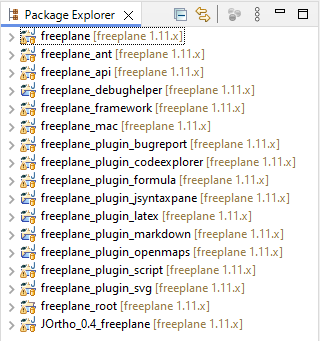
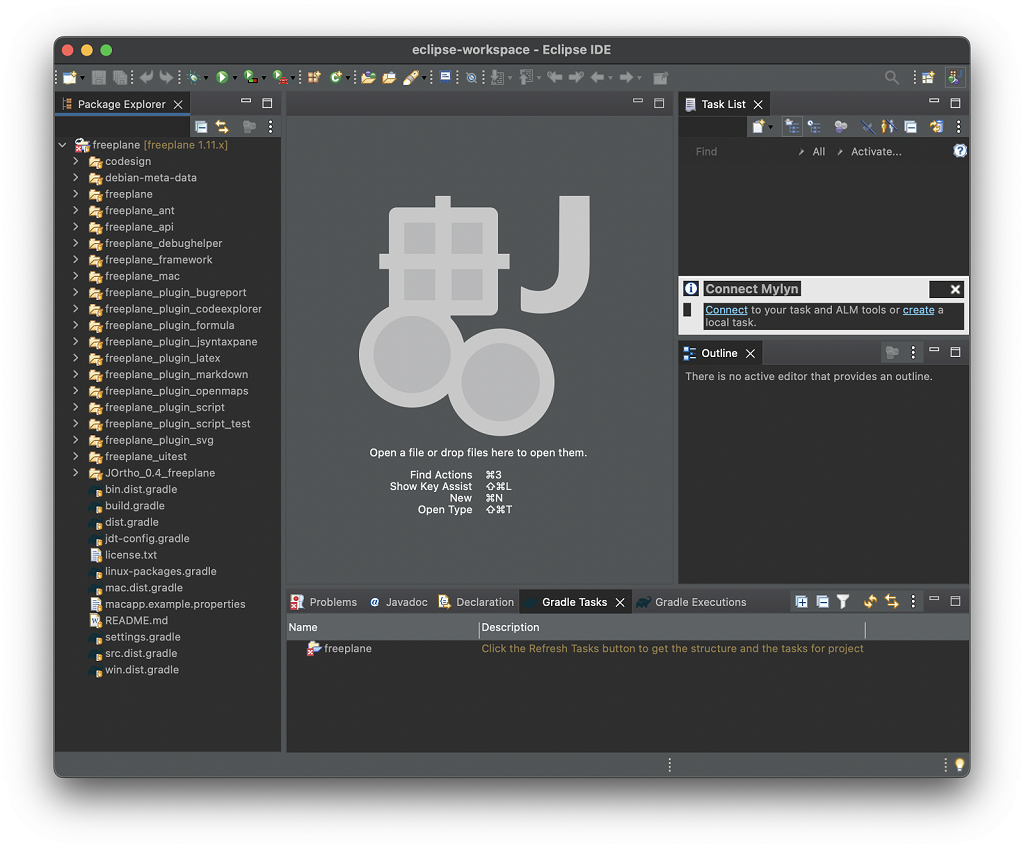
I was not sure how to run the application. I had unloaded it and reloaded it. I asked copilot “how to run an imported gradle project in eclipse” and the last step is to right-click on the project and choose Refresh to ensure Eclipse recognizes the changes. This time, the project explorer folders are rearranged, and version numbers are appended after each project!
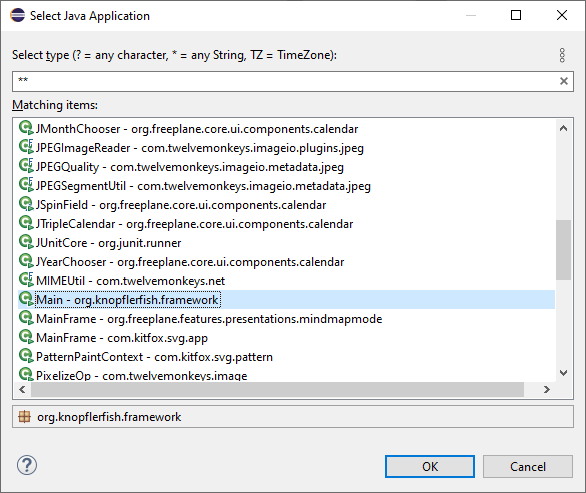
I right clicked on the freeplane project, selected Run As… Java Application, then chose the Main (org.knopflerfish.framework) application and clicked OK.
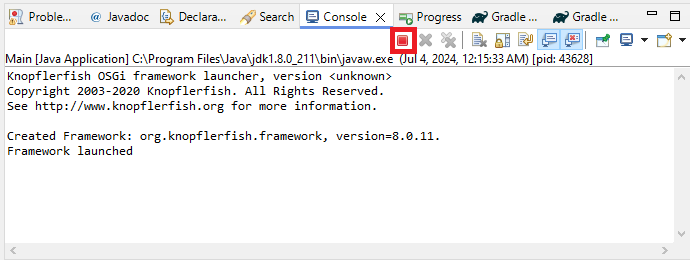
This text appeared in the console but no application Window appeared.
Knopflerfish OSGi framework launcher, version <unknown>
Copyright 2003-2020 Knopflerfish. All Rights Reserved.
See http://www.knopflerfish.org for more information.

Created Framework: org.knopflerfish.framework, version=8.0.11.
Framework launched
I was not even sure how to terminate the application so I asked copilot “how to stop a running java program in eclipse”. Yes, it has been that long. Forgot about this button.
I then downloaded freeplane_bin-1.11.14.zip to explore the UI and see if I could track down the strings from the menus… I found some resource files that but that was not helpful, so I continued exploring other projects. I finally stumbled into the freeplane_framework project. Clicking on “Run As… > Java Application” revealed that it has a Launcher project! I had been looking for a project like this. It failed with this error in the console window:
Exception in thread "main" java.lang.UnsupportedOperationException: The Security Manager is deprecated and will be removed in a future release
	at java.base/java.lang.System.setSecurityManager(System.java:430)
	at org.freeplane.launcher.Launcher.launchWithoutUICheck(Launcher.java:291)
	at org.freeplane.launcher.Launcher.main(Launcher.java:88)
I manually set the disableSecurityManager field to true to bypass this issue. The application finally launched!!
Launching Freeplane in Eclipse on macOS
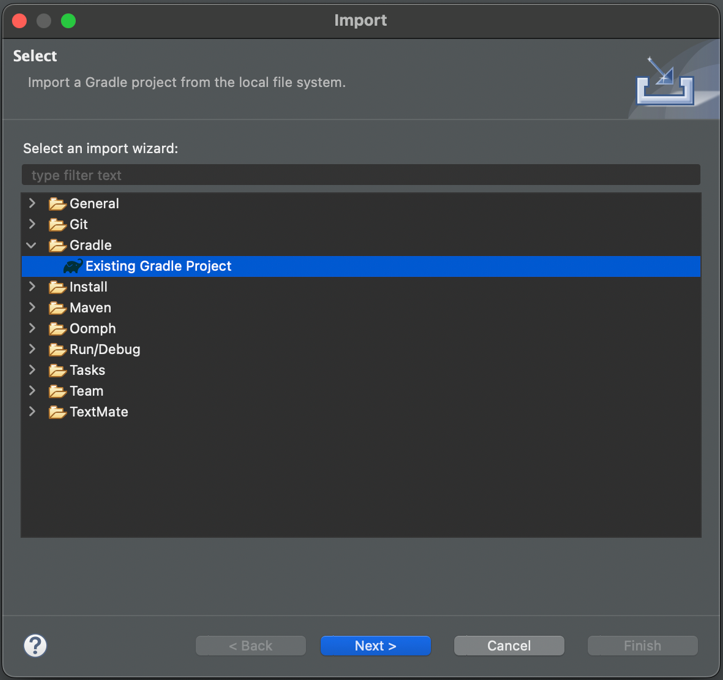
I decided to try this process on my M1 laptop. I downloaded the macOS AArch64 Eclipse IDE for Java Developers, accepted the default workspace path, and clicked on the “Import projects…” command in the package explorer. I selected the “Existing Gradle Project” import wizard then clicked Next.
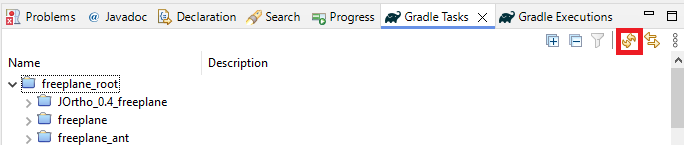
For the “Project root directory”, I browsed to the freeplane repo: /Users/saint/repos/freeplane then clicked on “Finish”. There is a helpful message in the Gradle Tasks pane (which shows up by default): Click on the Refresh Tasks button to get the structure and the tasks for project.
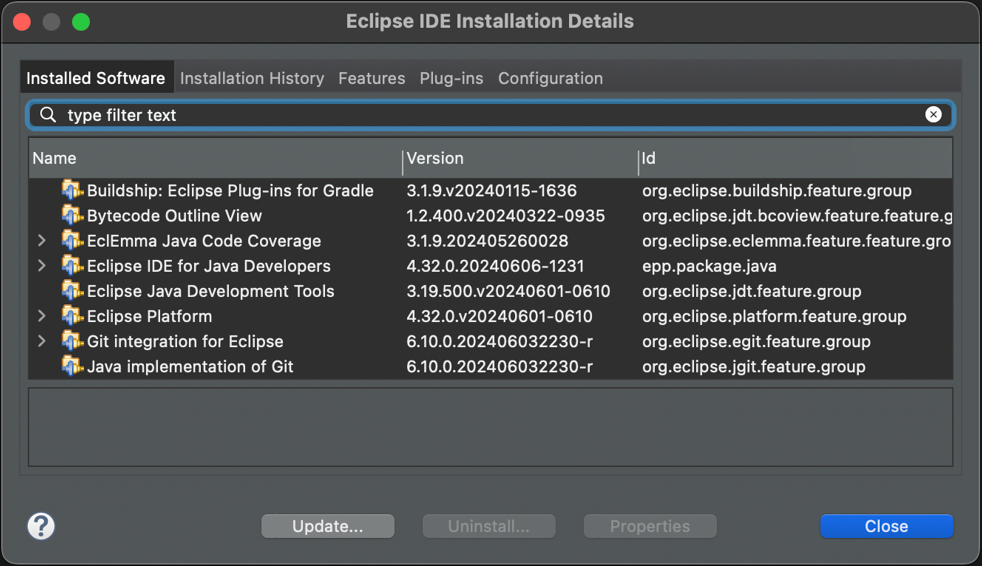
A message in the status bar flashed by fast but nothing else happened in the IDE. I confirmed that “Buildship: Eclipse Plug-ins for Gradle” was listed in the Installation Details (Eclipse > About Eclipse).
I didn’t have the console view of what could have happened though so I enabled it via Window > Show View > Console. Aha, looks like the same error that happened the first time in Windows (not even sure how that got resolved at this point).
FAILURE: Build failed with an exception.

* What went wrong:
Could not open cp_init generic class cache for initialization script '/Users/saint/eclipse-workspace/.metadata/.plugins/org.eclipse.buildship.core/init.d/eclipsePlugin.gradle' (/Users/saint/.gradle/caches/8.1.1/scripts/2to4is5l87jn9v7vrcgka57e).
> BUG! exception in phase 'semantic analysis' in source unit '_BuildScript_' Unsupported class file major version 65

* Try:
> Run with --stacktrace option to get the stack trace.
> Run with --info or --debug option to get more log output.
> Run with --scan to get full insights.

* Get more help at https://help.gradle.org

CONFIGURE FAILED in 568ms
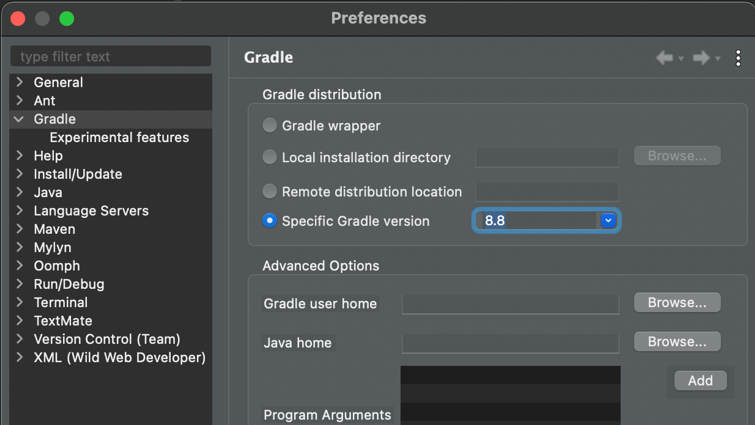
The Specific Gradle version dropdown has many options. I selected 8.8 then clicked on Apply and Close. Refreshing the Gradle Tasks still didn’t do anything. I closed the project and reopened it and now all the tasks showed up in the Gradle Tasks pane. However, the Run As option on the freeplane_framework project only had a Run Configurations… option. After some poking around, I discovered that just like on Windows, I need to expand the project, right click on the build.gradle file, then select the Gradle > Refresh Gradle Project to get the Package Explorer to refresh. This hides the top level files in the project. Now I could right click on the project and use the Run As > Java Application command. Selecting the “Launcher” Java application resulted in previously mentioned error message so I manually set the disableSecurityManager field to true. Freeplane finally launched successfully!
Summary: How to launch Freeplane in Eclipse
Clone the repo: git clone https://github.com/freeplane/freeplane
Set the gradle distribution to 8.8 (on Windows/Linux, use Window > Preferences, on macOS, use Eclipse > Preferences).
Click on Import projects… in the Package Explorer.
Select Existing Gradle Project then browse to the repo for the “Project root directory” (you can click Next to override the workspace settings to choose a specific Gradle version).
Click on Refresh Gradle Tasks.
Right click on the root build.gradle file and click on Refresh Tasks (if necessary, i.e. this file is shown at the root level of the package explorer)
Manually set the disableSecurityManager field to true to bypass the UnsupportedOperationException.
Run the “build” Gradle task in the Gradle Tasks window.
Right click on the freeplane_framework project, Run As > Java Application then select the Launcher application.
Select the freeplane dist option in the “Select Java Application” Window and click OK.