I often need to copy files from my MacBook to my Windows desktop. For some files, I especially want to ensure that they were copied correctly (no data loss or any changes to the files). Therefore, I wrote a Python script that takes a directory and enumerates all the files under that directory, computes their SHA 256 hashes, and writes these hashes to a file. As a final step, I compute the SHA 256 hash of the file containing the list of file/digest pairs. Under this setup, I just need to run the script on each machine after copying a directory and verify that it generates the same final SHA 256 hash. This guarantees that the probability of an error in the file transfer is extremely tiny. One of the issues I ran into was this Python error:
$ python /c/repos/scratchpad/scripts/python/write_sha256.py . --concat-hashes hashes.txt
[2026-07-31 12:51:12] Processing: .\._somefile.dat
Traceback (most recent call last):
  File "C:\repos\scratchpad\scripts\python\write_sha256.py", line 79, in <module>
    process_concat(args.directory, args.concat_hashes, force=args.force)
    ~~~~~~~~~~~~~~^^^^^^^^^^^^^^^^^^^^^^^^^^^^^^^^^^^^^^^^^^^^^^^^^^^^^^
  File "C:\repos\scratchpad\scripts\python\write_sha256.py", line 54, in process_concat
    concat_file.write(f"{sha256sum}  {relpath}\n")
    ~~~~~~~~~~~~~~~~~^^^^^^^^^^^^^^^^^^^^^^^^^^^^^
  File "C:\Python314\Lib\encodings\cp1252.py", line 19, in encode
    return codecs.charmap_encode(input,self.errors,encoding_table)[0]
           ~~~~~~~~~~~~~~~~~~~~~^^^^^^^^^^^^^^^^^^^^^^^^^^^^^^^^^^
UnicodeEncodeError: 'charmap' codec can't encode character '\u202f' in position 107: character maps to <undefined>
This had to be the Windows code page keeping things exciting! I explicitly set the encoding to UTF-8 to prevent such issues. For the final hashes to be identical, the list of files in the source directory needs to match the list of files in the destination directory. However, this wasn’t the case when copying files from my MacBook Pro to my Windows machine. I had never stopped to figure out what all these files with a leading period and underscore were whenever I did such a copy: they are AppleDouble files, which are used to store extended attributes/metadata (see description at AppleSingle and AppleDouble formats – Wikipedia). I don’t care about such files when validating my file copies so I made a change to ignore them by default.
$ file hashes-macos.txt
hashes-macos.txt: Unicode text, UTF-8 text

$ file hashes.txt
hashes.txt: Unicode text, UTF-8 text, with CRLF line terminators
I already had a change in place to iterate over the files in alphabetical order (which is a stable ordering). With this implementation, I no longer need to tar/compress files or verify hashes for individual files.
I tried running a program on my desktop recently and got this error:
$ python myscript.py
Fatal Python error: Failed to import encodings module
Python runtime state: core initialized
ModuleNotFoundError: No module named 'encodings'

Current thread 0x0000b500 (most recent call first):
  <no Python frame>
I had realized that I was accumulating Python installations, so I uninstalled the older versions from my machine. I still had a valid 3.13 installation, so this error was confusing to me. I ensured there were no other versions on my machine.
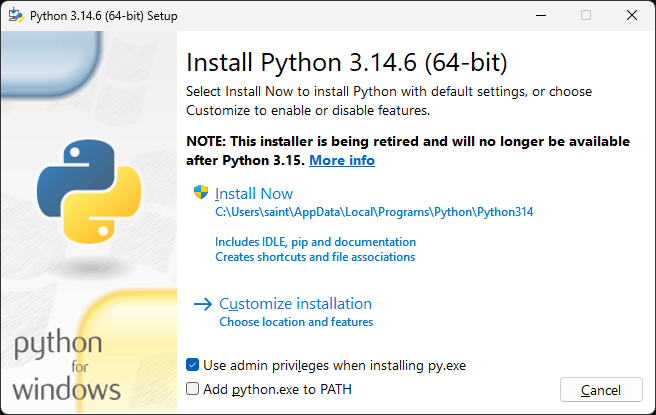
I decided to uninstall 3.14 and install 3.14 since I’m in cleanup mode anyway. This gave me an opportunity to review the active python releases and their end of life dates on the Download Python | Python.org page. I found it interesting that the installer itself is being retired (here’s the More info link).
Once installation of 3.14 was done, I was surprised to find that the problem was still there!
$ python --version
Python 3.14.6

$ python myscript.py
Fatal Python error: Failed to import encodings module
Python runtime state: core initialized
ModuleNotFoundError: No module named 'encodings'

Current thread 0x00007edc (most recent call first):
  <no Python frame>

$ which python
/c/Python314/python

$ /c/Python314/python myscript.py
Fatal Python error: Failed to import encodings module
Python runtime state: core initialized
ModuleNotFoundError: No module named 'encodings'

Current thread 0x00007f60 (most recent call first):
  <no Python frame>
I consulted my AI assistant and its next recommendation was to check for corrupted environment variables! Look at this culprit!
$ echo $PYTHONHOME
C:\Python311\
All I needed to do to this fix was to clear the PYTHONHOME environment variable.
$ export PYTHONHOME=
I also deleted it from the “User variables for saint” section of the Environment Variables dialog box.
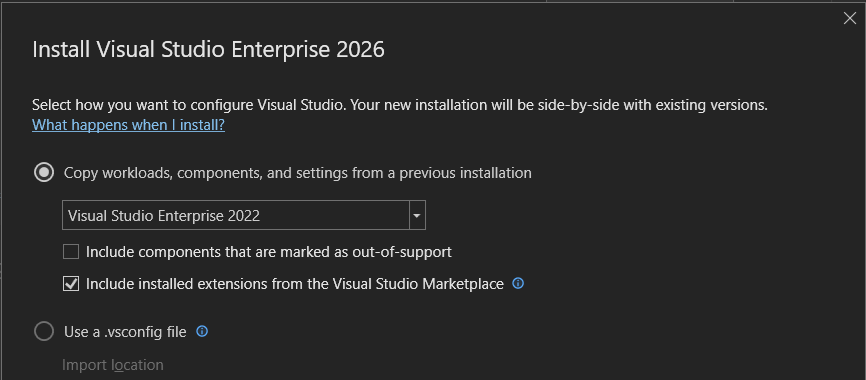
I want to write a VS extension so I figured this is the best time to finally install Visual Studio 2026. I was pleasantly surprised to find that I had the option to “Copy workloads, components, and settings from a previous installation”! This meant that the key reason I had been putting off upgrading was invalid – I didn’t want to mess around with build errors from missing components that just work in my Visual Studio 2022 setup.
Alias name: dummy
Entry type: PrivateKeyEntry
Valid from: Mon May 16 04:06:38 MDT 2016 until: Sat May 16 04:06:38 MDT 2026
Signature algorithm name: SHA256withRSA
Subject Public Key Algorithm: 2048-bit RSA key
Alias name: dummydsa
Entry type: PrivateKeyEntry
Valid from: Thu Mar 29 17:06:34 MDT 2018 until: Tue Mar 28 17:06:34 MDT 2028
Signature algorithm name: SHA256withDSA
Subject Public Key Algorithm: 1024-bit DSA key (weak)
Alias name: dummyecdsa
Entry type: PrivateKeyEntry
Valid from: Mon May 16 04:09:01 MDT 2016 until: Sat May 16 04:09:01 MDT 2026
Signature algorithm name: SHA256withECDSA
Subject Public Key Algorithm: 256-bit EC (secp256k1) key (disabled)
Alias name: dummyecrsa
Entry type: PrivateKeyEntry
Valid from: Fri Apr 13 02:20:55 MDT 2018 until: Wed Apr 12 02:20:55 MDT 2028
Signature algorithm name: SHA256withRSA
Subject Public Key Algorithm: 256-bit EC (secp256r1) key
Valid from: Mon May 16 04:06:38 MDT 2016 until: Sat May 16 04:06:38 MDT 2026
Signature algorithm name: SHA256withRSA
Subject Public Key Algorithm: 2048-bit RSA key
Alias name: ecdsasecp256r1
Entry type: PrivateKeyEntry
Valid from: Tue Mar 27 16:41:31 MDT 2018 until: Sun Mar 26 16:41:31 MDT 2028
Signature algorithm name: SHA256withECDSA
Subject Public Key Algorithm: 256-bit EC (secp256r1) key

Warning:
<dummydsa> uses a 1024-bit DSA key which is considered a security risk. This key size will be disabled in a future update.
<dummyecdsa> uses a 256-bit EC (secp256k1) key which is considered a security risk and is disabled.
The JKS keystore uses a proprietary format. It is recommended to migrate to PKCS12 which is an industry standard format using "keytool -importkeystore -srckeystore C:/java/.../test/jdk/javax/net/ssl/etc/keystore -destkeystore C:/java/.../test/jdk/javax/net/ssl/etc/keystore -deststoretype pkcs12".
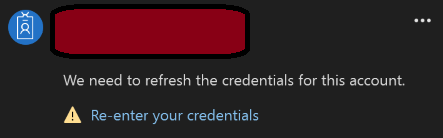
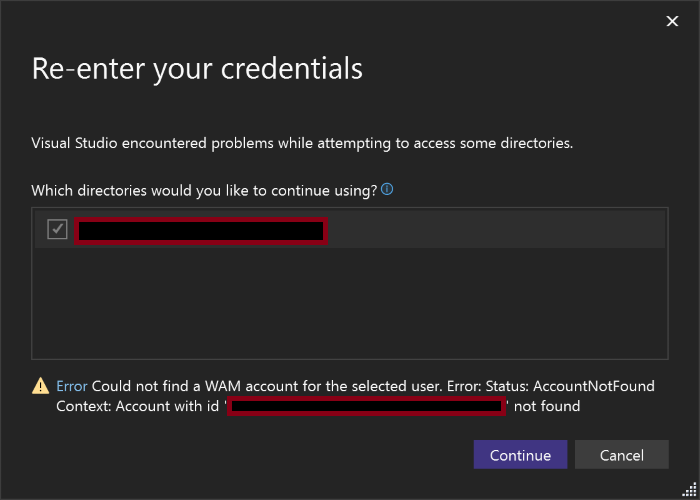
I was trying to use Visual Studio recently but it wouldn’t let me because my “license has gone stale and must be updated. Please make sure that you’re connected to the internet, then check for an updated license to continue using the product.” Clicking on the “Check for an updated license” command did not work. Under the “All Accounts” section of the dialog, there was a message under my account saying that “We need to refresh the credentials for this account.” Notice the Re-enter your credentials command.
Re-entering credentials failed with the AcccountNotFound error:
Aborting due to java.lang.OutOfMemoryError: Metaspace
#
# A fatal error has been detected by the Java Runtime Environment:
#
#  Internal Error (debug.cpp:289), pid=1234, tid=5678
#  fatal error: OutOfMemory encountered: Metaspace
#
# JRE version: OpenJDK Runtime Environment Microsoft-13945457 (25.0.3+9) (build 25.0.3+9-LTS)
# Java VM: OpenJDK 64-Bit Server VM Microsoft-13945457 (25.0.3+9-LTS, mixed mode, sharing, tiered, compressed oops, compressed class ptrs, g1 gc, windows-aarch64)
# Core dump will be written. Default location: D:\
The test failure output was:
getCoreFileLocation found stringWithLocation = D:\...\hs_err_pid1234.mdmp
Found core file D:\...\hs_err_pid1234.mdmp, size = 0mb
STDERR:
java.lang.RuntimeException: Test ERROR java.lang.RuntimeException: Unexpected core size: expected 0 > 0
	at ClhsdbFindPC.testFindPC(ClhsdbFindPC.java:317)
	at ClhsdbFindPC.main(ClhsdbFindPC.java:339)
	at java.base/jdk.internal.reflect.DirectMethodHandleAccessor.invoke(DirectMethodHandleAccessor.java:104)
	at java.base/java.lang.reflect.Method.invoke(Method.java:565)
	at com.sun.javatest.regtest.agent.MainWrapper$MainTask.run(MainWrapper.java:138)
	at java.base/java.lang.Thread.run(Thread.java:1474)
Caused by: java.lang.RuntimeException: Unexpected core size: expected 0 > 0
	at jdk.test.lib.Asserts.fail(Asserts.java:715)
	at jdk.test.lib.Asserts.assertGreaterThan(Asserts.java:403)
	at jdk.test.lib.Asserts.assertGT(Asserts.java:374)
	at jdk.test.lib.util.CoreUtils.getCoreFileLocation(CoreUtils.java:113)
	at ClhsdbFindPC.testFindPC(ClhsdbFindPC.java:113)
	... 5 more
The issue here clearly appears to be that the JVM ran out of memory before it could complete the test. However, I wanted to save the expected output from the test for quick reference in future:
# A fatal error has been detected by the Java Runtime Environment:
#
#  EXCEPTION_ACCESS_VIOLATION (0xc0000005) at pc=0x00007ffaf8cd112c, pid=1234, tid=5678
#
# JRE version: OpenJDK Runtime Environment Microsoft-13945457 (25.0.3+9) (build 25.0.3+9-LTS)
# Java VM: OpenJDK 64-Bit Server VM Microsoft-13945457 (25.0.3+9-LTS, compiled mode, sharing, tiered, compressed oops, compressed class ptrs, g1 gc, windows-aarch64)
# Problematic frame:
# C  [LingeredApp.dll+0x112c]
#
# Core dump will be written. Default location: C:\...
If the test is working correctly, the crash should come from LingeredApp.dll. This binary is in the test image, specifically in hotspot/jtreg/native. LingeredApp.java has a native method called crash(). It’s implementation in libLingeredApp.c dereferences a non-null invalid pointer with set bits in every word. This guarantees that an EXCEPTION_ACCESS_VIOLATION should be seen if the test ran correctly.
Verifying Signed JAR Files states that the basic command to use for verifying a signed JAR file is jarsigner -verify jar-file. The jarsigner Command adds that when the -strict option is specified, it constructs the exit code depending on which checks failed. We can check the exit code using echo $? in bash. For example, I get exit code 16 for my unsigned JAR file with --strict but exit code 0 without it.
cd /c/repos/factorize/java/project
time mvn package

export JAVA_HOME=/d/java/binaries/jdk/x64/2026-04/windows-jdk25u/jdk-25.0.3+9

$JAVA_HOME/bin/jarsigner -verify -strict target/factorize-1.0.0-jar-with-dependencies.jar

echo $?
Warning:  Different store and key passwords not supported for PKCS12 KeyStores. Ignoring user-specified -keypass value.
keytool error: java.lang.Exception: The -keyalg option must be specified.
Generating 2048-bit DSA key pair and self-signed certificate (SHA256withDSA) with a validity of 180 days
        for: CN=Saint Wesonga, OU=Java, O=Microsoft, C=US
$JAVA_HOME/bin/jarsigner \
 -keystore mykeys/mykeystore \
 -signedjar target/factorize-1.0.0-signed-jar-with-dependencies.jar \
 target/factorize-1.0.0-jar-with-dependencies.jar business
Its output is:
Enter Passphrase for keystore:

jar signed.

Warning:
The signer's certificate is self-signed.
POSIX file permission and/or symlink attributes detected. These attributes are ignored when signing and are not protected by the signature.
Earlier this year I dug into intermittent test hangs in the ProducerConsumerLoops test when using the Windows AArch64 JDK 25 build. I decided to test it on JDK 17 and JDK 21 to see how far back the hang went:
export JAVA_HOME17=/c/java/binaries/jdk/aarch64/2025-10/windows-jdk17u/jdk-17.0.17+10
export JAVA_HOME21=/c/java/binaries/jdk/aarch64/2025-10/windows-jdk21u/jdk-21.0.9+10

date; time $JAVA_HOME17/bin/java -Xcomp -XX:-TieredCompilation ProducerConsumerLoops
date; time $JAVA_HOME21/bin/java -Xcomp -XX:-TieredCompilation ProducerConsumerLoops
The test passed on jdk17u but hang on jdk21u. The hang did not happen with -Xint or -Xcomp -XX:TieredStopAtLevel=1 and the jstack command did not report any deadlock. I couldn’t find a Windows AArch64 jdk19u build to test, so I had to build the sources myself. I suspected that I would need a jdk18u build for the jdk19u boot JDK, so I started by building jdk18u. See Building OpenJDK 18 for Windows AArch64 for details on the errors I ran into and how I worked around them – I needed a jdk18u build for the boot JDK when building jdk18u.
configure: Found potential Boot JDK using configure arguments
configure: Potential Boot JDK found at /cygdrive/d/java/binaries/jdk/x64/2025-10/windows-jdk17u/jdk-17.0.17+10 is incorrect JDK version (openjdk version "17.); ignoring-Bit Server VM Microsoft-12574423 (build 17.0.17+10-LTS, mixed mode, sharing)
configure: (Your Boot JDK version must be one of: 18 19)
configure: error: The path given by --with-boot-jdk does not contain a valid Boot JDK
configure exiting with result code 1
ERROR: Build failed for target 'images' in configuration 'windows-aarch64-server-release' (exit code 2)
Stopping javac server

=== Output from failing command(s) repeated here ===
* For target support_native_jdk.jdwp.agent_libjdwp_debugInit.obj:
debugInit.c
d:\java\forks\openjdk\jdk\src\jdk.jdwp.agent\share\native\libjdwp\debugInit.c(248): error C2220: the following warning is treated as an error
d:\java\forks\openjdk\jdk\src\jdk.jdwp.agent\share\native\libjdwp\debugInit.c(248): warning C5287: operands are different enum types '<unnamed-enum-JVMTI_VERSION_1>' and '<unnamed-enum-JVMTI_VERSION_MASK_INTERFACE_TYPE>'; use an explicit cast to silence this warning
d:\java\forks\openjdk\jdk\src\jdk.jdwp.agent\share\native\libjdwp\debugInit.c(248): note: to simplify migration, consider the temporary use of /Wv:18 flag with the version of the compiler with which you used to build without warnings
d:\java\forks\openjdk\jdk\src\jdk.jdwp.agent\share\native\libjdwp\debugInit.c(250): warning C5287: operands are different enum types '<unnamed-enum-JVMTI_VERSION_1>' and '<unnamed-enum-JVMTI_VERSION_MASK_INTERFACE_TYPE>'; use an explicit cast to silence this warning
d:\java\forks\openjdk\jdk\src\jdk.jdwp.agent\share\native\libjdwp\debugInit.c(250): note: to simplify migration, consider the temporary use of /Wv:18 flag with the version of the compiler with which you used to build without warnings
d:\java\forks\openjdk\jdk\src\jdk.jdwp.agent\share\native\libjdwp\debugInit.c(252): warning C5287: operands are different enum types '<unnamed-enum-JVMTI_VERSION_1>' and '<unnamed-enum-JVMTI_VERSION_MASK_INTERFACE_TYPE>'; use an explicit cast to silence this warning
d:\java\forks\openjdk\jdk\src\jdk.jdwp.agent\share\native\libjdwp\debugInit.c(252): note: to simplify migration, consider the temporary use of /Wv:18 flag with the version of the compiler with which you used to build without warnings
   ... (rest of output omitted)

* All command lines available in /cygdrive/d/java/forks/openjdk/jdk/build/windows-aarch64-server-release/make-support/failure-logs.
=== End of repeated output ===
I deleted the build directory and reran configure with the --disable-warnings-as-errors flag to work around this and found that the test passed on the jdk20u (release configuration) build.
checking for gtest... /cygdrive/d/repos/googletest
configure: error: gtest version is too old, at least version 1.13.0 is required
configure exiting with result code 1
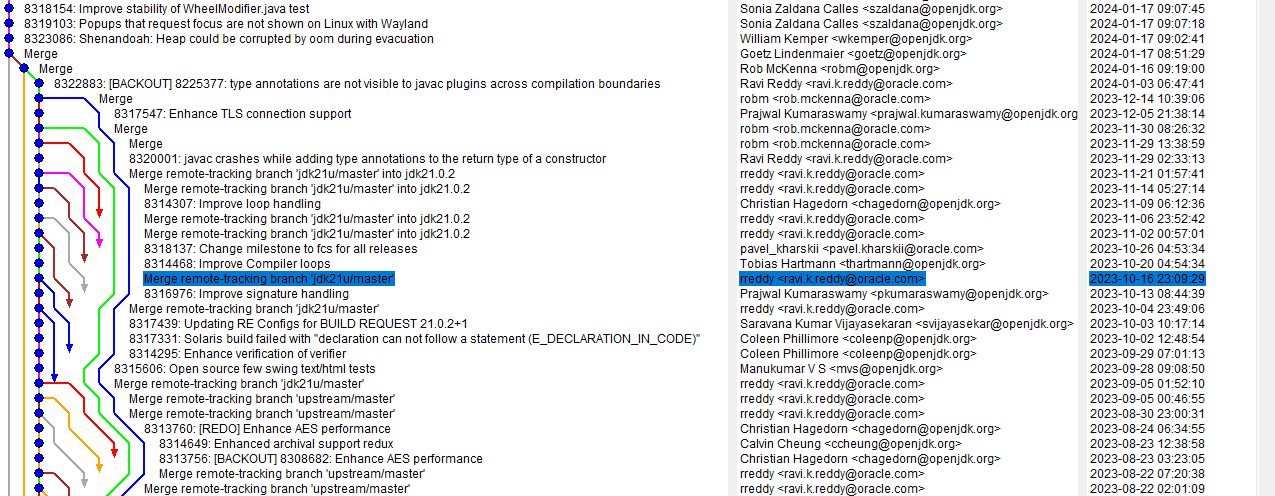
I fixed the gtest tag and the test passed on that Windows AArch64 build. It looked like the test was passing on every build was so I decided to build the end tag of the search: jdk-21+26. The test passed there too! I downloaded the 21.0.9+10 build from Adoptium and it failed so I needed to continue bisecting in the jdk21u repo. I had a fork of openjdk/jdk21u-dev locally so I started by searching (by JBS ID) for the last commit that passed the test on tip:
$ git log --grep='8306841'
commit bb377b26730f3d9da7c76e0d171517e811cef3ce (tag: jdk-22+0, tag: jdk-21+26)
Author: Stefan Karlsson <stefank@openjdk.org>
Date:   Thu Jun 8 14:06:27 2023 +0000

    8306841: Generational ZGC: NMT reports Java heap size larger than max heap size

    Reviewed-by: eosterlund, stuefe
# show log up to a specific commit
git log bb377b2..HEAD

# show just summary line of a commit
git show -s --oneline bb377b2..HEAD

# command to count number of lines (outputs 1727)
git show -s --oneline bb377b2..HEAD | wc -l

# show the commit halfway between the two ends
git show -s --oneline bb377b2..HEAD | head -n 863

# outputs 8ac431347fd 8324723: GHA: Upgrade some actions to avoid deprecated Node 16

git checkout 8ac431347fd
# command to count number of lines (outputs 865)
git show -s --oneline bb377b2..8ac4313 | wc -l

# show the commit halfway between the two ends
git show -s --oneline bb377b2..8ac4313 | head -n 432

# outputs a4e78f30fce Merge remote-tracking branch 'jdk21u/master'
$ git checkout 9ca8761
error: short object ID 9ca8761 is ambiguous
hint: The candidates are:
hint:   9ca87615550 commit 2024-01-17 - 8323086: Shenandoah: Heap could be corrupted by oom during evacuation
hint:   9ca8761a221 tree
error: pathspec '9ca8761' did not match any file(s) known to git

$ git checkout 9ca87615550eba5493dde94e6204e58ca8cc1119
saint@MacBookPro build_llvm_Aarch64 % pwd
/Users/saint/repos/llvm/llvm-project/build_llvm_Aarch64
saint@MacBookPro build_llvm_Aarch64 % cmake ~/repos/llvm/llvm-project
CMake Warning:
  Ignoring extra path from command line:

   "/Users/saint/repos/llvm/llvm-project"


CMake Error: The source directory "/Users/saint/repos/llvm/llvm-project" does not appear to contain CMakeLists.txt.
Specify --help for usage, or press the help button on the CMake GUI.
saint@MacBookPro build_llvm_Aarch64 % cmake ~/repos/llvm/llvm-project/llvm
-- The C compiler identification is AppleClang 17.0.0.17000404
-- The CXX compiler identification is AppleClang 17.0.0.17000404
-- The ASM compiler identification is Clang with GNU-like command-line
-- Found assembler: /Applications/Xcode.app/Contents/Developer/Toolchains/XcodeDefault.xctoolchain/usr/bin/cc
-- Detecting C compiler ABI info
-- Detecting C compiler ABI info - done
-- Check for working C compiler: /Applications/Xcode.app/Contents/Developer/Toolchains/XcodeDefault.xctoolchain/usr/bin/cc - skipped
-- Detecting C compile features
-- Detecting C compile features - done
-- Detecting CXX compiler ABI info
-- Detecting CXX compiler ABI info - done
-- Check for working CXX compiler: /Applications/Xcode.app/Contents/Developer/Toolchains/XcodeDefault.xctoolchain/usr/bin/c++ - skipped
-- Detecting CXX compile features
-- Detecting CXX compile features - done
CMake Error at CMakeLists.txt:82 (message):


  No build type selected.  You need to pass -DCMAKE_BUILD_TYPE=<type> in
  order to configure LLVM.

  Available options are:

    * -DCMAKE_BUILD_TYPE=Release - For an optimized build with no assertions or debug info.
    * -DCMAKE_BUILD_TYPE=Debug - For an unoptimized build with assertions and debug info.
    * -DCMAKE_BUILD_TYPE=RelWithDebInfo - For an optimized build with no assertions but with debug info.
    * -DCMAKE_BUILD_TYPE=MinSizeRel - For a build optimized for size instead of speed.

  Learn more about these options in our documentation at
  https://llvm.org/docs/CMake.html#cmake-build-type


-- Configuring incomplete, errors occurred!
See also "/Users/saint/repos/llvm/llvm-project/build_llvm_Aarch64/CMakeFiles/CMakeOutput.log".
See also "/Users/saint/repos/llvm/llvm-project/build_llvm_Aarch64/CMakeFiles/CMakeError.log".
I don’t know why it wouldn’t just default to the release build. Providing that flag was sufficient for the configuration and build to succeed.
My first successful build was via the cmake --build . command, which took over 3 hours on my M1. This was longer than I expected but it was a very simple process overall when compared to Windows AArch64 cross-compilation.
Below are some example commands showing how to which assembly instruction to use in the SpinWait() call and how many of them should be used. On my Surface Pro X, the SB instruction is not supported. A good post to read about various barrier instructions is The AArch64 processor (aka arm64), part 14: Barriers – The Old New Thing.
$ $JDKTOTEST/bin/java -Xcomp -XX:-TieredCompilation -XX:+UnlockDiagnosticVMOptions -XX:OnSpinWaitInst=sb ProducerConsumerLoops
Error occurred during initialization of VM
OnSpinWaitInst is SB but current CPU does not support SB instruction

$ $JDKTOTEST/bin/java -Xcomp -XX:-TieredCompilation -XX:+UnlockDiagnosticVMOptions -XX:OnSpinWaitInst=nop -XX:OnSpinWaitInstCount=5 ProducerConsumerLoops
The snippet below shows the 4 instructions in the spin_wait stub if the isb instruction is selected with a count of 3 (after copying the Linux SpinPause implementation). Whether or not this is a good idea is not the point, this is about showing what the flags do.
000001800B9D0700  isb         sy
000001800B9D0704  isb         sy
000001800B9D0708  isb         sy
000001800B9D070C  ret

extern "C" {
  int SpinPause() {
00007FFAB97A5CF8  stp         fp,lr,[sp,#-0x20]!
00007FFAB97A5CFC  mov         fp,sp
    using spin_wait_func_ptr_t = void (*)();
    spin_wait_func_ptr_t func = CAST_TO_FN_PTR(spin_wait_func_ptr_t, StubRoutines::aarch64::spin_wait());
00007FFAB97A5D00  bl          StubRoutines::aarch64::spin_wait (07FFAB97A63B8h)+#0xFFFF8005DA859DF6
00007FFAB97A5D04  mov         x8,x0
00007FFAB97A5D08  str         x8,[sp,#0x10]
    assert(func != nullptr, "StubRoutines::aarch64::spin_wait must not be null.");
00007FFAB97A5D0C  mov         w8,#0
00007FFAB97A5D10  cmp         w8,#0
00007FFAB97A5D14  bne         SpinPause+34h (07FFAB97A5D2Ch)
00007FFAB97A5D18  bl          DebuggingContext::is_enabled (07FFAB8619D18h)+#0xFFFF8005DF5832E8
00007FFAB97A5D1C  uxtb        w8,w0
00007FFAB97A5D20  mov         w8,w8
00007FFAB97A5D24  cmp         w8,#0
00007FFAB97A5D28  bne         SpinPause+74h (07FFAB97A5D6Ch)
00007FFAB97A5D2C  ldr         x8,[sp,#0x10]
00007FFAB97A5D30  cmp         x8,#0
00007FFAB97A5D34  bne         SpinPause+74h (07FFAB97A5D6Ch)
00007FFAB97A5D38  adrp        x8,g_assert_poison (07FFABAA80F88h)+#0xFFFF800635588740
00007FFAB97A5D3C  ldr         x9,[x8,g_assert_poison (07FFABAA80F88h)+#0xFFFF80063E9FB581]
00007FFAB97A5D40  mov         w8,#0x58
00007FFAB97A5D44  strb        w8,[x9]
00007FFAB97A5D48  adrp        x8,siglabels+690h (07FFABA5C5000h)
00007FFAB97A5D4C  add         x3,x8,#0x450
00007FFAB97A5D50  adrp        x8,siglabels+690h (07FFABA5C5000h)
00007FFAB97A5D54  add         x2,x8,#0x488
00007FFAB97A5D58  mov         w1,#0x128
00007FFAB97A5D5C  adrp        x8,siglabels+690h (07FFABA5C5000h)
00007FFAB97A5D60  add         x0,x8,#0x4B0
00007FFAB97A5D64  bl          report_vm_error (07FFAB8D15210h)+#0xFFFF8005DF046B1B
00007FFAB97A5D68  nop
00007FFAB97A5D6C  mov         w8,#0
00007FFAB97A5D70  cmp         w8,#0
00007FFAB97A5D74  bne         SpinPause+14h (07FFAB97A5D0Ch)
    (*func)();
00007FFAB97A5D78  ldr         x8,[sp,#0x10]
00007FFAB97A5D7C  blr         x8
    // If StubRoutines::aarch64::spin_wait consists of only a RET,
    // SpinPause can be considered implemented. There will be a sequence
    // of instructions for:
    // - call of SpinPause
    // - load of StubRoutines::aarch64::spin_wait stub pointer
    // - indirect call of the stub
    // - return from the stub
    // - return from SpinPause
    // So '1' always is returned.
    return 1;
00007FFAB97A5D80  mov         w0,#1
00007FFAB97A5D84  ldp         fp,lr,[sp],#0x20
00007FFAB97A5D88  ret
00007FFAB97A5D8C  ?? ??????
}
SpinPause is also used by the G1 collector as shown in the callstack below: