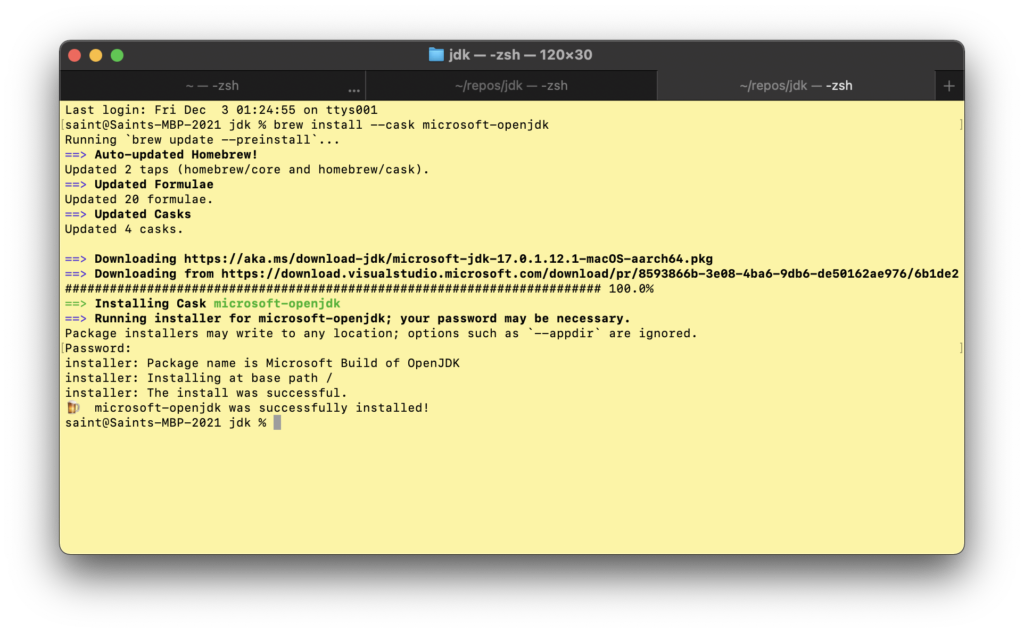
Last week I bought a new MacBook Pro with the Apple M1 Chip and 16GB of RAM. These are the steps I used to set it up for building the OpenJDK codebase.
Set your Mac’s name (it bothers me when the terminal has some random host name). You might need to restart your terminal for this change to take effect.
Install Development Tools
Should any of the commands below fail, see the troubleshooting section at the end for possible workarounds.
Install homebrew by running the recommended command (and see the troubleshooting section if there are any git errors):
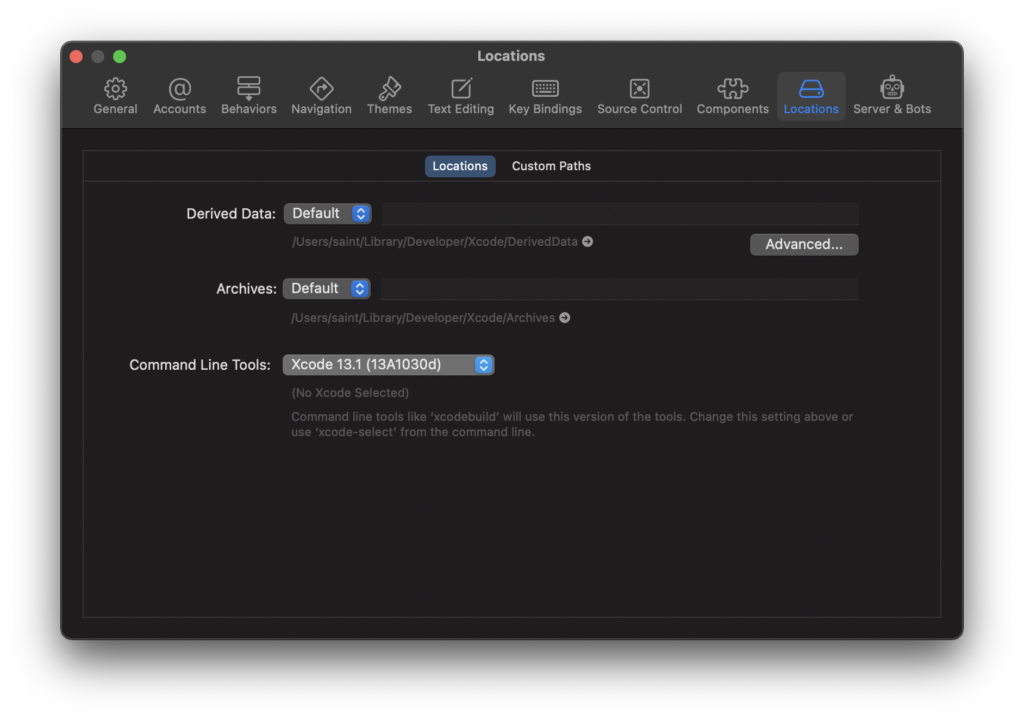
Select the Xcode command line tools: launch Xcode then go to Preferences > Locations. Select Xcode 13.1 in the Command Line Tools dropdown as shown below.
Running bash configure in the JDK folder should display any missing dependencies. Any errors from bash configure will need to be resolved before running make images.
cd ~/repos/jdk
bash configure
make images
To browse through the contents of the build folder in finder:
open ~/repos/jdk/build/
To try out your new build, switch to the bin folder and check the Java version:
cd ~/repos/jdk/build/macosx-aarch64-server-release/jdk/bin
./java -version
Here is the output I get:
saint@Saints-MBP-2021 bin % ./java -version
openjdk version "18-internal" 2022-03-22
OpenJDK Runtime Environment (build 18-internal+0-adhoc.saint.jdk)
OpenJDK 64-Bit Server VM (build 18-internal+0-adhoc.saint.jdk, mixed mode)
saint@Saints-MBP-2021 bin %
Troubleshooting
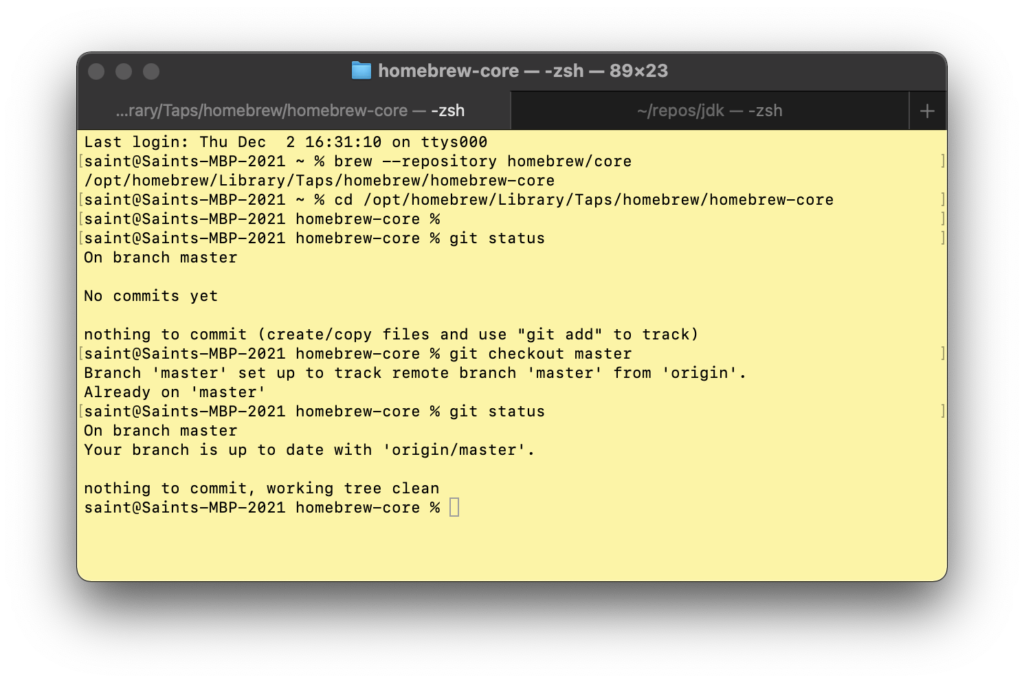
Homebrew Installation Failure
Installing homebrew appeared to be successful (last message output below) but there was a git error in the output!
==> Downloading and installing Homebrew..
remote: Enumerating objects: 345, done.
remote: Counting objects: 100% (297/297), done.
remote: Compressing objects: 100% (107/107), done.
remote: Total 345 (delta 227), reused 238 (delta 184), pack-reused 48
Receiving objects: 100% (345/345), 171.73 KiB | 971.00 KiB/s, done.
Resolving deltas: 100% (227/227),
completed with 54 local objects.
From https://github.com/Homebrew/brew
* [new branch]
dependabot/bundler/Librarv/Homebrew/sorbet-0.5.9396
-> origin/dependabot/bundler/Librarv/Homebrew/sorbet-0.5.9396
778de69b0..be908f679 master -> origin/master
* [new tag] 3.3.6 -> 3.3.6
HEAD is now at be908f679 Merge pull request #12502 from carlocab/bug-template
error: Not a valid ref: refs/remotes/origin/master
fatal: ambiguous argument
'refs/remotes/origin/master': unknown revision or path not in the working tree.
Use
"_-' to separate paths from revisions, like this:
'git <command> [<revision>...] - I<files...11
fatal: Could not resolve HEAD to a revision
Warning: /opt/homebrew/bin is not in your PATH.
Instructions on how to configure vour shell for Homebrew
can be found in the 'Next steps' section below.
==> Installation successful!
Here is the relevant error, which I was able to copy/paste (with some typos) from the PNG!!!
error: Not a valid ref: refs/remotes/origin/master
fatal: ambiguous argument
'refs/remotes/origin/master': unknown revision or path not in the working tree.
I ran into errors of the form No available formula with the name "autoconf" when attempting to install autoconf. However, this happen with the unresolved brew installation git issue described above. Once that was resolved, https://stackoverflow.com/questions/11552171/cant-install-software-using-brew-on-my-mac helpfully pointed out that autoconf is part of the command line tools package (hence step 4 in the instructions above).
[saint@Saints-MBP-2021 jk % brew install autoconf
fatal: Could not resolve HEAD to a revision
Running 'brew update --preinstall'
==> Homebrew is run entirelv by unpaid volunteers. Please consider donating:
https://github.com/Homebrew/brew#donations
==› Auto-updated Homebrew!
Updated 1 tap (homebrew/cask).
==> Updated Casks
dated 1 cask.
Warning: No available formula with the name
"autoconf"
==› Searching for similarlv named formulae.
Error: No similarly named formulae found.
==> Searching for a previously deleted formula (in the last month).
Error: No previously deleted formula found.
==> Searching taps on GitHub.
Error: No formulae found in taps.
No Such File or Directory @ dir_chdir
Setting up a build environment on my Intel MacBook Pro led to errors like this:
==> Installing autoconf dependency: m4
Error: No such file or directory @ dir_chdir - /usr/local/Cellar
One of my bash configure runs failed with this error:
checking for sdk name..
configure: error: No xcodebuild tool and no system framework headers found, use --with-sysroot or --with-sdk-name to provide a path to a valid SDK
/Users/saint/repos/idk/build/.configure-support/generated-configure.sh: line 84: 5: Bad file descriptor
configure exiting with result code 1
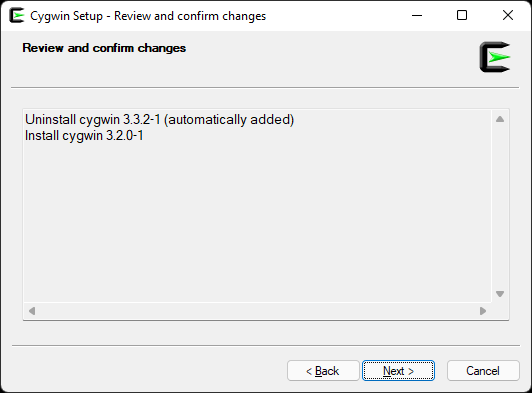
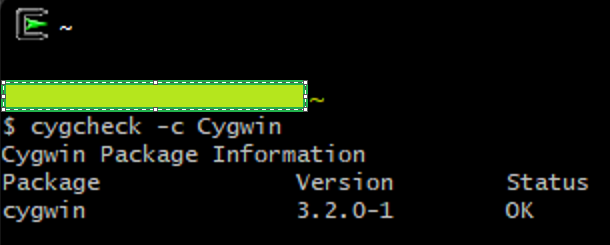
Last week I was trying to set up an OpenJDK build environment on my Windows 11 machine. Building the repo would fail due to segfaults when running make. The workaround is to downgrade Cygwin from 3.3 to 3.2:
I’m using a Windows 10 physical machine for my OpenJDK 17 development. Unfortunately, I ran into some issues getting the environment set up to build the JDK on Windows. To work around this, I created a Linux virtual machine. Although the instructions for building on Linux are on the OpenJDK site, I would like to have all the instructions in one spot, hence this post.
# Valid values are only '18.04' and '20.04'
# For other versions of Ubuntu, please use the tar.gz package
ubuntu_release=`lsb_release -rs`
cd ~/Downloads/
wget https://packages.microsoft.com/config/ubuntu/${ubuntu_release}/packages-microsoft-prod.deb -O packages-microsoft-prod.deb
sudo dpkg -i packages-microsoft-prod.deb
sudo apt-get install apt-transport-https
Verify that everything is working by running “java -version”
Clone and Build the JDK
Clone the JDK. Note that cloning a fork might be much slower than cloning the upstream Github repo! I was averaging about 60KiB/s on my rork whereas cloning the upstream OpenJDK was averaging 6 MiB/s when receiving objects!
mkdir ~/repos
cd ~/repos
git clone https://github.com/openjdk/jdk
The JDK repo can now be configured and built
cd jdk
bash configure
make images
The configure command should display any missing dependencies that it needs and a suggestion for how to install them.
To try out your new build, switch to the bin folder and check the Java version:
cd ~/repos/jdk/build/linux-x86_64-server-release/jdk/bin
./java -version
Last week was my first week in the Java engineering group. It has been about 11 years since I took a compiler course (while in the CS MS program at BYU). A quick review of the history of Java was in order. Turns out I last used Java in 2012 in grad school. That must have been Java SE 7 from 2011 and Java SE 6 before that. Since I have not been in the compiler space since then, I have a steep learning curve ahead. That is the exciting thing about technology though – there is always more to learn!
I am currently a programmer in the developer division at Microsoft so it was helpful going through some of the Java development with Microsoft documentation for a high level overview of all our offerings. Also informative given my long absence from Java-land were the docs on how to Transition from Java 7 to Java 8 and from Java 8 to Java 11. It hadn’t yet dawned on me by the time I read through these that the reason references to 8, 11, and 17 keep coming up is because they are LTS releases.
As a newbie to the Java development world, I started by watching this 2019 OpenJDK Development talk on how to become an OpenJDK contributor. It is a great overview of concepts like project roles (author, committer, reviewer, etc), the contributor agreement, and (perhaps most importantly to me), how to find an issue to work on and build the OpenJDK. The breakdown of commonly used terminology and abbreviations was great to have as well.
For an introduction to the hotspot compiler, I started going through “A Simple Graph-Based Intermediate Representation“. I ended up watching Cliff Click’s talk on The Sea of Nodes and the HotSpot JIT before I got that far along in the paper. It was fascinating seeing details such as the CPU L1/L2 cache size playing into the design! Some of the concepts that I need to review after that talk include:
The sea of nodes talk also revealed to me how little I know about companies in the Java space. I don’t think I had heard of Azul before, for example. In fact, it’s not just companies but also technologies! I was going through some build documentation when I ran into mentions of AdoptOpenJDK and Adoptium, both of which were foreign to me. I was glad though to see my old friend Eclipse doing well.
One of the most enjoyable things about being a programmer is working with very skilled people, especially watching them in action! I always learn a lot! My colleagues David and Mat were kind enough to pull me into their triage and reporting of [JDK-8277299] STACK_OVERFLOW in Java_sun_awt_shell_Win32ShellFolder2_getIconBits – Java Bug System so I could get my feet wet with how things are done in OpenJDK development.
The OpenJDK process is certainly different from the other open source communities I’ve been a part of (.NET and Mozilla Firefox). My manager and I poked around the bug DB to see what compiler starter bugs are out there. I picked bug [JDK-7077093] labelOper::label() should return Label& but since I must start out as an author, issues cannot be assigned to me. Unusual to me but the logic appears sound. Here is the query for C2 starter bugs.
Other highlights of the week were setting up my dev box to build the OpenJDK source code (unsuccessfully), discovering that compiler explorer is a thing (and an open source one at that), learning from my teammates how to investigate a failure of a fairly complex test on MacOS (they were using LLDB). I hope to write follow-up entries on these at some point.
In the last post, I described the straightforward process of setting up and Ubuntu VM in which to run Hadoop. Once you can successfully run the Hadoop MapReduce example in the MapReduce Tutorial, you may be interested in examining the source code using an IDE like Eclipse. To do so, install eclipse:
sudo apt-get install eclipse-platform
Some common Eclipse settings to adjust:
Show line numbers (Window > Preferences > General > Editors > Text Editors > Show Line Numbers
To generate an Eclipse project for the Hadoop source code, the src/BUILDING.txt file lists these steps (which we cannot yet run):
cd ~/hadoop-2.7.4/src/hadoop-maven-pluggins
mvn install
cd ..
mvn eclipse:eclipse -DskipTests
To be able to run these commands, we need to install the packages required for building Hadoop. They are also listed in the src/BUILDING.txt file. For the VM we set up, we do not need to install the packages listed under Oracle JDK 1.7. Instead, run these commands to install Maven, native libraries, and ProtocolBuffer:
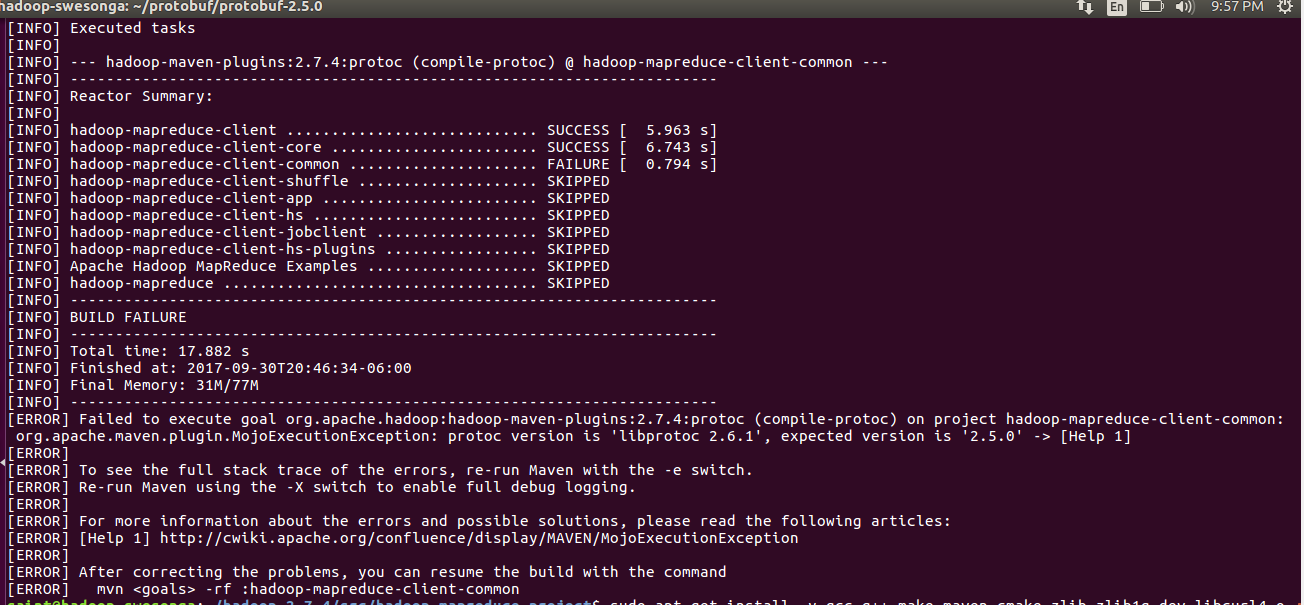
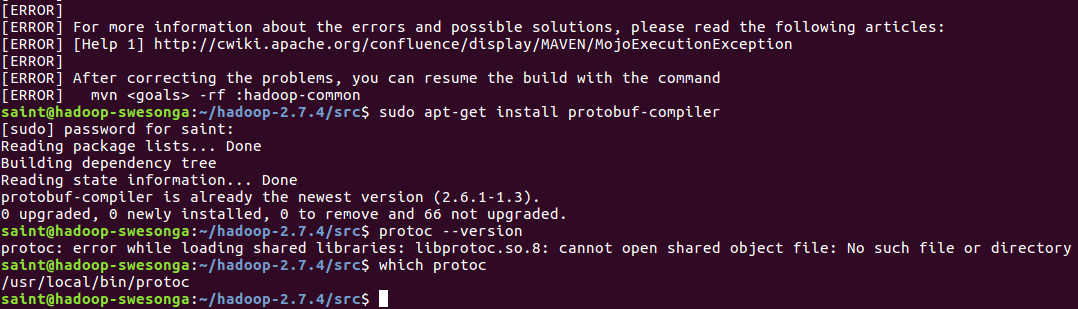
Now here’s where things get interesting. The last command installs version 2.6.1 of the ProtocolBuffer. The src/BUILDING.txt file states that version 2.5.0 is required. Turns out they aren’t kidding – if you try generating the Eclipse project using version 2.6.1 (or some non 2.5.0 version), you’ll get an error similar to this one:
As suggested here and here, you can check the version by typing:
mkdir ~/protobuf
cd ~/protobuf
wget https://github.com/google/protobuf/releases/download/v2.5.0/protobuf-2.5.0.tar.gz
tar xvzf protobuf-2.5.0.tar.gz
cd protobuf-2.5.0
Now follow the instructions in the README.txt file to build the source code.
./configure --prefix=/usr
make
make check
sudo make install
protoc --version
The output from the last command should now be “libprotoc 2.5.0“. Note: you most likely need to pass the –prefix option to ./configure to avoid errors like the one below.
Now we can finally generate the Eclipse project files for the Hadoop sources.
cd ~/hadoop-2.7.4/src/hadoop-maven-plugins
mvn install
cd ..
mvn eclipse:eclipse -DskipTests
Once project-file generation is complete:
Type eclipse to launch the IDE.
Go to the File > Import… menu option.
Select the Existing Projects into Workspace option under General.
Browse to the ~/hadoop-2.7.4/src folder in the Select root directory: input. A list of the projects in the src folder should be displayed.
Click Finish to import the projects.
You should now be able to navigate to the WordCount.java file and inspect the various Hadoop classes.
As part of my Dynamic Big Data course, I have to set up a distributed file system to experiment with various mapreduce concepts. Let’s use Hadoop since it’s widely adopted. Thankfully, there are instructions on how to set up Apache Hadoop – we’re starting with a single cluster for now.
Once installation is complete, log onto the Ubuntu OS. Set up shared folders and enable the bidirectional clipboard as follows:
From the VirtualBox Devices menu, choose Insert Guest Additions CD image… A prompt will be displayed stating that “VBOXADDITIONS_5.1.26_117224” contains software intended to be automatically started. Just click on the Run button to continue and enter the root password. When the guest additions installer completes, press Return to close the window when prompted.
From the VirtualBox Devices menu, choose Shared Clipboard > Bidirectional. This enables two way clipboard functionality between the guest and host.
From the VirtualBox Devices menu, choose Shared Folders > Shared Folders Settings… Click on the add Shared Folder button and enter a path to a folder on the host that you would like to be shared. Optionally select Auto-mount and Make Permanent.
Open a terminal window. Enter these commands to mount the shared folder (assuming you named it vmshare in step 3 above):
cd ~/Downloads
wget http://apache.cs.utah.edu/hadoop/common/hadoop-2.7.4/hadoop-2.7.4.tar.gz
mkdir ~/hadoop-2.7.4
tar xvzf hadoop-2.7.4.tar.gz -C ~/
cd ~/hadoop-2.7.4
If you skip setting up this export, running bin/hadoop will give this error:
Error: JAVA_HOME is not set and could not be found.
Note: I found that setting JAVA_HOME=/usr caused subsequent processes (like generating Eclipse projects from the source using mvn) to fail even though the steps in the tutorial worked just fine.
To verify that Hadoop is now configured and ready to run (in a non-distributed mode as a single Java process), execute the commands listed in the tutorial.
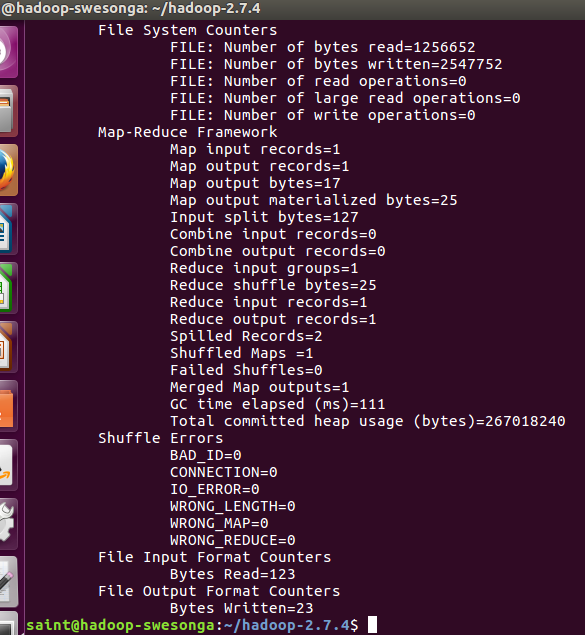
The bin/hadoop jar command runs the code in the .jar file, specifically the code in Grep.java, passing it the last 3 arguments. The output should resemble this summary:
If you’re interested in the details of this example (e.g. to inspect Grep.java), examine the src subfolder. If you don’t need the binaries and just want to look at the code, you can wget it from a download mirror, e.g.:
The first programming assignment in the Operating Systems course can be a challenge for students that haven’t written C++ code in a while. While working with the std::queue data structure in C++, it’s easy to make certain types of mistakes (especially if C++ isn’t your native tongue):
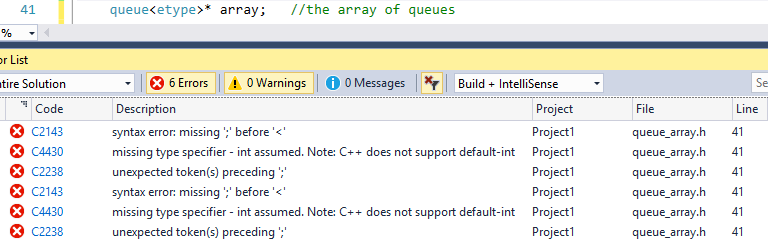
Not “using namespace std” when using standard library containers. This can result in some ugly error messages in Visual Studio, e.g. error/warning codes C2143, C4430, and C2238 for the class member array below (is there a better way for students/developers to find out what is happening when they make such a trivial mistake)?
Not understanding the assignment operator semantics on a container like a queue. If we write queue<type> myqueue = array[i]; we get a copy of the queue array[i] (we might have simply wanted a reference/alias). For such a mistake, the code obviously compiles but doesn’t function as intended.
Declaring a fixed-sized data structure to hold all values from a variable-sized container! Runtime errors take care of informing students about this bug (if they’re not lucky enough to have almost empty variable-size containers). The correct declaration of dynamic arrays of templated items is also not usually obvious: T* all_elements = new T[dynamic_integer_size];
For the past month or so, I have been unable to update my 7.5 year-old machine from Windows 10 Build 14393 because “we couldn’t connect to the update service”! Some folks online suggested trying the “Fix problems with Windows Update” wizard. Unfortunately (or fortunately), this Wizard identified a Potential Windows Update Database Error – but it couldn’t fix it!
The next idea was trying the system file checker as mentioned here. This tool did not find any issues on my filesystem. The DISM.exe commands seemed irrelevant so I took a quick peek at the Event Viewer. Lo and behold, a long list of WindowsUpdateFailure3 events. The supposed cure? These commands suggested in this thread (found by Googling “WindowsUpdateFailure3”).
net stop wuauserv net stop cryptSvc net stop bits net stop msiserver ren C:\Windows\SoftwareDistribution SoftwareDistribution.old ren C:\Windows\System32\catroot2 Catroot2.old net start wuauserv net start cryptSvc net start bits net start msiserver
These didn’t solve the problem either. Digging around in log files led me to error code 0x80240438, but then again, no useful hints from queries on this code. The registry keys mentioned didn’t even exist on my machine. OK Google. Now there is a list of connection error codes, but of course it doesn’t include the one from the update failure log.
Desperation: what else haven’t I tried? This page with connection error codes mentions ensuring that http://*.update.microsoft.com is reachable. http://update.microsoft.com redirects to a page describing how to get the Windows 10 Creators Update now. Aha! I end up downloading and running the Windows 10 Upgrade tool. The update hangs (or appears to, after a couple of hours) at 25% so I simply hit the reset button hoping for the best. Sure enough, I end up back at build 14393 after a while. Desperation led me to try this tool again yesterday. I was encouraged to see that it actually downloaded an update to the Windows 10 Upgrade tool. When I popped in after rebooting to update, it was still at 25% but I decided to let it run overnight. Quite pleased was I this morning to come and find a Welcome screen prompting me to select my telemetry, etc, settings. I’m now finally running an up to date OS!
As part of my HDL Digital Design course at the University of Wyoming, I have to implement various modules using Verilog. Interestingly, the course textbook (Digital Design and Computer Architecture) uses SystemVerilog. This leaves an HDL newbie like me in an interesting spot since I tend to make assumptions about Verilog based on what I’ve seen in SystemVerilog, even though the latter is newer. Some common newbie issues I ran into (that were easily resolved by finding examples of Verilog modules):
Declaring inputs as “input xyz[3:0]” instead of “input [3:0]xyz”.
Trying to use assertions. It was quite surprising to me that assertions as explained in SystemVerilog weren’t “a thing” in Verilog. Some digging around led me to this article discussing assertions (and implying there wasn’t a direct way to assert facts in Verilog).
Concatenating values
No assertions? What… oh, I guess I already mentioned that, but I’m new to this HDL arena.
I guess I could have been more diligent in my search for Verilog tutorials for beginners (like this one) to alleviate all the annoyances I ran into assuming that learning SystemVerilog would translate in a completely seamless transition into writing Verilog code. Oh well, I guess learning a new language doesn’t always involve taking the most efficient path from A to B.
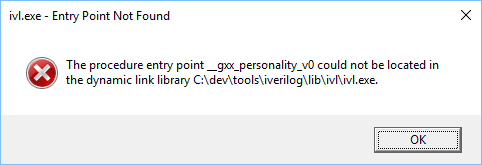
I ran into a strange error while trying to compile a Verilog module using the Icarus Verilog compiler:
A quick lookup of the __gxx_personality_v0 error on StackOverflow revealed to me that the cause of this strange error is a mismatched/missing libstdc++-6.dll, fixable with a simple command:
![Cygwin Setup - Select Packages
Select packages to install
Full
Pack age
base-cyg',vin
cygnin-debuginfo
cygwin-devel
cygwin-doc
cygwin-x-doc
cygwin32
cygwin32-binutiIs
cygwin32-binutiIs-debuginfo
cygwin32-defaufMıantfest
cygwi n 32-gcc-core
cygwi n 32-gcc-debuginfo
cyg n 32-gcc*oftran
cygwin32-gcc-g++
cygwin32-gettext
cygwin324ibbfd
cygwin324ibiconv
cygwin324ibtooI
cygwin32%N32apiheadem
cygwi n -ıuntime
cygwin32-zIib
Korg -serv Sh repon er
Korg -serv er-cygwin shrepoft
Side obsolete packages
Src7 Categofies
Uninstall
Skip
31.7-1
3.1 .ı-ı
3.12-1
3.1.5-ı
3.1.6-ı
3.1.7-ı
Size
O
kep Best
Descfiption
O
Jest
332-1
321-1
331-0,1.9814cfd8f693 (Test)
331-0.2.6c1f49f83fde (Test)
331- ı
33.1-1
Keep
Reinstall
L] Lhils
Debug
2,931k
Intial base installation helper scıipt
LIIBtion engine
or cyg',vın
pment files
%fıc documentation including man pages
yectfic document ation
t toolchain
ygwin 3%tt toolchain
or cygwin32-binutiIs
ication manifest for Cygwin32 toolchain
Win 32btt toolchain (C, OpenMP)
or cygwin32-gcc
Win 32btt toolchain (Fortran)
Win 32bt toolchain
t for Cygwin 32bt toolchain
Nin 32btt toolchain
gwin 3%tt toolchain
gwin 3%tt toolchain
,gwin 3%tt toolchain
veadem for Cygwin 3hit toolchain
libs for Cygwin 3hit toolchain
in 32btt toolchain
A breakpad crashrepofter for Cygwin
Debug info for xorg-servercygwincrashrepofter](https://blog.swesonga.org/wp-content/uploads/2021/11/image-1.png)