Categories: Visual Studio

Handy Visual Studio Installer Feature

I want to write a VS extension so I figured this is the best time to finally install Visual Studio 2026. I was pleasantly surprised to find that I had the option to “Copy workloads, components, and settings from a previous installation”! This meant that the key reason I had been putting off upgrading was invalid – I didn’t want to mess around with build errors from missing components that just work in my Visual Studio 2022 setup.
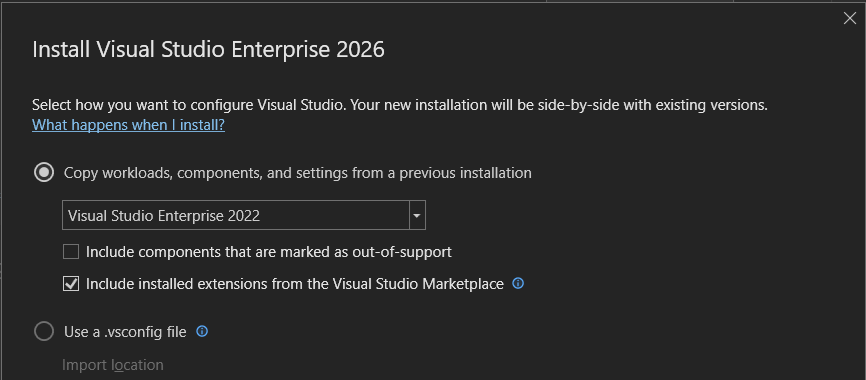
Visual Studio 2026 Installer Configuration

There were a couple of packages that weren’t available in VS 2026. The available packages ID linked to Visual Studio workload and component IDs | Microsoft Learn. These didn’t look like anything I have been using:

  1. Microsoft.VisualStudio.Component.Common.Azure.Tools
  2. Component.Microsoft.WebTools.BrowserLink.WebLivePreview
  3. aspire
  4. Microsoft.Net.Component.4.6.TargetingPack

I did confirm that they are included in the Visual Studio Enterprise (2022) workload and component IDs | Microsoft Learn. I decided to take a look at the Visual Studio Blog (it’s been a while) to see what else has been happening. This post particularly relevant to my extension writing goal caught my eye: SDK-Style Support for Extension Projects – Visual Studio Blog. That said, it’s incredible how much is happening in the developer tools space!
Categories: Visual Studio

Wierd Error About Stale Visual Studio Account

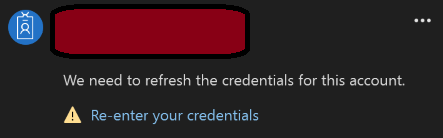
I was trying to use Visual Studio recently but it wouldn’t let me because my “license has gone stale and must be updated. Please make sure that you’re connected to the internet, then check for an updated license to continue using the product.” Clicking on the “Check for an updated license” command did not work. Under the “All Accounts” section of the dialog, there was a message under my account saying that “We need to refresh the credentials for this account.” Notice the Re-enter your credentials command.

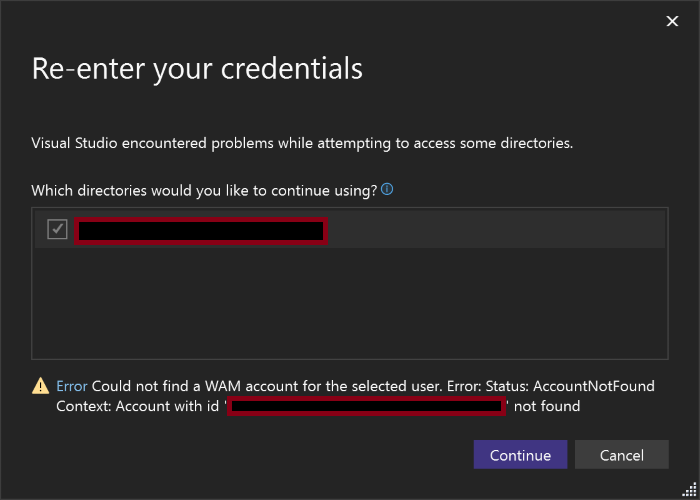
Re-entering credentials failed with the AcccountNotFound error:

Fortunately, this issue had already been reported in Authentication: WAM sign-in fails when Windows account is missing – Developer Community and there was a work-around: remove the folder %LOCALAPPDATA%\Microsoft\IdentityCache. This issue did pique my curiosity about how modern authentication is done. The Overview of the Microsoft Authentication Library (MSAL) – Microsoft identity platform appears to be sufficiently detailed. I’ll also have to poke around in the Microsoft Authentication Library for Java at some point. Thankfully, these libraries are open source, e.g. AzureAD/microsoft-authentication-library-for-dotnet: Microsoft Authentication Library (MSAL) for .NET.