As part of the jdk11u release process, I needed to run some shell tests on my Windows desktop to determine whether they failed due to a product issue or an environment issue. I defaulted to using my Git Bash environment instead of Cygwin. This post shares some errors I ran into as a result of the different shell environment. The key takeaway was to run such tests in Cygwin whenever I encountered path errors.
I confirmed that rmic.exe exists in the bin directory of the jdk.
$ ls -1 /d/java/binaries/jdk/x64/2025-07/windows-jdk11u/jdk-11.0.28+6/bin/rmic*
/d/java/binaries/jdk/x64/2025-07/windows-jdk11u/jdk-11.0.28+6/bin/rmic.exe*
Changing the test to directly refer to rmic.exe instead of rmic (as shown in the diff below) resulted in the test passing on my machine. I concluded that this specific issue must therefore be a test bug (i.e. the test should avoid this issue on Windows). See Shell Tests in jtreg for possible ways to fix this. This is one reason why shell scripts are being discouraged for OpenJDK testing.
STDOUT:
Warning: generation and use of skeletons and static stubs for JRMP
is deprecated. Skeletons are unnecessary, and static stubs have
been superseded by dynamically generated stubs. Users are
encouraged to migrate away from using rmic to generate skeletons and static
stubs. See the documentation for java.rmi.server.UnicastRemoteObject.
This warning is output by the sun.rmi.rmic.Main.compile method. The arguments to rmic.exe are parsed by Main.parseArgs. The -v1.2 argument specifies the non-default generator to use. My local machine must be using a different default generator (or so I thought).
So what does the failing line do? I asked Copilot: what does this command do in a bash script? . ${TESTSRC-.}/common.sh
. (dot command) This is shorthand for source, which executes the contents of a file in the current shell environment rather than in a subshell. This means any variables, functions, or changes made by the script will persist in the current shell.
${TESTSRC-.} This is a parameter expansion. It means:
Use the value of the TESTSRC environment variable if it is set.
If TESTSRC is not set, use . (the current directory) as the default.
/common.sh This appends /common.sh to the path determined above.
This error was a Windows path issue again. Notepad++ could open D:/java/ms/openjdk-jdk11u/test/jdk/sun/tools/jrunscript/common.sh so the path itself was fine. I used this workaround:
diff --git a/test/jdk/sun/tools/jrunscript/jrunscript-eTest.sh b/test/jdk/sun/tools/jrunscript/jrunscript-eTest.sh
index 6a3d4e76ff..94001967b0 100644
--- a/test/jdk/sun/tools/jrunscript/jrunscript-eTest.sh
+++ b/test/jdk/sun/tools/jrunscript/jrunscript-eTest.sh
@@ -30,10 +30,11 @@
 # @run shell jrunscript-eTest.sh
 # @summary Test that output of 'jrunscript -e' matches the dash-e.out file

-. ${TESTSRC-.}/common.sh
+comn=`/mnt/c/software/msys64/usr/bin/cygpath.exe ${TESTSRC-.}/common.sh`
+. "/mnt$comn"

 setup
-${JAVA} ${TESTVMOPTS} ${TESTJAVAOPTS} -cp ${TESTCLASSES} CheckEngine
+${JAVA}.exe ${TESTVMOPTS} ${TESTJAVAOPTS} -cp ${TESTCLASSES} CheckEngine
 if [ $? -eq 2 ]; then
     echo "No js engine found and engine not required; test vacuously passes."
     exit 0
This got me to the actual test error:
STDOUT:
Output of jrunscript -e differ from expected output. Failed.
STDERR:
Warning: Nashorn engine is planned to be removed from a future JDK release
diff: D:/java/ms/openjdk-jdk11u/test/jdk/sun/tools/jrunscript/dash-e.out: No such file or directory
I couldn’t see which command generated the output though, so I added set -ex to the top of the script (like run.sh in the previous test). This was the resulting output:
Aha! Notice the root cause of the filename issues: OS=Linux! This also confirmed that I was using the same diff command. I didn’t get the error message at jdk11u/test/jdk/sun/tools/jrunscript/jrunscript-eTest.sh at jdk-11.0.28+5 · openjdk/jdk11u because because of set -ex (the e means exit immediately if any command fails, which does not match the behavior this test requires). After removing the e, I got this output:
$ ls -1 `cygpath D:/java/ms/openjdk-jdk11u/test/jdk/sun/tools/jrunscript/dash-e.out`
/d/java/ms/openjdk-jdk11u/test/jdk/sun/tools/jrunscript/dash-e.out
I patched the script as shown in the next diff:
diff --git a/test/jdk/sun/tools/jrunscript/jrunscript-eTest.sh b/test/jdk/sun/tools/jrunscript/jrunscript-eTest.sh
index 6a3d4e76ff..4c7130857e 100644
--- a/test/jdk/sun/tools/jrunscript/jrunscript-eTest.sh
+++ b/test/jdk/sun/tools/jrunscript/jrunscript-eTest.sh
@@ -30,10 +30,13 @@
 # @run shell jrunscript-eTest.sh
 # @summary Test that output of 'jrunscript -e' matches the dash-e.out file

-. ${TESTSRC-.}/common.sh
+set -x
+
+comn=`/mnt/c/software/msys64/usr/bin/cygpath.exe ${TESTSRC-.}/common.sh`
+. "/mnt$comn"

 setup
-${JAVA} ${TESTVMOPTS} ${TESTJAVAOPTS} -cp ${TESTCLASSES} CheckEngine
+${JAVA}.exe ${TESTVMOPTS} ${TESTJAVAOPTS} -cp ${TESTCLASSES} CheckEngine
 if [ $? -eq 2 ]; then
     echo "No js engine found and engine not required; test vacuously passes."
     exit 0
@@ -44,7 +47,9 @@ fi
 rm -f jrunscript-eTest.out 2>/dev/null
 ${JRUNSCRIPT} -J-Dnashorn.args.prepend=--no-deprecation-warning -J-Djava.awt.headless=true -l nashorn -e "println('hello')" > jrunscript-eTest.out 2>&1

-$golden_diff jrunscript-eTest.out ${TESTSRC}/dash-e.out
+diffarg=`/mnt/c/software/msys64/usr/bin/cygpath.exe ${TESTSRC}/dash-e.out`
+
+$golden_diff jrunscript-eTest.out "/mnt$diffarg"
 if [ $? != 0 ]
 then
   echo "Output of jrunscript -e differ from expected output. Failed."
Avoiding Path Issues
This madness (in the diff above) that made me realize that I needed to fix the path issues and that perhaps Cygwin was the better environment for these tests. Sure enough, the test passed the first time I executed it in Cygwin:
Executing: D:/java/binaries/jdk/x64/2025-07/windows-jdk11u/jdk-11.0.28+6/bin/java -Xmx512m -jar C:/java/binaries/jtreg/jtreg-7.4+1/lib/jtreg.jar -agentvm -ignore:quiet -automatic -xml -vmoption:-Xmx512m -timeoutFactor:4 -concurrency:1 -testjdk:D:/java/binaries/jdk/x64/2025-07/windows-jdk11u/jdk-11.0.28+6 -verbose:fail,error,summary -nativepath:D:/java/binaries/jdk/x64/2025-07/windows-jdk11u/jdk-11.0.28+6-test-image/hotspot/jtreg/native test/jdk/sun/tools/jrunscript/jrunscript-eTest.sh
XML output  to D:\java\ms\dups\openjdk-jdk11u\JTwork
Passed: sun/tools/jrunscript/jrunscript-eTest.sh
Test results: passed: 1
Moral of the story: run OpenJDK shell tests on Windows in the Cygwin environment! At this point, the only outstanding question is about the difference between the local machine and the test environment the build was executed in. I thought that the fact that I didn’t get the rmic.jrmp.stubs.deprecated warning meant that a different default generator was used on my machine. However, I realized that the stdout messages were not being displayed! That warning was present in the output but I needed to open JTwork\sun\rmi\rmic\defaultStubVersion\run.jtr to see it!
----------System.out:(11/743)----------
Warning: generation and use of skeletons and static stubs for JRMP
is deprecated. Skeletons are unnecessary, and static stubs have
been superseded by dynamically generated stubs. Users are
encouraged to migrate away from using rmic to generate skeletons and static
stubs. See the documentation for java.rmi.server.UnicastRemoteObject.
Warning: generation and use of skeletons and static stubs for JRMP
is deprecated. Skeletons are unnecessary, and static stubs have
been superseded by dynamically generated stubs. Users are
encouraged to migrate away from using rmic to generate skeletons and static
stubs. See the documentation for java.rmi.server.UnicastRemoteObject.
TEST PASSED: default output identical to -v1.2 output
----------System.err:(8/706)----------
+ defdir=./default_output
+ refdir=./reference_output
+ rm -rf ./default_output ./reference_output
+ mkdir ./default_output ./reference_output
+ D:/java/binaries/jdk/x64/2025-07/windows-jdk11u/jdk-11.0.28+6/bin/rmic -classpath D:/java/ms/openjdk-jdk11u/JTwork/classes/sun/rmi/rmic/defaultStubVersion/run.d -keep -nowrite -d ./default_output G1Impl
+ D:/java/binaries/jdk/x64/2025-07/windows-jdk11u/jdk-11.0.28+6/bin/rmic -classpath D:/java/ms/openjdk-jdk11u/JTwork/classes/sun/rmi/rmic/defaultStubVersion/run.d -keep -nowrite -d ./reference_output -v1.2 G1Impl
+ diff -r ./default_output ./reference_output
+ echo 'TEST PASSED: default output identical to -v1.2 output'
This was sufficient for me to confirm that the build behaves as expected in this scenario.
I wanted to test some recent changes I was making in the OpenJDK repo. Running make test-tier1 failed because I did not specify the location of jtreg when I ran configure using this command on Windows or bash configure on my MacBook M1. I cleaned up the sample commands in the script to specify the --with-jtreg option as explained at jdk/testing.md at master · openjdk/jdk · GitHub.
Building target 'test-tier1' in configuration 'macosx-aarch64-server-release'
Test selection 'tier1', will run:
* jtreg:test/hotspot/jtreg:tier1
* jtreg:test/jdk:tier1
* jtreg:test/langtools:tier1
* jtreg:test/jaxp:tier1
* jtreg:test/lib-test:tier1
Error: jtreg framework is not found.
Please run configure using --with-jtreg.
RunTests.gmk:1027: *** Cannot continue.  Stop.
make[2]: *** [test-tier1] Error 2
To run these tests on macOS, run bash configure --with-jtreg=/Users/saint/java/binaries/jtreg-7.1.1+1. configure does not like the ~/java/… path format for some reason. I also missed the fact that the Gtest suite is included in the tier1 tests. Therefore, I got errors like:
--------------------------------------------------
TEST: gtest/GTestWrapper.java
TEST JDK: /Users/saint/repos/java/forks/panama-foreign/build/macosx-aarch64-server-release/images/jdk
...
...
...=---==]=============
java.lang.Error: TESTBUG: the library has not been found in /Users/saint/repos/java/forks/panama-foreign/build/macosx-aarch64-server-release/images/test/hotspot/jtreg/native. Did you forget to use --with-gtest to configure?
	at GTestWrapper.main(GTestWrapper.java:62)
	at java.base/jdk.internal.reflect.DirectMethodHandleAccessor.invoke(DirectMethodHandleAccessor.java:104)
	at java.base/java.lang.reflect.Method.invoke(Method.java:578)
	at com.sun.javatest.regtest.agent.MainActionHelper$AgentVMRunnable.run(MainActionHelper.java:312)
	at java.base/java.lang.Thread.run(Thread.java:1623)

JavaTest Message: Test threw exception: java.lang.Error
JavaTest Message: shutting down test
cd ~/repos
git clone -b release-1.8.1 https://github.com/google/googletest

cd ~/repos/java/forks/panama-foreign
bash configure --with-debug-level=slowdebug \
 --with-jtreg=/Users/saint/java/binaries/jtreg-7.1.1+1 \
 --with-gtest=/Users/saint/repos/googletest

make test-tier1
On Windows, I time the commands (out of my own curiosity) since they take much longer to run on my hardware:
cd /c/repos
git clone -b release-1.8.1 https://github.com/google/googletest

cd /cygdrive/c/java/forks/panama-foreign
time bash configure --with-debug-level=slowdebug \
 --with-jtreg=/cygdrive/c/java/binaries/jtreg-7.1.1+1 \
 --with-gtest=/cygdrive/c/repos/googletest

time make test-tier1
gtest Failure on macOS
make test-tier1 fails on macOS due to errors in the googletest sources. Here is a snippet of the configure output showing the C and C++ compiler versions in use:
configure: Using default toolchain clang (clang/LLVM)
checking for clang... /usr/bin/clang
checking resolved symbolic links for CC... no symlink
configure: Using clang C compiler version 13.1.6 [Apple clang version 13.1.6 (clang-1316.0.21.2.5) Target: arm64-apple-darwin21.2.0 Thread model: posix InstalledDir: /Applications/Xcode.app/Contents/Developer/Toolchains/XcodeDefault.xctoolchain/usr/bin]
checking whether the C compiler works... yes
checking for C compiler default output file name... a.out
checking for suffix of executables...
checking whether we are cross compiling... no
checking for suffix of object files... o
checking whether the compiler supports GNU C... yes
checking whether /usr/bin/clang accepts -g... yes
checking for /usr/bin/clang option to enable C11 features... none needed
checking for clang++... /usr/bin/clang++
checking resolved symbolic links for CXX... no symlink
configure: Using clang C++ compiler version 13.1.6 [Apple clang version 13.1.6 (clang-1316.0.21.2.5) Target: arm64-apple-darwin21.2.0 Thread model: posix InstalledDir: /Applications/Xcode.app/Contents/Developer/Toolchains/XcodeDefault.xctoolchain/usr/bin]
checking whether the compiler supports GNU C++... yes
checking whether /usr/bin/clang++ accepts -g... yes
checking for /usr/bin/clang++ option to enable C++11 features... none needed
checking how to run the C preprocessor... /usr/bin/clang -E
checking how to run the C++ preprocessor... /usr/bin/clang++ -E
configure: Using clang linker version 764 [@(#)PROGRAM:ld  PROJECT:ld64-764]
checking for ar... /usr/bin/ar
The errors are about implicit copy constructors like in the example below. The build fails because there are too many errors (all related to this warning).
Creating hotspot/variant-server/libjvm/gtest/gtestLauncher from 1 file(s)
In file included from /Users/saint/repos/googletest/googlemock/src/gmock-all.cc:39:
In file included from /Users/saint/repos/googletest/googlemock/include/gmock/gmock.h:59:
/Users/saint/repos/googletest/googlemock/include/gmock/gmock-actions.h:484:3: error: definition of implicit copy constructor for 'PolymorphicAction<testing::internal::ReturnNullAction>' is deprecated because it has a user-declared copy assignment operator [-Werror,-Wdeprecated-copy]
  GTEST_DISALLOW_ASSIGN_(PolymorphicAction);
  ^
/Users/saint/repos/googletest/googletest/include/gtest/internal/gtest-port.h:928:8: note: expanded from macro 'GTEST_DISALLOW_ASSIGN_'
  void operator=(type const &) GTEST_CXX11_EQUALS_DELETE_
       ^
/Users/saint/repos/googletest/googlemock/include/gmock/gmock-actions.h:1125:10: note: in implicit copy constructor for 'testing::PolymorphicAction<testing::internal::ReturnNullAction>' first required here
  return MakePolymorphicAction(internal::ReturnNullAction());
         ^
/Users/saint/repos/googletest/googlemock/include/gmock/gmock-actions.h:484:3: error: definition of implicit copy constructor for 'PolymorphicAction<testing::internal::ReturnVoidAction>' is deprecated because it has a user-declared copy assignment operator [-Werror,-Wdeprecated-copy]
  GTEST_DISALLOW_ASSIGN_(PolymorphicAction);
  ^
/Users/saint/repos/googletest/googletest/include/gtest/internal/gtest-port.h:928:8: note: expanded from macro 'GTEST_DISALLOW_ASSIGN_'
  void operator=(type const &) GTEST_CXX11_EQUALS_DELETE_
       ^
/Users/saint/repos/googletest/googlemock/include/gmock/gmock-actions.h:1130:10: note: in implicit copy constructor for 'testing::PolymorphicAction<testing::internal::ReturnVoidAction>' first required here
  return MakePolymorphicAction(internal::ReturnVoidAction());
         ^
In file included from /Users/saint/repos/googletest/googlemock/src/gmock-all.cc:39:
In file included from /Users/saint/repos/googletest/googlemock/include/gmock/gmock.h:62:
In file included from /Users/saint/repos/googletest/googlemock/include/gmock/gmock-generated-function-mockers.h:44:
In file included from /Users/saint/repos/googletest/googlemock/include/gmock/gmock-spec-builders.h:71:
Creating hotspot/variant-server/libjvm/libgtest/libgtest.a from 1 file(s)
/Users/saint/repos/java/forks/panama-foreign/test/hotspot/gtest/gtestMain.cpp:233:7: error: no member named 'FLAGS_gtest_internal_run_death_test' in namespace 'testing::internal'; did you mean 'testing::FLAGS_gtest_internal_run_death_test'?
  if (::testing::internal::GTEST_FLAG(internal_run_death_test).length() > 0) {
      ^~~~~~~~~~~~~~~~~~~~~~~~~~~~~~~~~~~~~~~~~~~~~~~~~~~~~~~~
      testing::FLAGS_gtest_internal_run_death_test
Looks like this will need some additional tweaks to get the macOS tests to run successfully. However, the tests on Windows x64 ran successfully and that was enough for what I was investigating.
Update: gtest Failure on Windows
I tried setting up a build environment on a new Windows machine and got this error about the gtest version from bash configure.
checking for gtest... /cygdrive/c/repos/googletest
configure: error: gtest at /cygdrive/c/repos/googletest does not seem to be version 1.8.1
configure exiting with result code 1
configure detects the googletest version by grepping the googletests CMakeLists.txt for GOOGLETEST_VERSION then using a regex to replace the whole line with the version number only.
grep GOOGLETEST_VERSION /cygdrive/c/repos/googletest/CMakeLists.txt | sed -E -e 's/set\(GOOGLETEST_VERSION (.*)\)/\1/'
The output is the string 1.9.0 as expected. Wondering if this is a line ending issue, I switch CMakeLists.txt to the Unix line endings using Notepad++. The new error below means that was indeed the issue!
I recently had to investigate an OpenJDK google test. To run the test locally, I needed to ensure that configure is aware of my intent. As documented at jdk/building.md · openjdk/jdk (github.com), we need to pass the --with-gtest option to configure. We first need to get the appropriate googletest sources, e.g (in Git Bash):
cd /c/dev/repos
git clone -b release-1.8.1 https://github.com/google/googletest
Then in Cygwin:
cd /cygdrive/d/java/forks/jdk
bash configure --with-gtest=/cygdrive/c/dev/repos/googletest --with-debug-level=slowdebug
Once this is done, the OpenJDK repo can be built using this script. I use the time command to get statistics on how long the build took. I also only just discovered that the prompt can be configured to include the time.
time /cygdrive/d/dev/repos/scratchpad/scripts/java/cygwin/build-jdk.sh
The googletest launcher is in the images folder of the build configuration:
An interesting observation is that the JVM test code is in build/windows-x86_64-server-slowdebug/images/test/hotspot/gtest/server/jvm.dll, which is just over 5 MB larger than build/windows-x86_64-server-slowdebug/jdk/bin/server/jvm.dll. Here’s a snippet of the call stack showing how the tests get kicked off.
jvm.dll!JVMInitializerListener::OnTestStart(const testing::TestInfo & test_info) Line 129
...
jvm.dll!RUN_ALL_TESTS() Line 2342	C++
jvm.dll!runUnitTestsInner(int argc, char * * argv) Line 289	C++
jvm.dll!runUnitTests(int argc, char * * argv) Line 370	C++
gtestLauncher.exe!main(int argc, char * * argv) Line 40	C++
[Inline Frame] gtestLauncher.exe!invoke_main() Line 78	C++
gtestLauncher.exe!__scrt_common_main_seh() Line 288	C++
kernel32.dll!BaseThreadInitThunk...
Behind the Scenes
My first attempt at running the gtests was to launch them using the gtestLauncher from a build I was testing but using a locally built JDK:
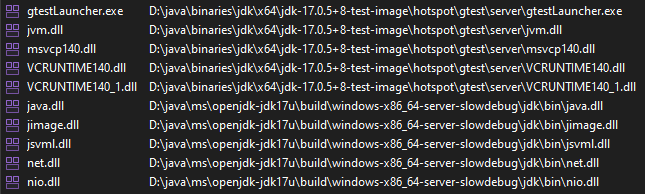
The logging I added to my local gtest was not showing up in the output. Naturally, the question that arose was how do I know which binaries it is running against since I don’t see the logging I expected? Process Explorer and Process Monitor did not seem to have a way to show me all the DLLs in the process (before it terminated). I end up creating a dump file using Process Explorer. Here are the non-Windows binaries – a mix of local build and CI build DLLS.
DLLs Loaded in gTestLauncher.exe
This was what inspired me to figure out how to run the whole show with locally built binaries as described in the main section of this post.
mkdir investigate
cd investigate
git clone https://github.com/openjdk/jdk11u

# Download jtreg 6
curl -Lo jtreg-6+1.tar.gz https://ci.adoptopenjdk.net/view/Dependencies/job/dependency_pipeline/lastSuccessfulBuild/artifact/jtreg/jtreg-6+1.tar.gz

tar xzfv jtreg-6+1.tar.gz

cd jdk11u
We switch the current directory to the root of jdk11u repo so that test paths are relative to the repo root. I will assume that we’re in the jdk11u repo root directory and are using the directory structure generated by the commands above. To see a detailed list of all the jtreg options, run this command:
../jtreg/bin/jtreg -help all
Now let us try to run a jtreg test, specifically AmazonCA.java:
There are some failure messages but it looks like a test ran.
failed to get value for vm.hasJFR
java.lang.UnsatisfiedLinkError: 'boolean sun.hotspot.WhiteBox.isJFRIncludedInVmBuild()'
	at sun.hotspot.WhiteBox.isJFRIncludedInVmBuild(Native Method)
	at requires.VMProps.vmHasJFR(VMProps.java:343)
	at requires.VMProps$SafeMap.put(VMProps.java:72)
	at requires.VMProps.call(VMProps.java:107)
	at requires.VMProps.call(VMProps.java:60)
	at com.sun.javatest.regtest.agent.GetJDKProperties.run(GetJDKProperties.java:80)
	at com.sun.javatest.regtest.agent.GetJDKProperties.main(GetJDKProperties.java:54)
failed to get value for vm.aot.enabled
java.lang.UnsatisfiedLinkError: 'int sun.hotspot.WhiteBox.aotLibrariesCount()'
	at sun.hotspot.WhiteBox.aotLibrariesCount(Native Method)
	at requires.VMProps.vmAotEnabled(VMProps.java:408)
	at requires.VMProps$SafeMap.put(VMProps.java:72)
	at requires.VMProps.call(VMProps.java:112)
	at requires.VMProps.call(VMProps.java:60)
	at com.sun.javatest.regtest.agent.GetJDKProperties.run(GetJDKProperties.java:80)
	at com.sun.javatest.regtest.agent.GetJDKProperties.main(GetJDKProperties.java:54)
.
.
.
Test results: passed: 1
Report written to /Users/saint/repos/java/jdk11u/JTreport/html/report.html
Results written to /Users/saint/repos/java/jdk11u/JTwork
Are these failure messages concerning given that the test passed? Reviewing the test report suggests not. The report keywords mention bug 8233223, which must be Bug ID: JDK-8233223 Add Amazon Root CA certificates (java.com). From the look of things, the java.lang.UnsatisfiedLinkErrors can be safely ignored (for this test anyway). That said, let us dig into these errors to ensure we understand what is happening.
The immediate cause of these errors is the failure to get the values for the SafeMap in VMProps.java. This raises the question of which JDK is being used by jtreg? My MacBook has both JDK11 and JDK17. The default java version is:
java -version
openjdk version "17.0.1" 2021-10-19 LTS
OpenJDK Runtime Environment Microsoft-28056 (build 17.0.1+12-LTS)OpenJDK 64-Bit Server VM Microsoft-28056 (build 17.0.1+12-LTS, mixed mode)
Let’s ensure jtreg is using JDK11 by setting JTREG_JAVA.
JTREG_JAVA=/Library/Java/JavaVirtualMachines/microsoft-11.jdk/Contents/Home

$JTREG_JAVA/bin/java -version

openjdk version "11.0.14" 2022-01-18 LTS
OpenJDK Runtime Environment Microsoft-30257 (build 11.0.14+9-LTS)
OpenJDK 64-Bit Server VM Microsoft-30257 (build 11.0.14+9-LTS, mixed mode)

../jtreg/bin/jtreg test/jdk/security/infra/java/security/cert/CertPathValidator/certification/AmazonCA.java
We still see the same warnings though so let us explicitly use the -jdk option:
We now get an interesting error message indicating that the -jdk option was using the newer JDK17.
Exception while calling user-specified class: requires.VMProps
java.lang.UnsupportedClassVersionError: requires/VMProps has been compiled by a more recent version of the Java Runtime (class file version 61.0), this version of the Java Runtime only recognizes class file versions up to 55.0
	at java.base/java.lang.ClassLoader.defineClass1(Native Method)
	...
	at java.base/java.lang.ClassLoader.loadClass(ClassLoader.java:522)
	at java.base/java.lang.Class.forName0(Native Method)
	at java.base/java.lang.Class.forName(Class.java:315)
	at com.sun.javatest.regtest.agent.GetJDKProperties.run(GetJDKProperties.java:78)
	at com.sun.javatest.regtest.agent.GetJDKProperties.main(GetJDKProperties.java:54)
failed to get JDK properties for /Library/Java/JavaVirtualMachines/microsoft-11.jdk/Contents/Home/bin/java ; exit code 1
Error: failed to get JDK properties for /Library/Java/JavaVirtualMachines/microsoft-11.jdk/Contents/Home/bin/java ; exit code 1
On my machine, I can remove these files as follows:
ls -l /Users/saint/repos/java/jdk11u/JTwork/extraPropDefns/classes/requires

rm -fr /Users/saint/repos/java/jdk11u/JTwork/extraPropDefns/classes/requires
Rerunning the test now results in a single (different) UnsatisfiedLinkError AND a test failure! However, we now have a properly set up environment since we control the JDK version tested by jtreg.
jdk11u % ../jtreg/bin/jtreg -jdk:$JTREG_JAVA test/jdk/security/infra/java/security/cert/CertPathValidator/certification/AmazonCA.java

failed to get value for vm.musl
java.lang.UnsatisfiedLinkError: 'java.lang.String sun.hotspot.WhiteBox.getLibcName()'
	at sun.hotspot.WhiteBox.getLibcName(Native Method)
	at requires.VMProps.isMusl(VMProps.java:514)
	at requires.VMProps$SafeMap.put(VMProps.java:72)
	at requires.VMProps.call(VMProps.java:122)
	at requires.VMProps.call(VMProps.java:60)
	at com.sun.javatest.regtest.agent.GetJDKProperties.run(GetJDKProperties.java:80)
	at com.sun.javatest.regtest.agent.GetJDKProperties.main(GetJDKProperties.java:54)
Test results: failed: 1
Report written to /Users/saint/repos/java/jdk11u/JTreport/html/report.html
Results written to /Users/saint/repos/java/jdk11u/JTwork
Error: Some tests failed or other problems occurred.
Now here’s an interesting question: why doesn’t this approach yield identical result to setting the -jdk flag to this same JTREG_JAVA path?
The outcome of the experiment so far though is that the AmazonCA test appears to fail when run with JDK11 and pass when run with JDK17 (of the respective versions). To convince ourselves that the infrastructure is fine, we can run this test with JDK11 (which is our focus) after exporting JTREG_JAVA.
This test passes, despite the single UnsatisfiedLinkError printed out.
failed to get value for vm.musl
java.lang.UnsatisfiedLinkError: 'java.lang.String sun.hotspot.WhiteBox.getLibcName()'
	at sun.hotspot.WhiteBox.getLibcName(Native Method)
	at requires.VMProps.isMusl(VMProps.java:514)
	at requires.VMProps$SafeMap.put(VMProps.java:72)
	at requires.VMProps.call(VMProps.java:122)
	at requires.VMProps.call(VMProps.java:60)
	at com.sun.javatest.regtest.agent.GetJDKProperties.run(GetJDKProperties.java:80)
	at com.sun.javatest.regtest.agent.GetJDKProperties.main(GetJDKProperties.java:54)
Test results: passed: 1
Report written to /Users/saint/repos/java/jdk11u/JTreport/html/report.html
Results written to /Users/saint/repos/java/jdk11u/JTwork
An Interesting Test
The above experimentation was inspired by AotInvokeDynamic2AotTest.java. The first time I tried to run this test, I used this command line.
We first set of 5 UnsatisfiedLinkError failures in the previous experiment were displayed but no tests were executed.
...
Test results: no tests selected
Report written to /Users/saint/repos/java/jdk11u/JTreport/html/report.html
This was happening while jtreg was using JDK17 and one of the values that could not be get()ed vm.aot.enabled. Could that be why there were no selected tests? Ignoring that rabbit hole for now sine jdk11u is our focus. We can now run the test with JTREG_JAVA exported. The test is now run but fails with this message in JTreport/text/summary.txt:
compiler/aot/calls/fromAot/AotInvokeDynamic2AotTest.java Failed. Execution failed: `main' threw exception: java.lang.RuntimeException: Expected to get exit value of [0]
To see more details about the test failure, use the -verbose flag:
Once this command completes (and fails), a file named AotInvokeDynamic2AotTest.so.o exists on disk. The format of the ld command can be deduced from Linker.java:101. The ld command can then be directly invoked to see the actual failure:
% ld -dylib -o AotInvokeDynamic2AotTest.so AotInvokeDynamic2AotTest.so.o
ld: dynamic main executables must link with libSystem.dylib for architecture x86_64