Building OpenJDK 18 for Windows AArch64
I am investigating a (Windows AArch64) test that passes on jdk17u but fails on jdk21u. I need to bisect to the first commit with a release build that fails this test. Unfortunately, Latest Releases | Adoptium doesn’t have Windows AArch64 builds between jdk17u and jdk21u so I had to build them myself. To find the commits for the intermediate releases, I used this command:
git show-ref --tagsThe output was of this form:
...
26bac24088faab1c3c82223c27f45dcea1462f87 refs/tags/jdk-17-ga
cba5cf5c2f83de5352ccf3fd3b247f0381daae43 refs/tags/jdk-18+0
cf839a043ff13762a5d1671e42132e5407a9a7bf refs/tags/jdk-18+1
...
This let me identify the tag I needed on GitHub: openjdk/jdk at jdk-18-ga. I set up the jdk18u build option in my personal build script: Add config options for more jdk versions · swesonga/scratchpad@98ab982 and set up google/googletest at v1.14.0. Unfortunately, I got compilation errors stating that ‘FLAGS_gtest_internal_run_death_test’: is not a member of ‘testing::internal’. There were also errors about an identifier that could not be found in winnt.h. Here’s how I addressed them.
Identifier not found in winnt.h
There were errors in “C:\Program Files (x86)\Windows Kits\10\Include\10.0.26100.0\um\winnt.h” stating that the _CountOneBits64 identifier could not be found:
ERROR: Build failed for target 'images' in configuration 'windows-aarch64-server-release' (exit code 2)
Stopping sjavac server

=== Output from failing command(s) repeated here ===
* For target hotspot_variant-server_libjvm_gtest_launcher-objs_gtestLauncher.obj:
gtestLauncher.cpp
c:\progra~2\wi3cf2~1\10\include\100261~1.0\um\winnt.h(6343): error C3861: '_CountOneBits64': identifier not found
   ... (rest of output omitted)
* For target hotspot_variant-server_libjvm_gtest_objs_BUILD_GTEST_LIBJVM_pch.obj:
BUILD_GTEST_LIBJVM_pch.cpp
c:\progra~2\wi3cf2~1\10\include\100261~1.0\um\winnt.h(6343): error C3861: '_CountOneBits64': identifier not found
   ... (rest of output omitted)
* For target hotspot_variant-server_libjvm_libgtest_objs_gtest-all.obj:
gtest-all.cc
c:\progra~2\wi3cf2~1\10\include\100261~1.0\um\winnt.h(6343): error C3861: '_CountOneBits64': identifier not found
   ... (rest of output omitted)
Based on “identifier not found” while compiling for ARM64 with Visual Studio 2019 – Stack Overflow and MSVC ARM build error with winnt.h · Issue #11684 · actions/runner-images, the likely problem was that the latest SDK was being used instead of one of the older SDKs. These are the SDKs that were on my machine:
user@machine MINGW64 /c/Program Files (x86)/Windows Kits/10/Include
$ ls -1
10.0.19041.0/
10.0.22621.0/
10.0.26100.0/
The Visual Studio 2019 installer showed only the Windows 10 SDK installed:
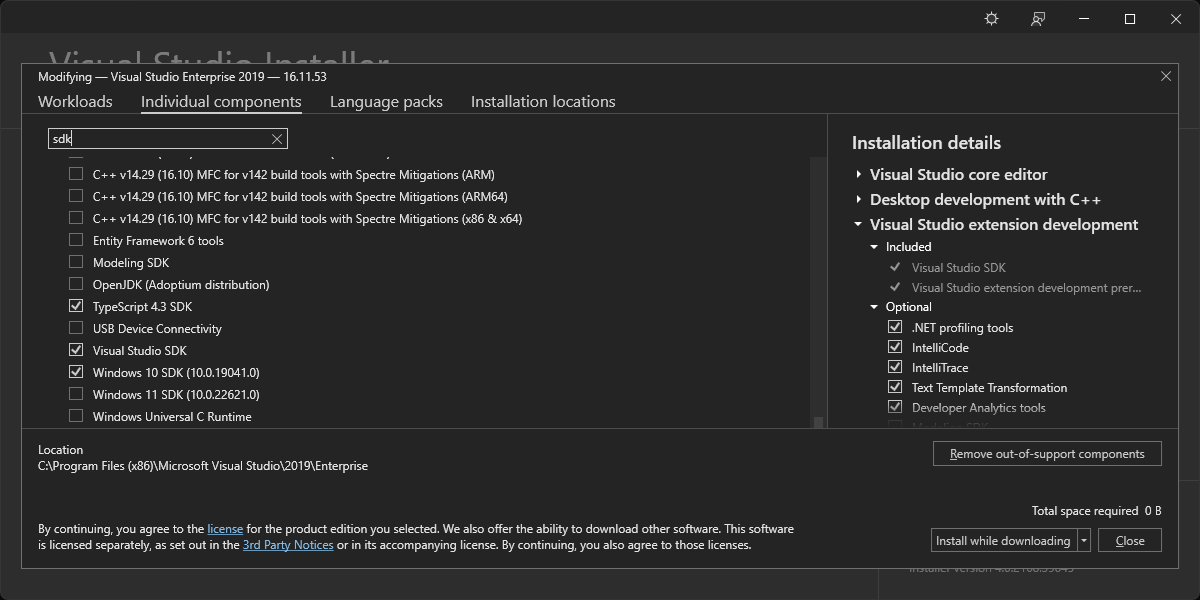
I set off on a journey of discovery, seeking to learn how the SDK is selected for the build.
VS_ENV_CMD is set in the TOOLCHAIN_CHECK_POSSIBLE_VISUAL_STUDIO_ROOT macro in toolchain_microsoft.m4 to the 64-bit path in the TOOLCHAIN_CHECK_POSSIBLE_VISUAL_STUDIO_ROOT macro. This path on my machine is “C:\Program Files\Microsoft Visual Studio\2022\Enterprise\VC\Auxiliary\Build\vcvarsamd64_arm64.bat“. It contains this line: @call "%~dp0vcvarsall.bat" x64_arm64 %*. This command calls the vcvarsall.bat file in the same directory. “build\windows-aarch64-server-release\configure-support\config.log” doesn’t seem to have any SDK-related output. vcvarsall.bat in turn calls “C:\Program Files\Microsoft Visual Studio\2022\Enterprise\Common7\Tools\VsDevCmd.bat“. I don’t think it passes the -winsdk argument. VsDevCmd.bat then calls “C:\Program Files\Microsoft Visual Studio\2022\Enterprise\Common7\Tools\vsdevcmd\core\winsdk.bat“, which has a GetWin10SdkDir function that is called if the VSCMD_ARG_WINSDK environment variable has not been set. GetWin10SdkDirHelper queries these locations:
HKLM\SOFTWARE\Wow6432NodeHKCU\SOFTWARE\Wow6432NodeHKLM\SOFTWAREHKCU\SOFTWARE
More specifically, it searches in the Microsoft\Microsoft SDKs\Windows\v10.0 subkey of each of them for the InstallationFolder value. The WindowsSdkDir environment variable is set to the value found here. It would be set to “C:\Program Files (x86)\Windows Kits\10\” on my machine (shown below).
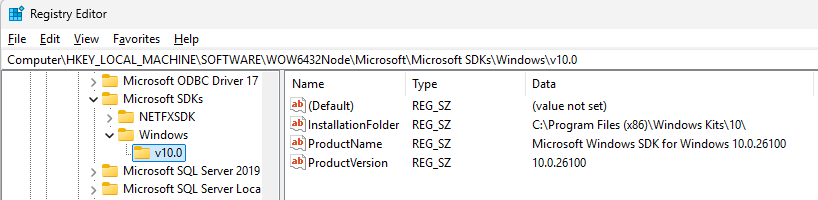
I tried setting the environment variable before configuring the build but that didn’t work:
export VSCMD_ARG_WINSDK=10.0.22621.0The configure output from this section of the TOOLCHAIN_EXTRACT_VISUAL_STUDIO_ENV macro is shown below:
  AC_MSG_NOTICE([Trying to extract Visual Studio environment variables for $TARGET_CPU])
  AC_MSG_NOTICE([using $VS_ENV_CMD $VS_ENV_ARGS])
configure: Using default toolchain microsoft (Microsoft Visual Studio)
configure: Found Visual Studio installation at /cygdrive/c/progra~2/micros~3/2019/Enterprise using well-known name
configure: Found Microsoft Visual Studio 2019
configure: Trying to extract Visual Studio environment variables for aarch64
configure: using /cygdrive/c/progra~2/micros~3/2019/Enterprise/vc/auxiliary/build/vcvarsamd64_arm64.bat
configure: Setting extracted environment variables for aarch64This shows that no arguments are passed to vcvarsamd64_arm64.bat (and therefore to vcvarsall.bat as well). Since vcvarsall.bat has logic that parses 10.* strings into the __VCVARSALL_WINSDK variable (to pass on to VsDevCmd.bat), I realized that I could just specify the SDK version when calling vcvarsamd64_arm64.bat. I used this diff (on commit 0f2113cee79):
diff --git a/make/autoconf/toolchain_microsoft.m4 b/make/autoconf/toolchain_microsoft.m4
index 2600b431cfb..a7d6aaae250 100644
--- a/make/autoconf/toolchain_microsoft.m4
+++ b/make/autoconf/toolchain_microsoft.m4
@@ -349,7 +349,7 @@ AC_DEFUN([TOOLCHAIN_EXTRACT_VISUAL_STUDIO_ENV],
   # We can't pass -vcvars_ver=$VCVARS_VER here because cmd.exe eats all '='
   # in bat file arguments. :-(
   $FIXPATH $CMD /c "$TOPDIR/make/scripts/extract-vs-env.cmd" "$VS_ENV_CMD" \
-      "$VS_ENV_TMP_DIR/set-vs-env.sh" $VCVARS_VER $VS_ENV_ARGS \
+      "$VS_ENV_TMP_DIR/set-vs-env.sh" $VCVARS_VER $VS_ENV_ARGS 10.0.22621.0 \
       > $VS_ENV_TMP_DIR/extract-vs-env.log | $CAT 2>&1
   PATH="$OLDPATH"
This enabled the build to use the SDK version I specified.
gtest undeclared identifier Error
The remaining build failures were related to gtests:
ERROR: Build failed for target 'images' in configuration 'windows-aarch64-server-release' (exit code 2)

=== Output from failing command(s) repeated here ===
* For target buildjdk_hotspot_variant-server_libjvm_gtest_objs_gtestMain.obj:
gtestMain.cpp
d:\java\forks\openjdk\jdk\test\hotspot\gtest\gtestMain.cpp(233): error C2039: 'FLAGS_gtest_internal_run_death_test': is not a member of 'testing::internal'
d:\repos\googletest\googlemock\include\gmock/gmock-nice-strict.h(80): note: see declaration of 'testing::internal'
d:\java\forks\openjdk\jdk\test\hotspot\gtest\gtestMain.cpp(233): error C2065: 'FLAGS_gtest_internal_run_death_test': undeclared identifier
   ... (rest of output omitted)
* For target hotspot_variant-server_libjvm_gtest_objs_gtestMain.obj:
gtestMain.cpp
d:\java\forks\openjdk\jdk\test\hotspot\gtest\gtestMain.cpp(233): error C2039: 'FLAGS_gtest_internal_run_death_test': is not a member of 'testing::internal'
d:\repos\googletest\googlemock\include\gmock/gmock-nice-strict.h(80): note: see declaration of 'testing::internal'
d:\java\forks\openjdk\jdk\test\hotspot\gtest\gtestMain.cpp(233): error C2065: 'FLAGS_gtest_internal_run_death_test': undeclared identifier
   ... (rest of output omitted)

* All command lines available in /cygdrive/d/java/forks/openjdk/jdk/build/windows-aarch64-server-release/make-support/failure-logs.
=== End of repeated output ===
I was using google/googletest at v1.13.0 but the openjdk/jdk repo moved to it in 8300806: Update googletest to v1.13.0 · openjdk/jdk@ccf2f58, which is after jdk18u (the failing source code is in jdk18u/test/hotspot/gtest/gtestMain.cpp at master · openjdk/jdk18u). Per [JDK-8300806] Update googletest to v1.13.0 – Java Bug System, this change was backported to jdk17u, which explains why I might have been confused about this. So I really should have been using the google/googletest at release-1.8.1 tag to build jdk-18-ga. This switch finally enabled me to successfully cross-compile the jdk-18-ga sources to get a Windows AArch64 release build.
Leave a Reply