Notes on Cross-Compiling LLVM for Windows ARM64
I recently wanted an LLVM build for Windows ARM64 so I followed the instructions from my post on Building LLVM for Windows ARM64 – Saint’s Log. Unfortunately, I didn’t indicate which commits I built when I wrote that post so this time I started at commit [clang-tools-extra] Update Maintainers for Clang-Doc (#175822) · llvm/llvm-project@feeb934a3c4d825cd673f01416c39ca73ede170f. I briefly considered using the release branch instead but plowed ahead on this commit. My host platform was a Windows 11 x64 machine. I had no trouble building the native x64 LLVM configuration. The build command ended with this line: -- Installing: D:/repos/llvm/llvm-project/build_llvm/install_local/cmake/llvm/LLVMConfigExtensions.cmake, which showed that the install step succeeded. Unfortunately, I had a few hiccups with the Windows AArch64 cross-compilation.
Windows AArch64 Build Installation Error
The build failed and this was the tail of the build output:
  Building Custom Rule D:/repos/llvm/llvm-project/llvm/tools/yaml2obj/CMakeLists.txt
  yaml2obj.cpp
  yaml2obj.vcxproj -> D:\repos\llvm\llvm-project\build_llvm_AArch64\Release\bin\yaml2obj.exe
  Building Custom Rule D:/repos/llvm/llvm-project/llvm/CMakeLists.txt
  1>
  -- Install configuration: "Release"
  CMake Error at lib/Demangle/cmake_install.cmake:39 (file):
    file cannot create directory: C:/Program Files (x86)/LLVM/lib.  Maybe need
    administrative privileges.
  Call Stack (most recent call first):
    cmake_install.cmake:37 (include)


C:\Program Files\Microsoft Visual Studio\2022\Enterprise\MSBuild\Microsoft\VC\v170\Microsoft.CppCommon.targets(166,5): error MSB3073: The command "setlocal [D:\repos\llvm\llvm-project\build_llvm_AArch64\install.vcxproj]
C:\Program Files\Microsoft Visual Studio\2022\Enterprise\MSBuild\Microsoft\VC\v170\Microsoft.CppCommon.targets(166,5): error MSB3073: "C:\Program Files\Microsoft Visual Studio\2022\Enterprise\Common7\IDE\CommonExtensions\Microsoft\CMake\CMake\bin\cmake.exe" -DBUILD_TYPE=Release
-P cmake_install.cmake [D:\repos\llvm\llvm-project\build_llvm_AArch64\install.vcxproj]
C:\Program Files\Microsoft Visual Studio\2022\Enterprise\MSBuild\Microsoft\VC\v170\Microsoft.CppCommon.targets(166,5): error MSB3073: if %errorlevel% neq 0 goto :cmEnd [D:\repos\llvm\llvm-project\build_llvm_AArch64\install.vcxproj]
C:\Program Files\Microsoft Visual Studio\2022\Enterprise\MSBuild\Microsoft\VC\v170\Microsoft.CppCommon.targets(166,5): error MSB3073: :cmEnd [D:\repos\llvm\llvm-project\build_llvm_AArch64\install.vcxproj]
C:\Program Files\Microsoft Visual Studio\2022\Enterprise\MSBuild\Microsoft\VC\v170\Microsoft.CppCommon.targets(166,5): error MSB3073: endlocal & call :cmErrorLevel %errorlevel% & goto :cmDone [D:\repos\llvm\llvm-project\build_llvm_AArch64\install.vcxproj]
C:\Program Files\Microsoft Visual Studio\2022\Enterprise\MSBuild\Microsoft\VC\v170\Microsoft.CppCommon.targets(166,5): error MSB3073: :cmErrorLevel [D:\repos\llvm\llvm-project\build_llvm_AArch64\install.vcxproj]
C:\Program Files\Microsoft Visual Studio\2022\Enterprise\MSBuild\Microsoft\VC\v170\Microsoft.CppCommon.targets(166,5): error MSB3073: exit /b %1 [D:\repos\llvm\llvm-project\build_llvm_AArch64\install.vcxproj]
C:\Program Files\Microsoft Visual Studio\2022\Enterprise\MSBuild\Microsoft\VC\v170\Microsoft.CppCommon.targets(166,5): error MSB3073: :cmDone [D:\repos\llvm\llvm-project\build_llvm_AArch64\install.vcxproj]
C:\Program Files\Microsoft Visual Studio\2022\Enterprise\MSBuild\Microsoft\VC\v170\Microsoft.CppCommon.targets(166,5): error MSB3073: if %errorlevel% neq 0 goto :VCEnd [D:\repos\llvm\llvm-project\build_llvm_AArch64\install.vcxproj]
C:\Program Files\Microsoft Visual Studio\2022\Enterprise\MSBuild\Microsoft\VC\v170\Microsoft.CppCommon.targets(166,5): error MSB3073: :VCEnd" exited with code 1. [D:\repos\llvm\llvm-project\build_llvm_AArch64\install.vcxproj]
This was strange. Why was the build trying to write into C:/Program Files (x86)/LLVM when this is an AArch64 build, setting aside that the install location was specified on the command line? The head of build_llvm/cmake/modules/cmake_install.cmake at that point is shown below:
# Install script for directory: D:/repos/llvm/llvm-project/llvm/cmake/modules

# Set the install prefix
if(NOT DEFINED CMAKE_INSTALL_PREFIX)
  set(CMAKE_INSTALL_PREFIX "D:/repos/llvm/llvm-project/build_llvm/install_local")
endif()
string(REGEX REPLACE "/$" "" CMAKE_INSTALL_PREFIX "${CMAKE_INSTALL_PREFIX}")
The corresponding head of build_llvm_AArch64/cmake/modules/cmake_install.cmake set CMAKE_INSTALL_PREFIX to the problematic path!
# Install script for directory: D:/repos/llvm/llvm-project/llvm/cmake/modules

# Set the install prefix
if(NOT DEFINED CMAKE_INSTALL_PREFIX)
  set(CMAKE_INSTALL_PREFIX "C:/Program Files (x86)/LLVM")
endif()
string(REGEX REPLACE "/$" "" CMAKE_INSTALL_PREFIX "${CMAKE_INSTALL_PREFIX}")
build_llvm/cmake/modules/CMakeFiles/LLVMConfig.cmake contained (among other things) these 3 lines:
set(LLVM_TARGET_TRIPLE "x86_64-pc-windows-msvc")

set(LLVM_TARGET_TRIPLE_ENV "")

set(LLVM_HOST_TRIPLE "x86_64-pc-windows-msvc")
build_llvm_AArch64/cmake/modules/CMakeFiles/LLVMConfig.cmake contained these 3:
set(LLVM_TARGET_TRIPLE "")

set(LLVM_TARGET_TRIPLE_ENV "")

set(LLVM_HOST_TRIPLE "x86_64-pc-windows-msvc")
The missing LLVM_TARGET_TRIPLE value prompted me to replace -DLLVM_DEFAULT_TARGET_TRIPLE=aarch64-win32-msvc with -DLLVM_TARGET_TRIPLE=aarch64-win32-msvc as follows:
cd llvm-project
mkdir build_llvm_AArch64
cd build_llvm_Aarch64

cmake ../llvm -DLLVM_TARGETS_TO_BUILD:STRING=AArch64 \
 -DCMAKE_BUILD_TYPE:STRING=Release \
 -DCMAKE_INSTALL_PREFIX=install_local \
 -DCMAKE_CROSSCOMPILING=True \
 -DLLVM_TARGET_ARCH=AArch64 \
 -DLLVM_NM=D:/repos/llvm-project/build_llvm/install_local/bin/llvm-nm.exe \
 -DLLVM_TABLEGEN=D:/repos/llvm-project/build_llvm/install_local/bin/llvm-tblgen.exe \
 -DLLVM_TARGET_TRIPLE=aarch64-win32-msvc \
 -A ARM64 \
 -T host=x64
The triple was still empty! That was my clue that something else was wrong and that I needed to take a step back. Turns out I was pasting the bash command into the Developer Command Prompt! Running it as follows was the solution!
cd llvm-project
mkdir build_llvm_AArch64
cd build_llvm_Aarch64

cmake ../llvm -DLLVM_TARGETS_TO_BUILD:STRING=AArch64 -DCMAKE_BUILD_TYPE:STRING=Release -DCMAKE_INSTALL_PREFIX=install_local -DCMAKE_CROSSCOMPILING=True -DLLVM_TARGET_ARCH=AArch64 -DLLVM_NM=D:/repos/llvm-project/build_llvm/install_local/bin/llvm-nm.exe -DLLVM_TABLEGEN=D:/repos/llvm-project/build_llvm/install_local/bin/llvm-tblgen.exe -DLLVM_DEFAULT_TARGET_TRIPLE=aarch64-win32-msvc -A ARM64 -T host=x64
The expected target triple was now set:
set(LLVM_TARGET_TRIPLE "aarch64-win32-msvc")

set(LLVM_TARGET_TRIPLE_ENV "")

set(LLVM_HOST_TRIPLE "aarch64-pc-windows-msvc")
It was at this point that I noticed a warning I had ignored:
D:\repos\llvm\llvm-project\build_llvm_AArch64> cmake ../llvm -DLLVM_TARGETS_TO_BUILD:STRING=AArch64 \
CMake Warning:
  Ignoring extra path from command line:

   "\"


-- Building for: Visual Studio 17 2022
-- Selecting Windows SDK version 10.0.26100.0 to target Windows 10.0.26200.
-- The C compiler identification is MSVC 19.44.35222.0
-- The CXX compiler identification is MSVC 19.44.35222.0
-- The ASM compiler identification is MSVC
Invalid llvm-tblgen Paths
I could now build with cmake --build . --config Release --target install but the build fails with lots of MSB8066 errors.
...
  2>Building ARMTargetParserDef.inc...
  The system cannot find the path specified.
  4>Building RISCVTargetParserDef.inc...
  The system cannot find the path specified.
  The system cannot find the batch label specified - VCEnd
C:\Program Files\Microsoft Visual Studio\2022\Enterprise\MSBuild\Microsoft\VC\v170\Microsoft.CppCommon.targets(237,5): error MSB8066: Custom build for 'D:\repos\llvm\llvm-project\build3_llvm_AArch64\CMakeFiles\4a6077c6d000b51855bb580d5619439e\ARMTargetParserDef.inc.rule' exited
with code 1. [D:\repos\llvm\llvm-project\build3_llvm_AArch64\include\llvm\TargetParser\target_parser_gen.vcxproj]
  The system cannot find the batch label specified - VCEnd
  3>Building PPCGenTargetFeatures.inc...
C:\Program Files\Microsoft Visual Studio\2022\Enterprise\MSBuild\Microsoft\VC\v170\Microsoft.CppCommon.targets(237,5): error MSB8066: Custom build for 'D:\repos\llvm\llvm-project\build3_llvm_AArch64\CMakeFiles\4a6077c6d000b51855bb580d5619439e\RISCVTargetParserDef.inc.rule' exite
d with code 1. [D:\repos\llvm\llvm-project\build3_llvm_AArch64\include\llvm\TargetParser\target_parser_gen.vcxproj]
  The system cannot find the path specified.
  The system cannot find the batch label specified - VCEnd
C:\Program Files\Microsoft Visual Studio\2022\Enterprise\MSBuild\Microsoft\VC\v170\Microsoft.CppCommon.targets(237,5): error MSB8066: Custom build for 'D:\repos\llvm\llvm-project\build3_llvm_AArch64\CMakeFiles\4a6077c6d000b51855bb580d5619439e\PPCGenTargetFeatures.inc.rule' exite
d with code 1. [D:\repos\llvm\llvm-project\build3_llvm_AArch64\include\llvm\TargetParser\target_parser_gen.vcxproj]
...
At this point, I switched to the latest release tag: llvm/llvm-project at llvmorg-21.1.8, which was at commit [Github] Remove use of setup-windows and install-ninja in llvm tests · llvm/llvm-project@2078da43e25a4623cab2d0d60decddf709aaea28
git remote add upstream https://github.com/llvm/llvm-project
git fetch upstream release/21.x
git checkout release/21.x
Building that release still failed with the same error but at least I was now using a tag that’s easy to refer to instead of a random commit. I tried building the release/13.x branch since LLVM was at major version 13 when I wrote the post on how to do this build.
git checkout release/13.xAfter getting the same error, I opened the project in Visual Studio 2022 and built it there to see if I could get a hint about which files are missing:
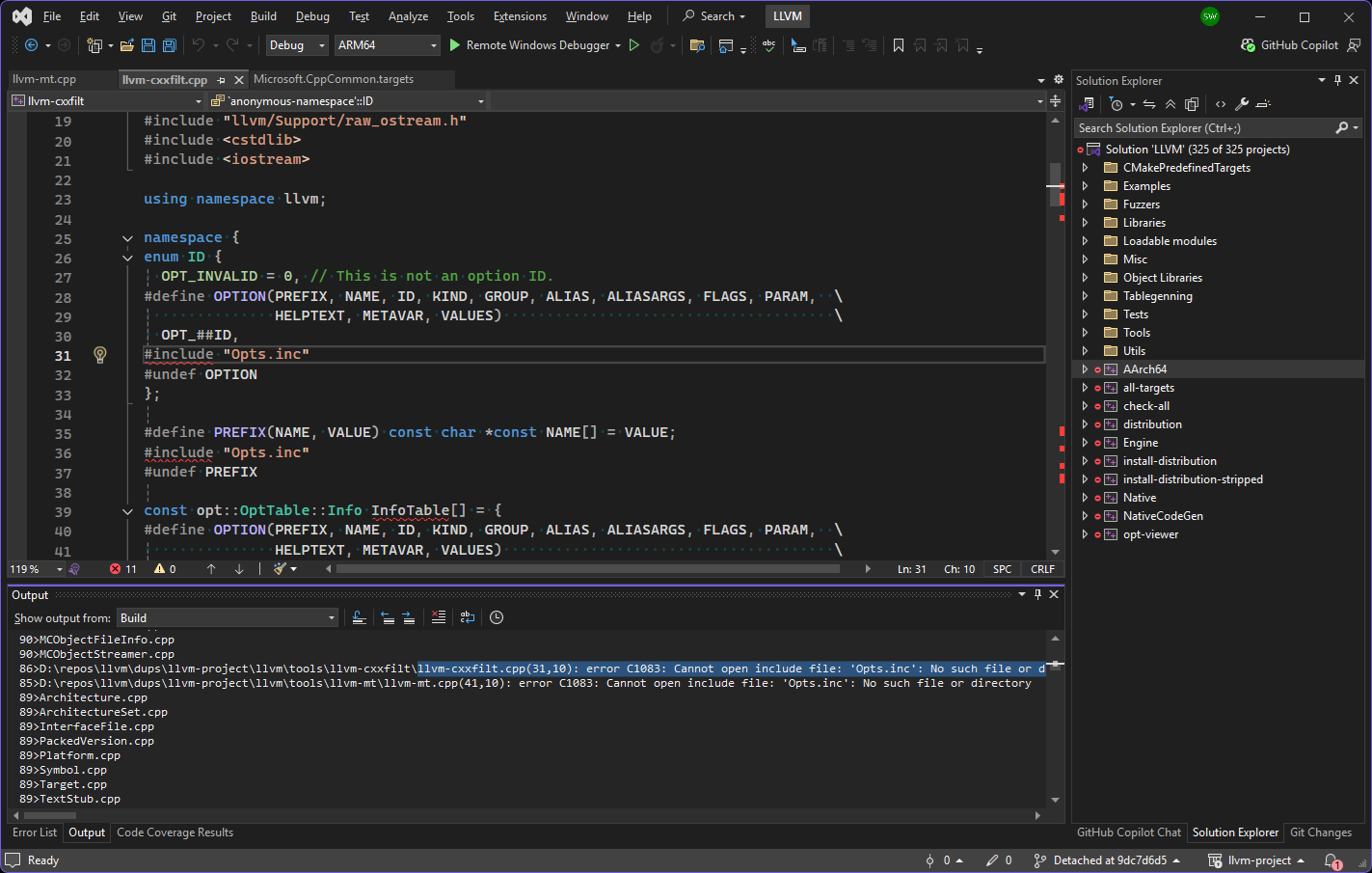
Seeing where the error was happening (above) made it easier to diagnose. This explanation from Copilot in VS Code was invaluable because it got me to verify that the table-gen executable path was valid (it wasn’t)!
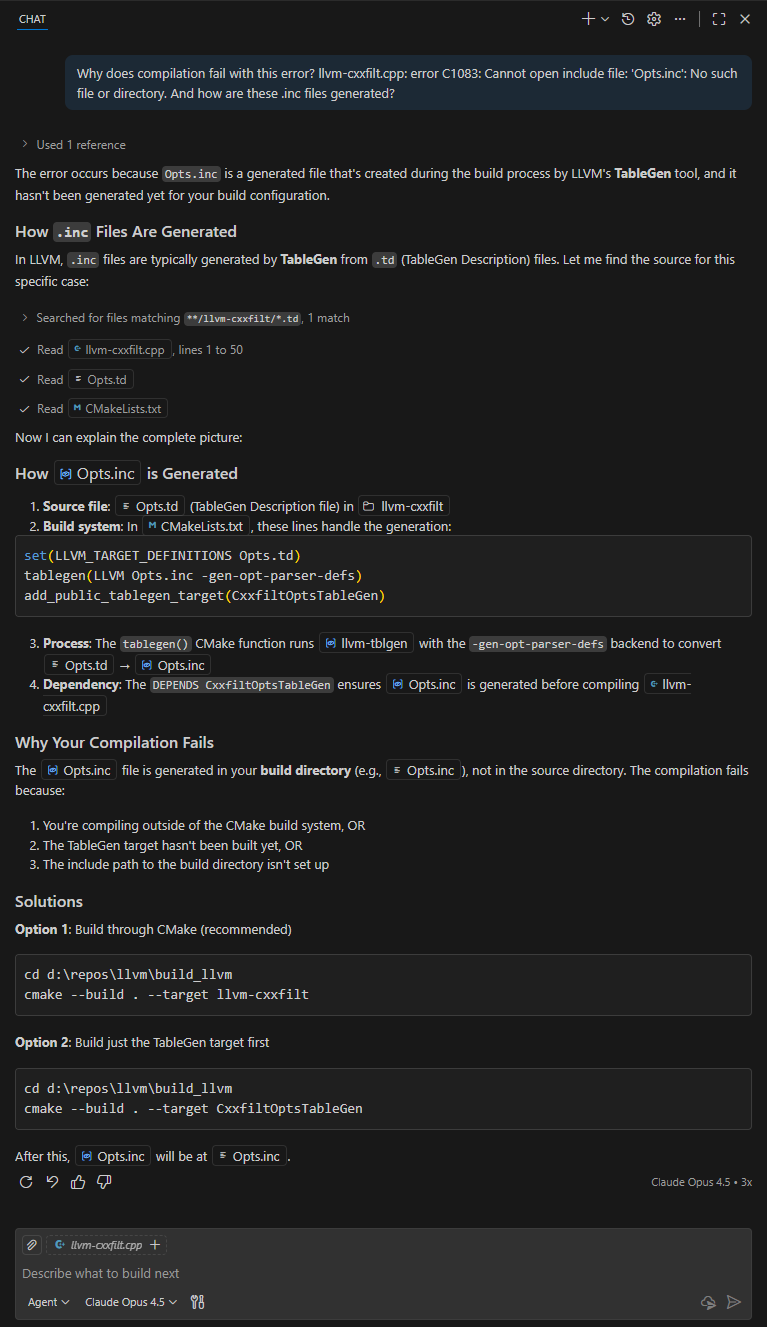
I updated the build instructions to check the two EXE paths before calling cmake as follows:
mkdir build_llvm_AArch64
cd build_llvm_Aarch64

set LLVM_NM=D:\repos\llvm\llvm-project\build_llvm\install_local\bin\llvm-nm.exe
set LLVM_TABLEGEN=D:\repos\llvm\llvm-project\build_llvm\install_local\bin\llvm-tblgen.exe

dir %LLVM_NM%
dir %LLVM_TABLEGEN%

cmake ../llvm -DLLVM_TARGETS_TO_BUILD:STRING=AArch64 -DCMAKE_BUILD_TYPE:STRING=Release -DCMAKE_INSTALL_PREFIX=install_local -DCMAKE_CROSSCOMPILING=True -DLLVM_TARGET_ARCH=AArch64 -DLLVM_NM=%LLVM_NM% -DLLVM_TABLEGEN=%LLVM_TABLEGEN% -DLLVM_DEFAULT_TARGET_TRIPLE=aarch64-win32-msvc -A ARM64 -T host=x64

cmake --build . --config Release --target install
Linker Errors: Missing Library
These are the next set of errors I ran into:
  LLVMDebugInfoPDB.vcxproj -> D:\repos\llvm\dups\llvm-project\build_llvm_AArch64\Release\lib\LLVMDebugInfoPDB.lib
  LLVMOption.vcxproj -> D:\repos\llvm\dups\llvm-project\build_llvm_AArch64\Release\lib\LLVMOption.lib
  LLVMSymbolize.vcxproj -> D:\repos\llvm\dups\llvm-project\build_llvm_AArch64\Release\lib\LLVMSymbolize.lib
LINK : fatal error LNK1104: cannot open file 'atls.lib' [D:\repos\llvm\dups\llvm-project\build_llvm_AArch64\tools\llvm-symbolizer\llvm-sy
mbolizer.vcxproj]
  llvm-objcopy.vcxproj -> D:\repos\llvm\dups\llvm-project\build_llvm_AArch64\Release\bin\llvm-objcopy.exe
  LLVMAArch64Info.vcxproj -> D:\repos\llvm\dups\llvm-project\build_llvm_AArch64\Release\lib\LLVMAArch64Info.lib
  LLVMAArch64Utils.vcxproj -> D:\repos\llvm\dups\llvm-project\build_llvm_AArch64\Release\lib\LLVMAArch64Utils.lib
  LLVMAArch64Desc.vcxproj -> D:\repos\llvm\dups\llvm-project\build_llvm_AArch64\Release\lib\LLVMAArch64Desc.lib
  LLVMAArch64AsmParser.vcxproj -> D:\repos\llvm\dups\llvm-project\build_llvm_AArch64\Release\lib\LLVMAArch64AsmParser.lib
  LLVMDlltoolDriver.vcxproj -> D:\repos\llvm\dups\llvm-project\build_llvm_AArch64\Release\lib\LLVMDlltoolDriver.lib
  LLVMLibDriver.vcxproj -> D:\repos\llvm\dups\llvm-project\build_llvm_AArch64\Release\lib\LLVMLibDriver.lib
  llvm-ar.vcxproj -> D:\repos\llvm\dups\llvm-project\build_llvm_AArch64\Release\bin\llvm-ar.exe
  llvm-dwarfdump.vcxproj -> D:\repos\llvm\dups\llvm-project\build_llvm_AArch64\Release\bin\llvm-dwarfdump.exe
  LLVMMCDisassembler.vcxproj -> D:\repos\llvm\dups\llvm-project\build_llvm_AArch64\Release\lib\LLVMMCDisassembler.lib
  LLVMAArch64Disassembler.vcxproj -> D:\repos\llvm\dups\llvm-project\build_llvm_AArch64\Release\lib\LLVMAArch64Disassembler.lib
LINK : fatal error LNK1104: cannot open file 'atls.lib' [D:\repos\llvm\dups\llvm-project\build_llvm_AArch64\tools\llvm-objdump\llvm-objdu
mp.vcxproj]
  llvm-readobj.vcxproj -> D:\repos\llvm\dups\llvm-project\build_llvm_AArch64\Release\bin\llvm-readobj.exe
  llvm-rc.vcxproj -> D:\repos\llvm\dups\llvm-project\build_llvm_AArch64\Release\bin\llvm-rc.exe
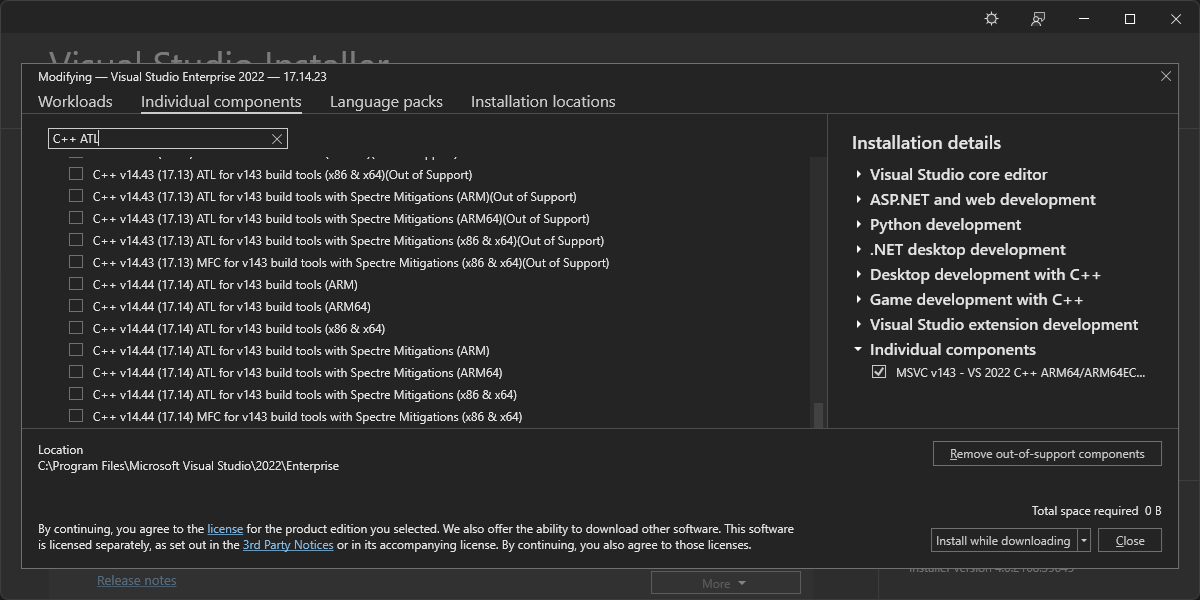
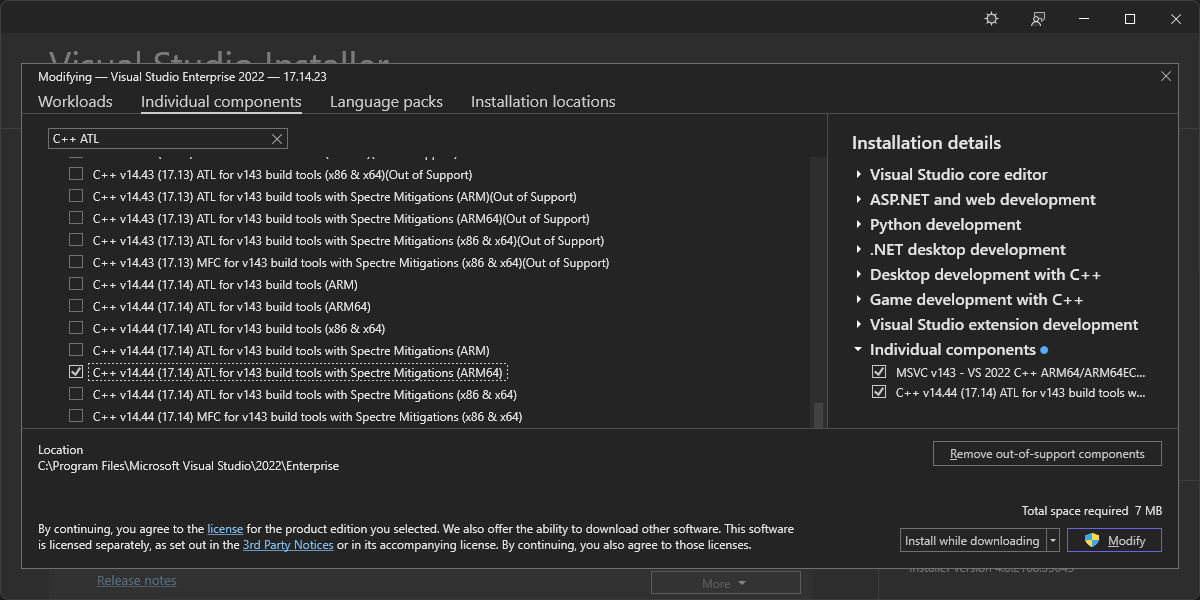
LINK : fatal error LNK1104: cannot open file ‘atls.lib’ llvm-objdump.vc xproj – Search led me to the solution in linker – Cannot Open File atls.lib – Stack Overflow: installing the C++ ATL. The screenshots below show the order in which I tried to install various components until I got the one I needed: C++ ATL for latest v143 build tools (ARM64/ARM64EC).
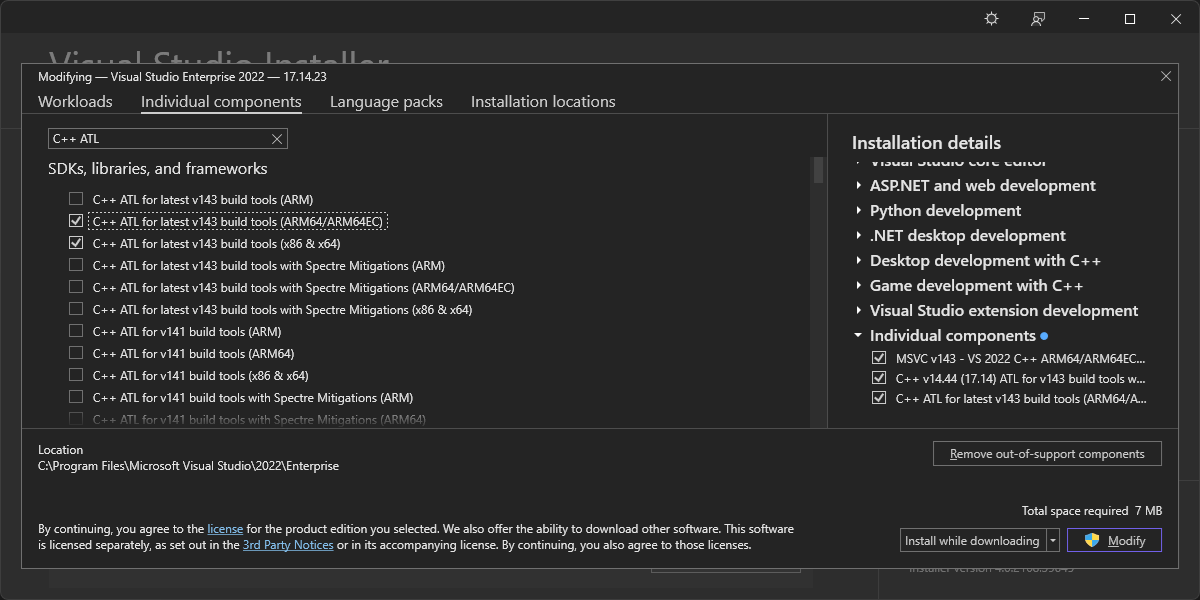
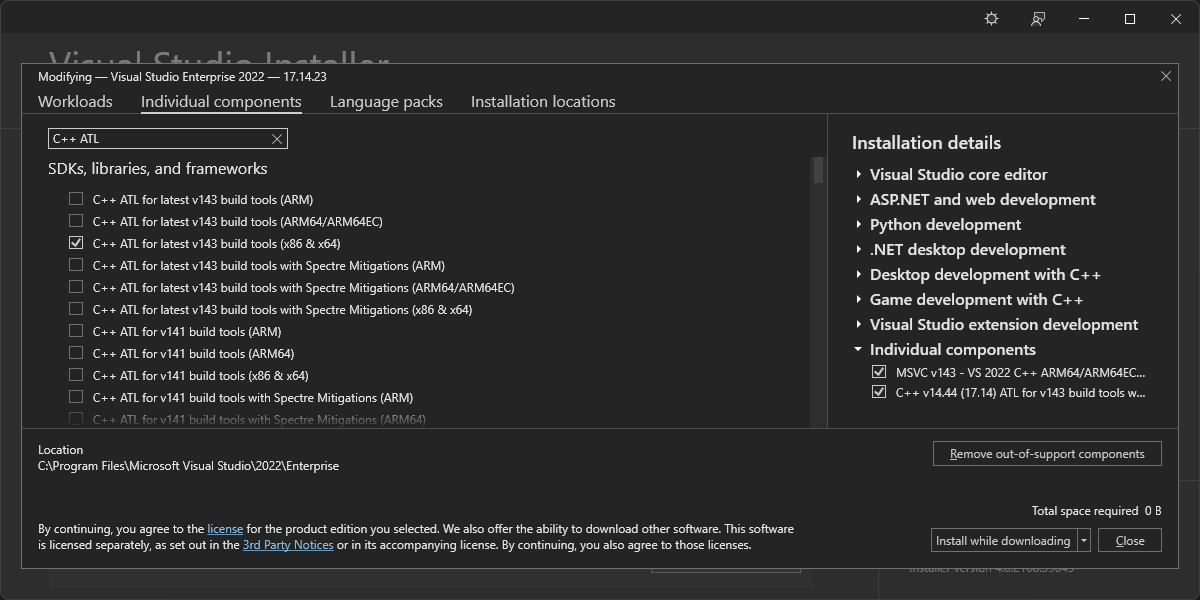
Linker Errors: Library Machine Type Conflicts
Now that atls.lib could be found, the build failed with this error:
  XCOFFDump.cpp
  llvm-objdump-driver.cpp
LLVMDebugInfoPDB.lib(DIASession.obj) : error LNK2019: unresolved external symbol "long __cdecl NoRegCoCreate(wchar_t const *,struct _GUID const &,struct _GUID const &,void * *)" (?NoRegCoCreate@@YAJPEB_WAEBU_GUID@@1PEAPEAX@Z) referenced in function "public: static class llvm::Error __cdecl llvm::pdb::DIASession::createFromExe(class llvm::StringRef,class std::unique_ptr<class llvm::pdb::IPDBSession,struct std::default_delete<class llvm::pdb::IPDBSession> > &)" (?createFromExe@DIASession@pdb@llvm@@SA?AVError@3@VStringRef@3@AEAV?$unique_ptr@VIPDBSession@pdb@llvm@@U?$default_delete@VIPDBSession@pdb@llvm@@@std@@@std@@@Z) [D:\repos\llvm\llvm-project\build_llvm_AArch64\tools\llvm-objdump\llvm-objdump.vcxproj]
LLVMDebugInfoPDB.lib(DIASession.obj) : error LNK2019: unresolved external symbol IID_IDiaDataSource referenced in function "public: static class llvm::Error __cdecl llvm::pdb::DIASession::createFromExe(class llvm::StringRef,class std::unique_ptr<class llvm::pdb::IPDBSession,struct std::default_delete<class llvm::pdb::IPDBSession> > &)" (?createFromExe@DIASession@pdb@llvm@@SA?AVError@3@VStringRef@3@AEAV?$unique_ptr@VIPDBSession@pdb@llvm@@U?$default_delete@VIPDBSession@pdb@llvm@@@std@@@std@@@Z) [D:\repos\llvm\llvm-project\build_llvm_AArch64\tools\llvm-objdump\llvm-objdump.vcxproj]
LLVMDebugInfoPDB.lib(DIASession.obj) : error LNK2019: unresolved external symbol CLSID_DiaSource referenced in function "public: static class llvm::Error __cdecl llvm::pdb::DIASession::createFromExe(class llvm::StringRef,class std::unique_ptr<class llvm::pdb::IPDBSession,struct std::default_delete<class llvm::pdb::IPDBSession> > &)" (?createFromExe@DIASession@pdb@llvm@@SA?AVError@3@VStringRef@3@AEAV?$unique_ptr@VIPDBSession@pdb@llvm@@U?$default_delete@VIPDBSession@pdb@llvm@@@std@@@std@@@Z) [D:\repos\llvm\llvm-project\build_llvm_AArch64\tools\llvm-objdump\llvm-objdump.vcxproj]
C:\Program Files\Microsoft Visual Studio\2022\Enterprise\DIA SDK\lib\amd64\diaguids.lib : warning LNK4272: library machine type 'x64' conflicts with target machine type 'ARM64' [D:\repos\llvm\llvm-project\build_llvm_AArch64\tools\llvm-objdump\llvm-objdump.vcxproj]
D:\repos\llvm\llvm-project\build_llvm_AArch64\Release\bin\llvm-objdump.exe : fatal error LNK1120: 3 unresolved externals [D:\repos\llvm\llvm-project\build_llvm_AArch64\tools\llvm-objdump\llvm-objdump.vcxproj]
  1>Generating ../../Release/bin/llvm-ranlib.exe
  Building Custom Rule D:/repos/llvm/llvm-project/llvm/tools/llvm-ar/CMakeLists.txt
  1>Building Opts.inc...
I ran Process Monitor to determine the command line of the failing linker operation. The command line itself was not helpful:
"C:\Program Files\Microsoft Visual Studio\2022\Enterprise\VC\Tools\MSVC\14.44.35207\bin\HostX64\arm64\link.exe" /ERRORREPORT:QUEUE @C:\Users\saint\AppData\Local\Temp\MSBuildTemp\tmpabac6ac6d830494aaaa6bcb2aa2219e7.rsp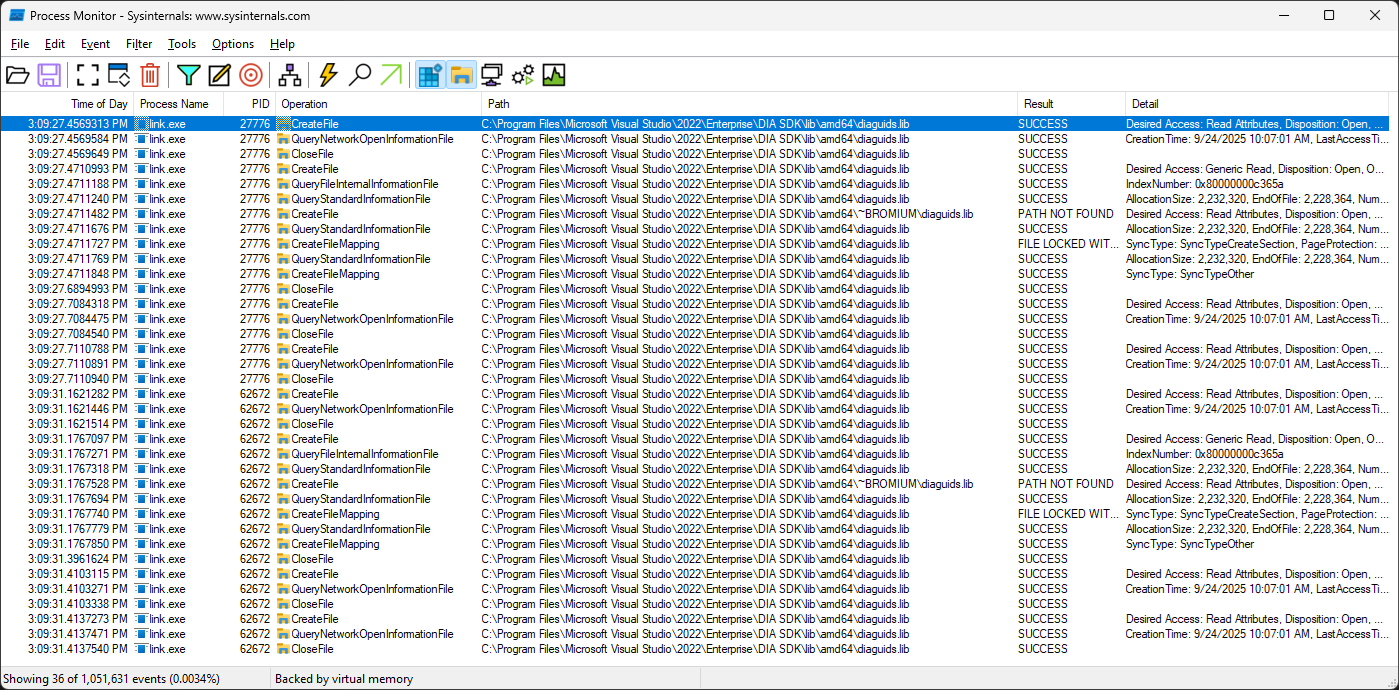
I asked copilot why this linker error was happening. The Claude Opus 4.5 agent stated that “There is no ARM64 version of diaguids.lib provided by Microsoft“.
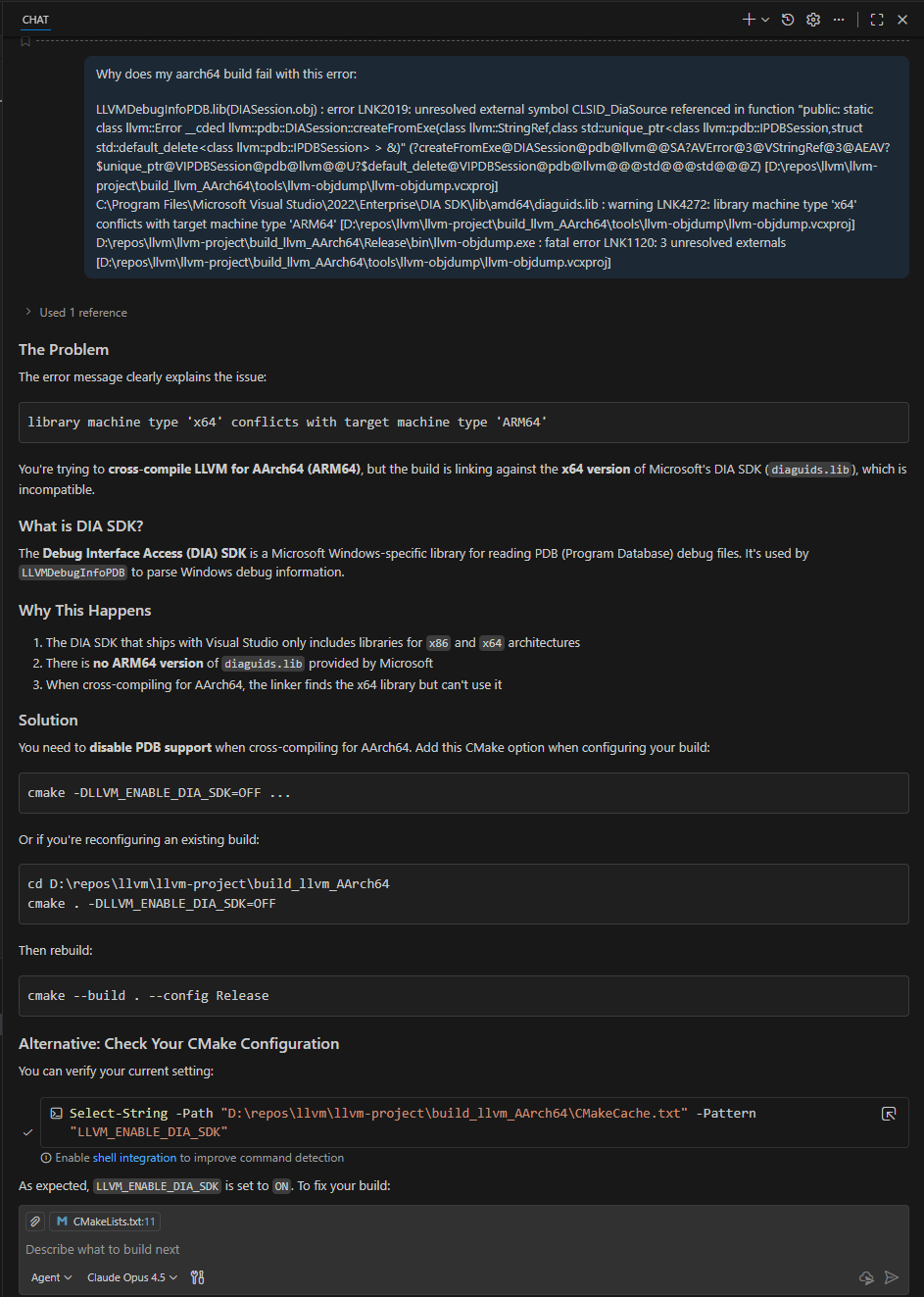
The DIA SDK aarch64 libraries – Search AI summary also claimed that “Microsoft does not ship prebuilt DIA SDK libraries for AArch64 (ARM64) targets” but this result, Getting Started (Debug Interface Access SDK) – Visual Studio (Windows) | Microsoft Learn, indicated otherwise. I verified that there was an arm64 equivalent path to the DIA on disk and continued with the prompt: “That’s not correct. “C:\Program Files\Microsoft Visual Studio\2022\Enterprise\DIA SDK\lib\arm64\diaguids.lib” exists on disk. Why doesn’t the build use it?“
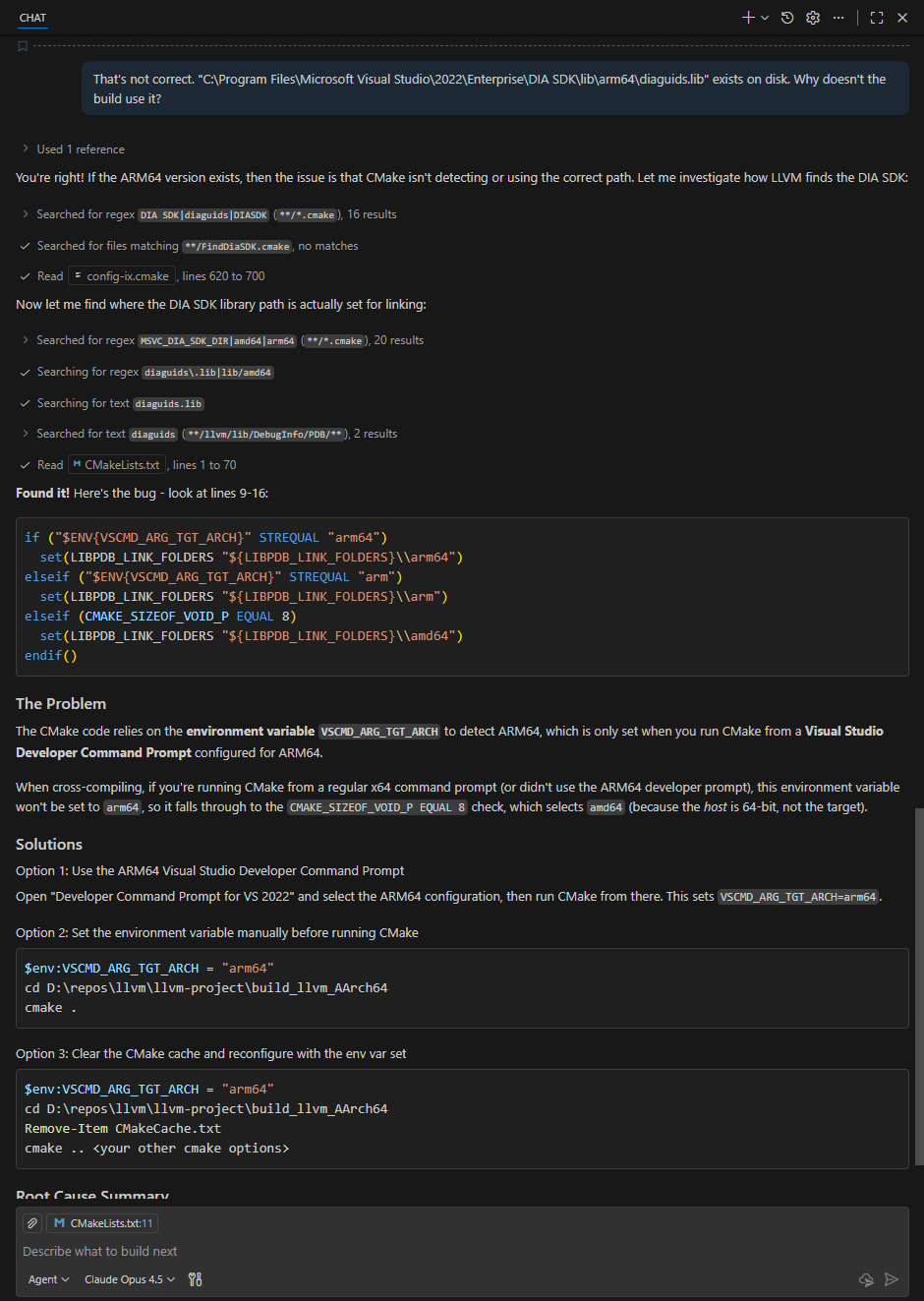
This explanation made sense. Setting the environment variable before running the first cmake command resolved this issue:
set VSCMD_ARG_TGT_ARCH=arm64The build then concluded successfully with this line: -- Installing: D:/repos/llvm/llvm-project/build_llvm_AArch64/install_local/lib/cmake/llvm/LLVMConfigExtensions.cmake
Leave a Reply