Printing Issues, Oh Brother
I bought new toner for my Brother printer. It’s been a while since I replaced it, but I knew I could count on someone on YouTube to walk me through the process again. The folks that upload these videos deserve an award for their service – I would have wasted time fidgeting around.
My next issue was figuring out why I couldn’t use double sided printing in the Microsoft Edge browser. does edge have double sided printing – Search pointed me to this helpful post: New Microsoft Edge can’t find Print on both sides & Flip on long edge function while print PDF – Microsoft Q&A. Turns out I needed to enable this feature of the printer. Find the printer in the Printers & scanners panel then open “Printer properties“
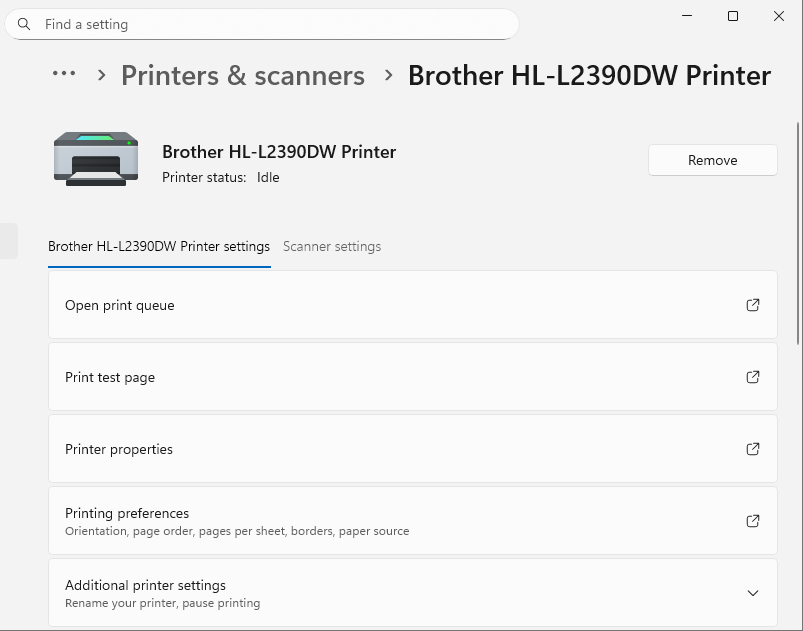
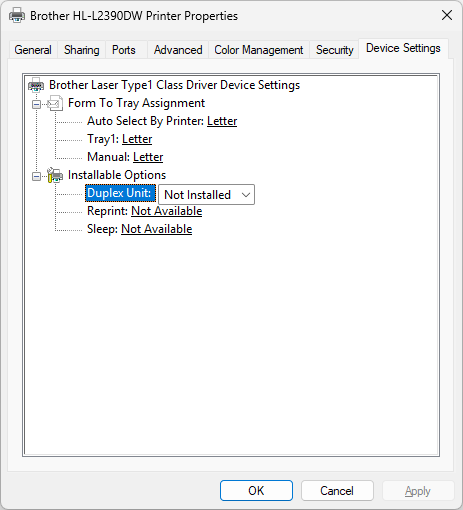
The Installable Options are in the Device Settings tab. Change the Duplex Unit setting to Installed.
The Print on both sides setting will now be displayed in Microsoft Edge.
Leave a Reply